
duduzer - Minecraft Skins & Skin History
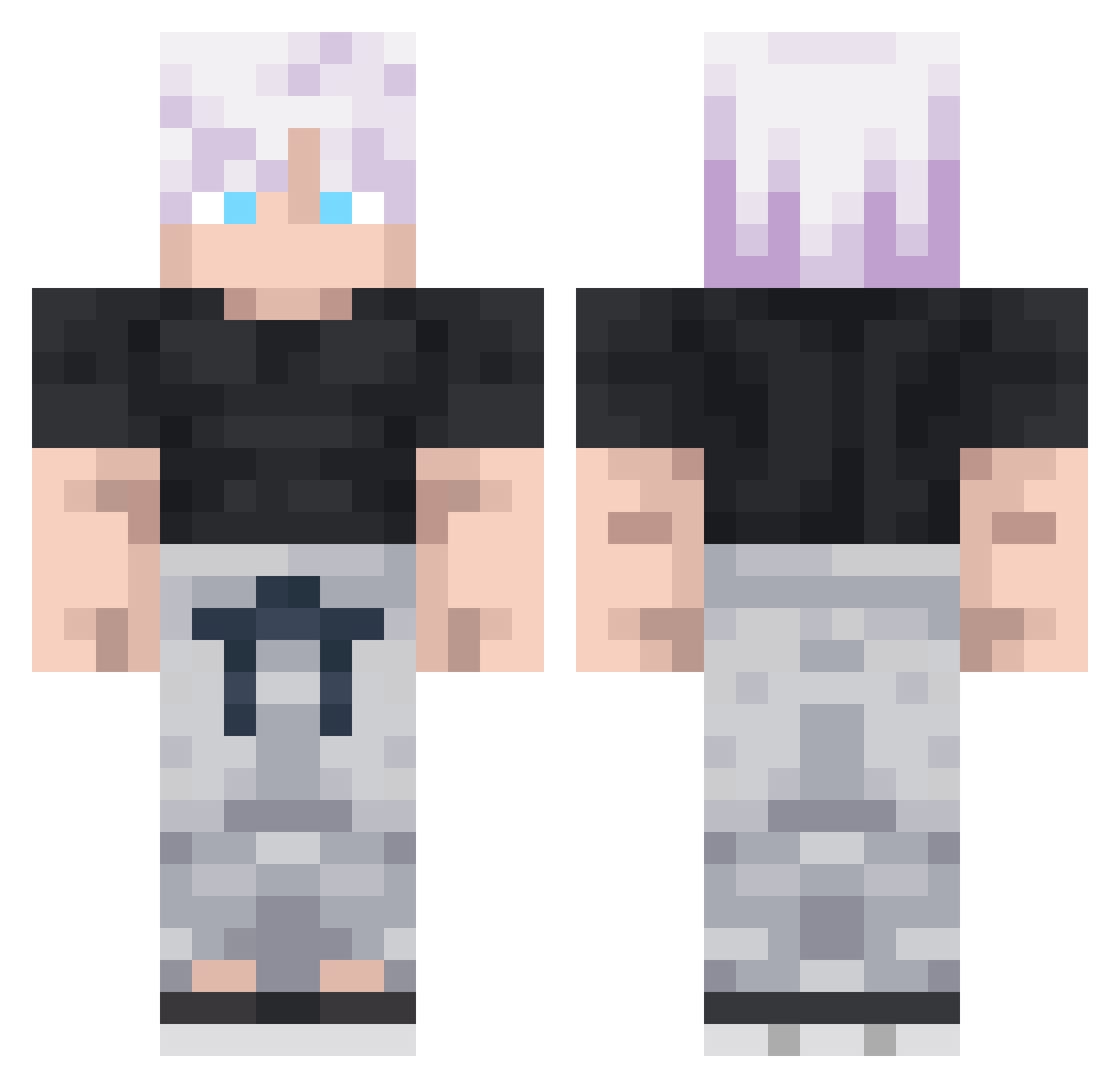
Current Minecraft skin of the player duduzer, loaded from the official Mojang API. Rotate the 3D model with your mouse or finger, then download the skin as a PNG file and use it in Minecraft: Bedrock Edition or Java Edition for free. When duduzer changes their skin, this page updates automatically and the old skin stays in the history below.
Other players with this skin (293)
duduzer was the 69th player we have seen with this skin, first spotted on 21.08.2026. The same skin was seen on these players. Open a nickname to see their current skin and skin history.
 Lescarf DashingDojo
 Laustgwb mizomoto Osada222 tempest_hg Nelis2 santiago47 FiGvAm_YT szymzn davidasdw3 SaMusOKZ Blizzyrde tatahero11 Eli0n5 JestemVictor JFK_XP dyllan0210 nova_sx63 Suhart Vessyn Eren_Uzumaki123 smigol12 Winta3443 KIllerZenth Kubixwoj Shiv_Kumar169 ZyraRJ1 BillouTheKing Neme621 hhoxa_x7 King_Cragger OmarWFY mana114 SunlitManager94 kneezpainz sunny_da_best Mr_ThanhHGioi pengpick Dixxy0311 Dimazik Gonchito836 zacreii CapYT23 LarsKeck WAT_Willy _SlothFace sAdShRiMpPp Perko137
 ThePykeSon
 jakepro11 ShizukoV negaoCAVALO666 azizsalih Marmota92 ImGROGU VEBWAN No_0neee Kabir1118 thunder6436
More Satoru Gojo Minecraft skins
See all 1322 Satoru Gojo skins
How to install the duduzer skin
- Press the Download button above to save the skin as a PNG file.
- Minecraft: Bedrock Edition (PE): open the Dressing Room from the main menu (or tap your character → Edit Character), go to Classic Skins → Owned, press the + (new skin) button, choose the downloaded PNG and pick the Classic (Steve) model. Works on PC and mobile; consoles cannot import custom skins.
- Minecraft: Java Edition: open the Minecraft Launcher, go to the Skins tab, click New Skin, load the PNG, pick the Classic (Steve) model and press Save & Use. You can also upload it at minecraft.net → Profile → Change Skin.
The skin does not show up after import - what should I do?
Restart Minecraft and open the Dressing Room again - imported skins sometimes appear only after a restart. Also make sure you selected the imported skin and picked the Classic (Steve) model.
Which model should I choose, Classic or Slim?
This skin is designed for the Classic (Steve) model. If you pick the wrong model, the arms of the skin will look stretched or squeezed.
Is the skin of duduzer free to download?
Yes. Press Download, save the PNG file and use it in Minecraft: Bedrock Edition or Java Edition - no payment or registration needed. The skin also works on multiplayer servers and Realms.
More skins
Looking for more? Go back to all Minecraft skins and check the top skins of the week, month and all time, or find any player's skin by nickname.