
PGFRM400 - Minecraft Skins & Skin History
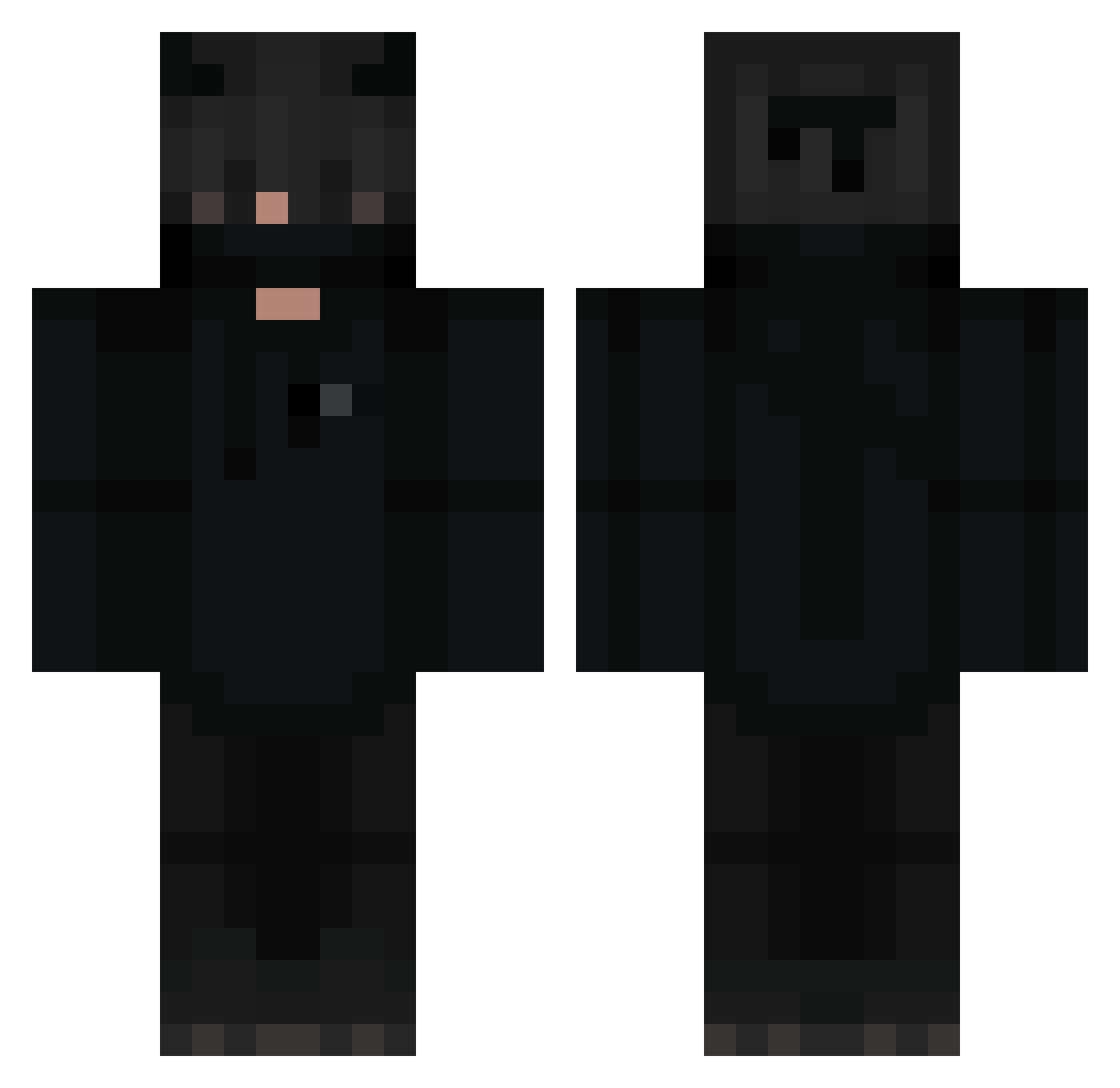
Current Minecraft skin of the player PGFRM400, loaded from the official Mojang API. Rotate the 3D model with your mouse or finger, then download the skin as a PNG file and use it in Minecraft: Bedrock Edition or Java Edition for free. When PGFRM400 changes their skin, this page updates automatically and the old skin stays in the history below.
Other players with this skin (297)
PGFRM400 was the 257th player we have seen with this skin, first spotted on 14.10.2026. The same skin was seen on these players. Open a nickname to see their current skin and skin history.
 SakuraMewx UniveXxe VanishIsHere Hell_blade_ hallucenating WovenVeilMM SolisDraco Risenku Fudgee S3BAST1AN_YT FreDado_02 SNIPE4K hamed_gamer Bebe_Zbiboun definable kioguh vixsty TomorrowsDay ESSVER1 Yelisay Apparentlyapunk Caiiin BunnyX18 BLACK2641962 youngnbeautiful JaeRage117 guiby_ xiao6K VasgaDeGama Seto11552 Dacoly AspergerBarn xMarazmus Jafel jill252512003 Oracle80 Breez_xD ClassD_Aerxn Giugiu20x H0KX zTheRed Blaysuerte xDanielGb harunkaan0 DaviX_in MatiDriver333 AlexSp525 Vodka_Night __Potz__ jacopo2424 NeKaN42 o7x_ sk1lex CookienatorXD Neosplach IiSeeU Deciobr10 Boopbrz Adasko_ destroyultra444
More Demon Minecraft skins
How to install the PGFRM400 skin
- Press the Download button above to save the skin as a PNG file.
- Minecraft: Bedrock Edition (PE): open the Dressing Room from the main menu (or tap your character → Edit Character), go to Classic Skins → Owned, press the + (new skin) button, choose the downloaded PNG and pick the Classic (Steve) model. Works on PC and mobile; consoles cannot import custom skins.
- Minecraft: Java Edition: open the Minecraft Launcher, go to the Skins tab, click New Skin, load the PNG, pick the Classic (Steve) model and press Save & Use. You can also upload it at minecraft.net → Profile → Change Skin.
The skin does not show up after import - what should I do?
Restart Minecraft and open the Dressing Room again - imported skins sometimes appear only after a restart. Also make sure you selected the imported skin and picked the Classic (Steve) model.
Which model should I choose, Classic or Slim?
This skin is designed for the Classic (Steve) model. If you pick the wrong model, the arms of the skin will look stretched or squeezed.
Is the skin of PGFRM400 free to download?
Yes. Press Download, save the PNG file and use it in Minecraft: Bedrock Edition or Java Edition - no payment or registration needed. The skin also works on multiplayer servers and Realms.
More skins
Looking for more? Go back to all Minecraft skins and check the top skins of the week, month and all time, or find any player's skin by nickname.