
petergruppensmur - Minecraft Skins & Skin History
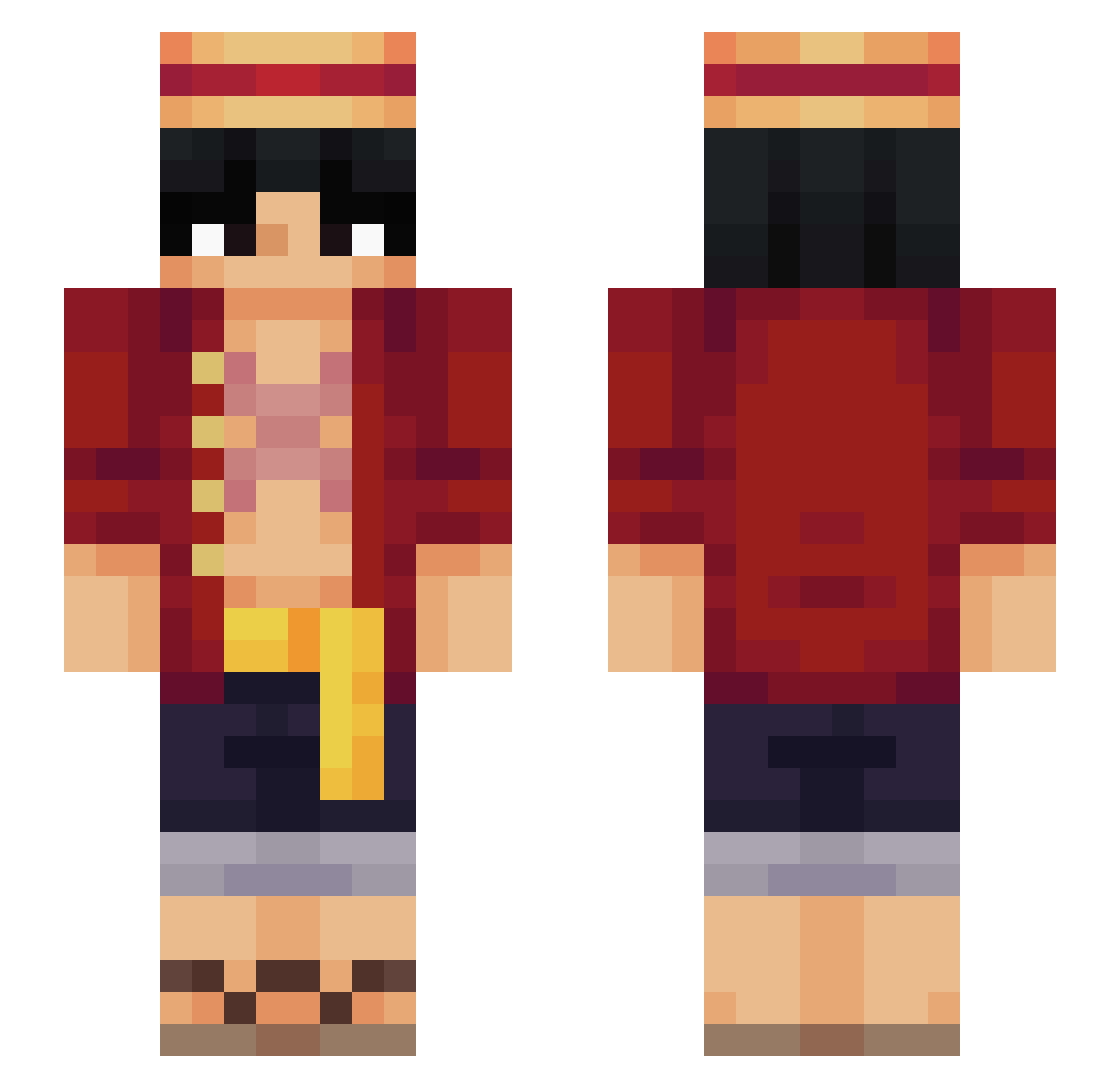
Current Minecraft skin of the player petergruppensmur, loaded from the official Mojang API. Rotate the 3D model with your mouse or finger, then download the skin as a PNG file and use it in Minecraft: Bedrock Edition or Java Edition for free. When petergruppensmur changes their skin, this page updates automatically and the old skin stays in the history below.
Other players with this skin (564)
petergruppensmur was the 65th player we have seen with this skin, first spotted on 05.08.2026. The same skin was seen on these players. Open a nickname to see their current skin and skin history.
 ClairoForLife anatiken kioto_the_cat_2 Oppxy yaliex Mideria ZRKen Festiveshark160 BootyGuy Maxence7600 mozeszpossac B1ll9_ Rkk052 AlphaBail23 Lazy686 simitpet Dullahan_L MEWENLF Mich4elD PorAutista juangr03 HuyKopLop Hyycks In10sTy MonkeyDPocket yorkLin1219 Kacujia NIKPRO2013 Zatrix27 Kriyp_ donghyun0711 solivan147 remsz cruiserlauch Ramboking43 Danil0w0 ukaiOCE AndreiRacore Dobbuh ArtixRaider Jasper0909 AdriftPlanet064 CHILL_BUTTER Zmarkooo Levinlas alexdragun xFlaire DAVI_BETO Halbgeist CableDaCookieMan Jase_Rey FVWaSs wushan__ Ferlapapa007 OneNiche Dawarfed fredmaya papi_luis P0wer3x doomraider278
More Monkey D Luffy Minecraft skins
See all 926 Monkey D Luffy skins
How to install the petergruppensmur skin
- Press the Download button above to save the skin as a PNG file.
- Minecraft: Bedrock Edition (PE): open the Dressing Room from the main menu (or tap your character → Edit Character), go to Classic Skins → Owned, press the + (new skin) button, choose the downloaded PNG and pick the Slim (Alex) model. Works on PC and mobile; consoles cannot import custom skins.
- Minecraft: Java Edition: open the Minecraft Launcher, go to the Skins tab, click New Skin, load the PNG, pick the Slim (Alex) model and press Save & Use. You can also upload it at minecraft.net → Profile → Change Skin.
The skin does not show up after import - what should I do?
Restart Minecraft and open the Dressing Room again - imported skins sometimes appear only after a restart. Also make sure you selected the imported skin and picked the Slim (Alex) model.
Which model should I choose, Classic or Slim?
This skin is designed for the Slim (Alex) model. If you pick the wrong model, the arms of the skin will look stretched or squeezed.
Is the skin of petergruppensmur free to download?
Yes. Press Download, save the PNG file and use it in Minecraft: Bedrock Edition or Java Edition - no payment or registration needed. The skin also works on multiplayer servers and Realms.
More skins
Looking for more? Go back to all Minecraft skins and check the top skins of the week, month and all time, or find any player's skin by nickname.