
P0wer3x - Minecraft Skins & Skin History
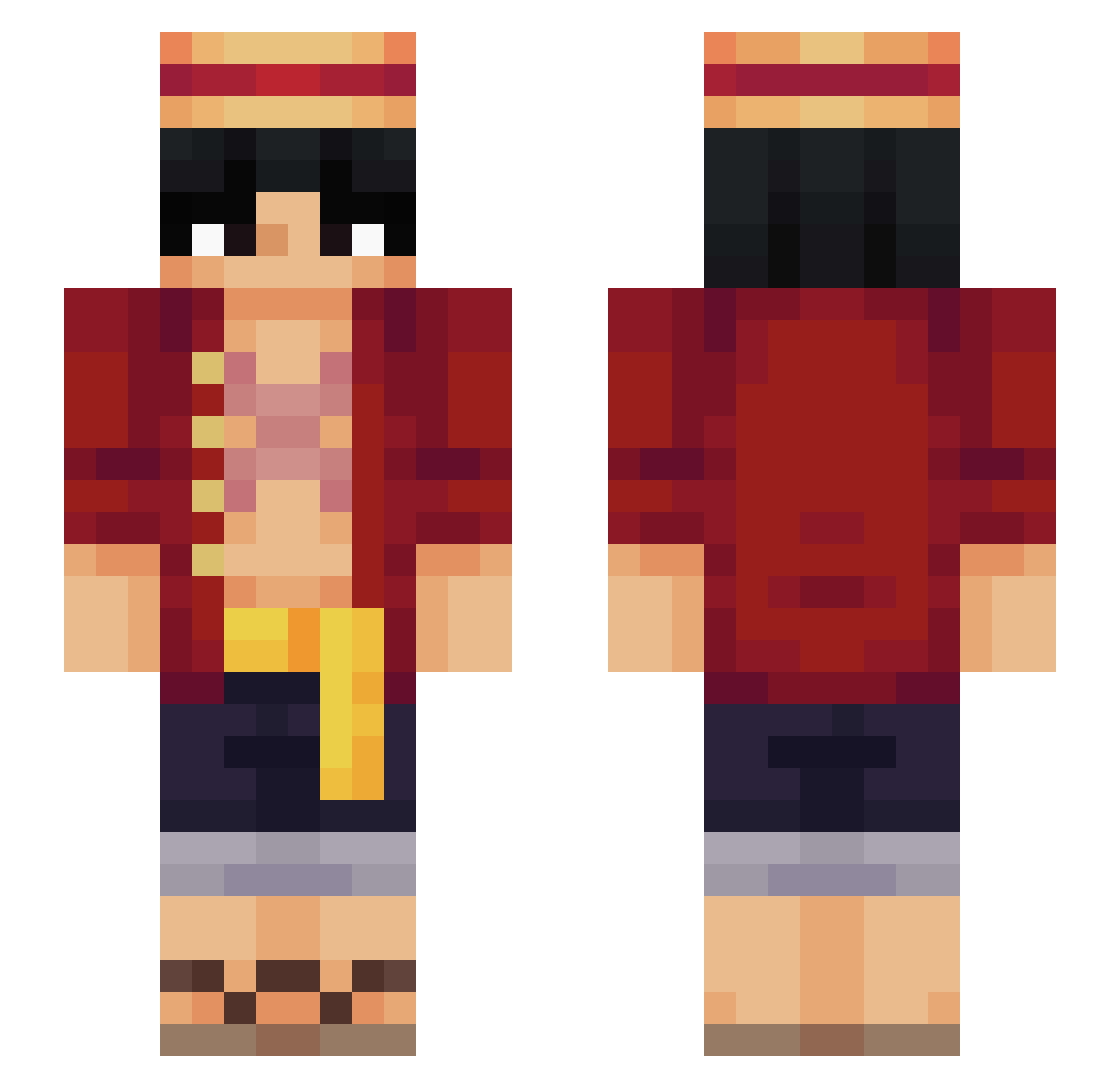
Current Minecraft skin of the player P0wer3x, loaded from the official Mojang API. Rotate the 3D model with your mouse or finger, then download the skin as a PNG file and use it in Minecraft: Bedrock Edition or Java Edition for free. When P0wer3x changes their skin, this page updates automatically and the old skin stays in the history below.
Other players with this skin (564)
P0wer3x was the 96th player we have seen with this skin, first spotted on 13.08.2026. The same skin was seen on these players. Open a nickname to see their current skin and skin history.
 doomraider278 gogopower_ranger Dawarfed DAKARAHOROBITA Antoninor9 FVWaSs CableDaCookieMan Rumyi DAVI_BETO xFlaire IvanWaffle Boomsiru Levinlas Call_Me_Senku Zmarkooo mukaaa122 Astrofure CHILL_BUTTER AdriftPlanet064 Fastbash36 Jasper0909 ArtixRaider Dobbuh AndreiRacore ukaiOCE jinxbt Javii_12 Danil0w0 K3xus __PvPBoss sttcnvi diamantforever remsz slanderxp solivan147 Kriyp_ LFGLuiz Gundarium00 _Strikee__
 Zilence1 klakster Marco_D_Phoenix IbaiLlanos26 Mason_71 Hyycks bbuurraakk HuyKopLop juangr03 MEWENLF Dullahan_L CheifKeeff xDan077 simitpet kevpox AlphaBail23 Rkk052 TACODEpastor99 Skepping1 Blaisser Arevy36
More Monkey D Luffy Minecraft skins
See all 926 Monkey D Luffy skins
How to install the P0wer3x skin
- Press the Download button above to save the skin as a PNG file.
- Minecraft: Bedrock Edition (PE): open the Dressing Room from the main menu (or tap your character → Edit Character), go to Classic Skins → Owned, press the + (new skin) button, choose the downloaded PNG and pick the Slim (Alex) model. Works on PC and mobile; consoles cannot import custom skins.
- Minecraft: Java Edition: open the Minecraft Launcher, go to the Skins tab, click New Skin, load the PNG, pick the Slim (Alex) model and press Save & Use. You can also upload it at minecraft.net → Profile → Change Skin.
The skin does not show up after import - what should I do?
Restart Minecraft and open the Dressing Room again - imported skins sometimes appear only after a restart. Also make sure you selected the imported skin and picked the Slim (Alex) model.
Which model should I choose, Classic or Slim?
This skin is designed for the Slim (Alex) model. If you pick the wrong model, the arms of the skin will look stretched or squeezed.
Is the skin of P0wer3x free to download?
Yes. Press Download, save the PNG file and use it in Minecraft: Bedrock Edition or Java Edition - no payment or registration needed. The skin also works on multiplayer servers and Realms.
More skins
Looking for more? Go back to all Minecraft skins and check the top skins of the week, month and all time, or find any player's skin by nickname.