
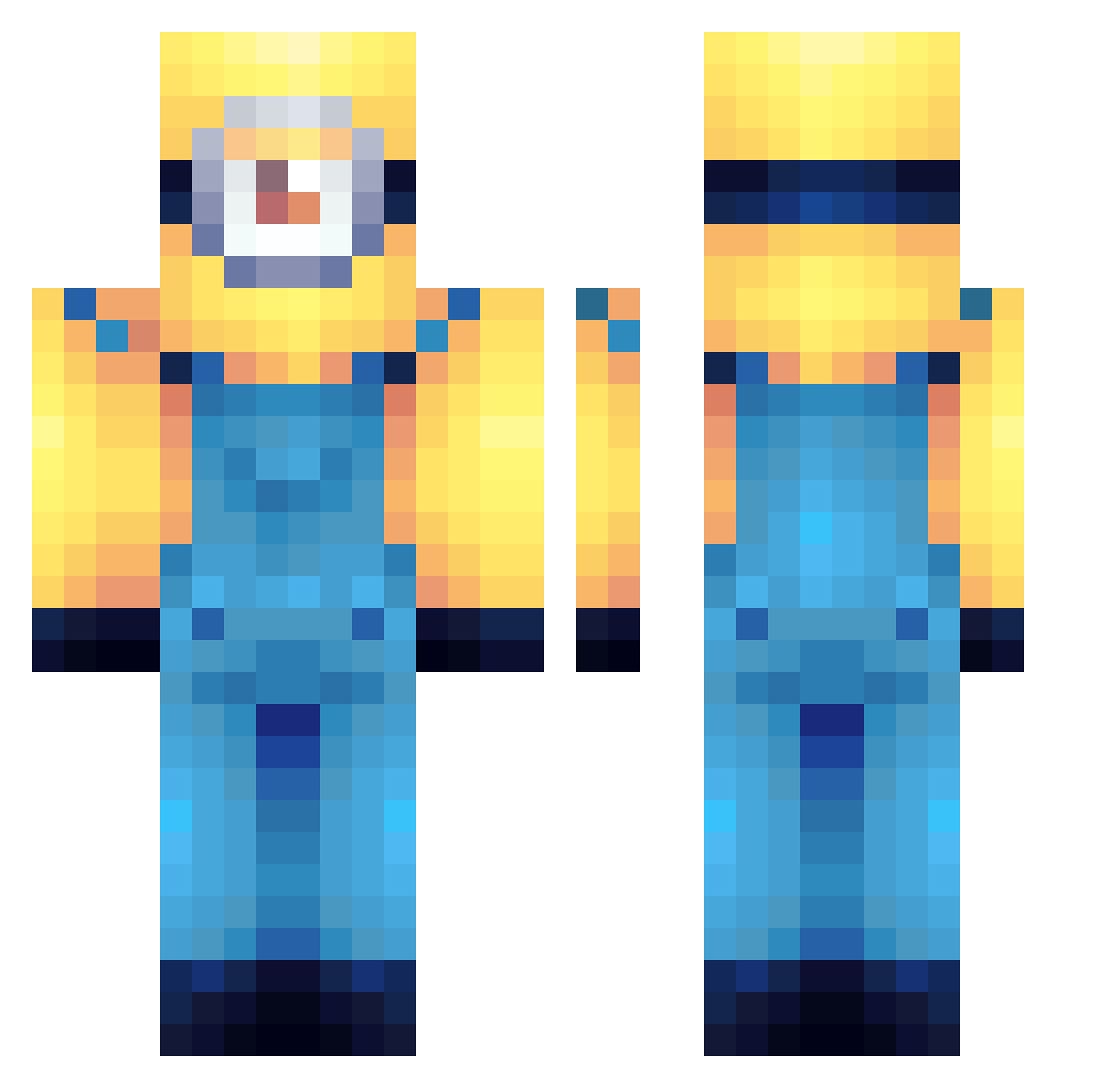
Current Minecraft skin of the player anxza, loaded from the official Mojang API. Rotate the 3D model with your mouse or finger, then download the skin as a PNG file and use it in Minecraft: Bedrock Edition or Java Edition for free. When anxza changes their skin, this page updates automatically and the old skin stays in the history below.
Other players with this skin (78)
anxza was the 57th player we have seen with this skin, first spotted on 28.09.2026. The same skin was seen on these players. Open a nickname to see their current skin and skin history.
 Tonn__ Skenk102 xXGoDAsiaNXx gabiideltor028 aettaM_ fartsniffer69876 Mavox77 Jootinha BenyJrr00 Sashi21 Maestroconstruct huynhboy jay_doggg holiday_ juwuh SputNiek sockeatr umin31 Andrea3563 PanikKohorte135 Obrog Bttrflyy_95 saltyfriendd nicoleeee330 HeliosHyper tae0104 ADJ12341234 EDWRDP jsmalls__ RENGOMALDITO Nyxillera a1_eX Pinkbubbles13 humanjuul Human_CaKE zhNoSQL petitpain3981 yessir420 joemama100424 MonkeyThing1 Cassario Strongest_Gamer Rubenchu23 Keuleeeeeee
 Baumers DNOOY Manifest_VN mors91 AndrewTatte
 0moha
0moha Mirell1234 gymguyjim lilpenciljr toezang Vntoide hammerjackcheese Sad27Penguino Frezzbe1 uniprezwolf Barran_boi
More Minion Minecraft skins
How to install the anxza skin
- Press the Download button above to save the skin as a PNG file.
- Minecraft: Bedrock Edition (PE): open the Dressing Room from the main menu (or tap your character → Edit Character), go to Classic Skins → Owned, press the + (new skin) button, choose the downloaded PNG and pick the Classic (Steve) model. Works on PC and mobile; consoles cannot import custom skins.
- Minecraft: Java Edition: open the Minecraft Launcher, go to the Skins tab, click New Skin, load the PNG, pick the Classic (Steve) model and press Save & Use. You can also upload it at minecraft.net → Profile → Change Skin.
The skin does not show up after import - what should I do?
Restart Minecraft and open the Dressing Room again - imported skins sometimes appear only after a restart. Also make sure you selected the imported skin and picked the Classic (Steve) model.
Which model should I choose, Classic or Slim?
This skin is designed for the Classic (Steve) model. If you pick the wrong model, the arms of the skin will look stretched or squeezed.
Is the skin of anxza free to download?
Yes. Press Download, save the PNG file and use it in Minecraft: Bedrock Edition or Java Edition - no payment or registration needed. The skin also works on multiplayer servers and Realms.
More skins
Looking for more? Go back to all Minecraft skins and check the top skins of the week, month and all time, or find any player's skin by nickname.