
Disotas - Minecraft Skins & Skin History
Current Minecraft skin of the player Disotas, loaded from the official Mojang API. Rotate the 3D model with your mouse or finger, then download the skin as a PNG file and use it in Minecraft: Bedrock Edition or Java Edition for free. When Disotas changes their skin, this page updates automatically and the old skin stays in the history below.
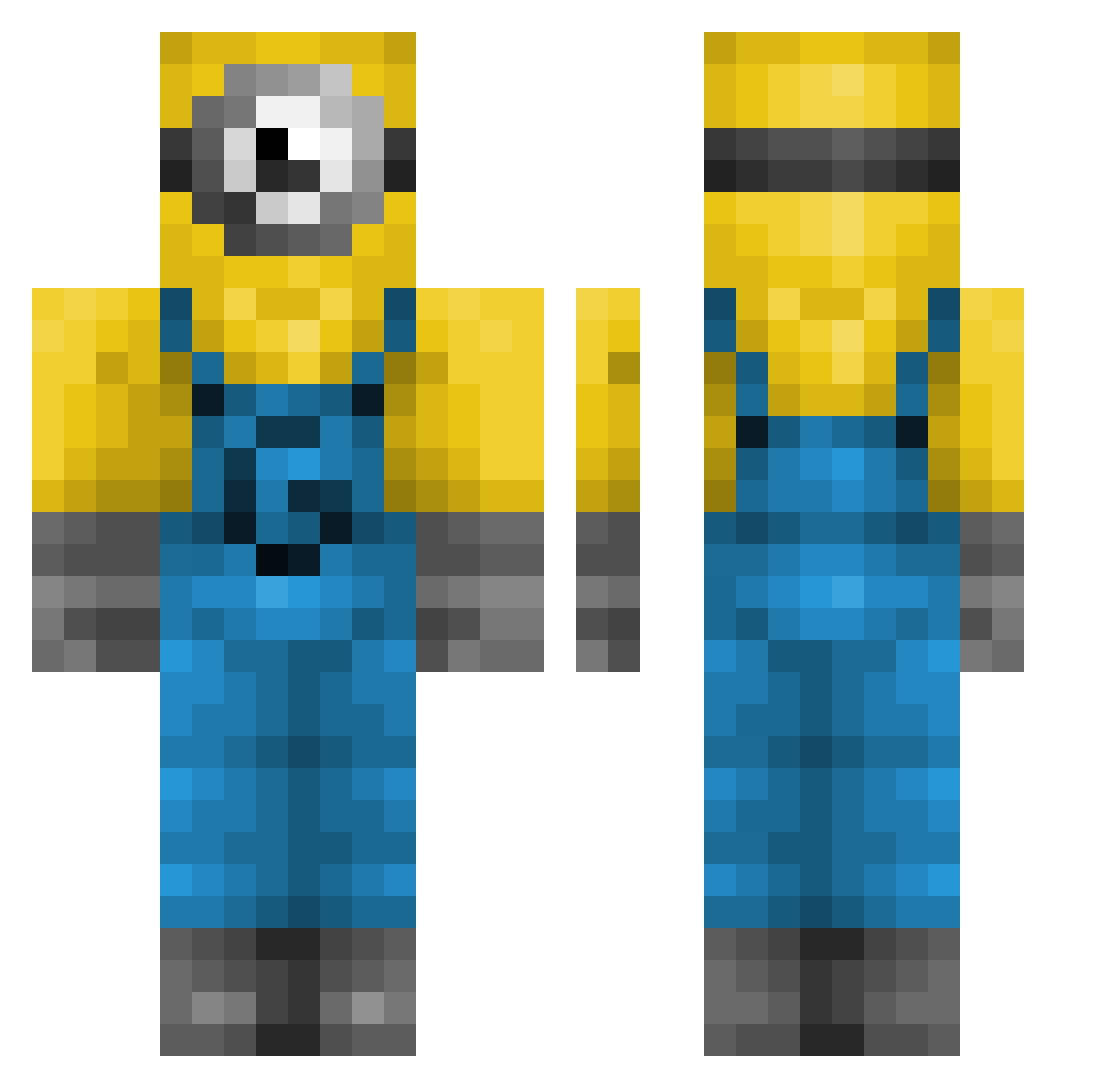
Other players with this skin (239)
Disotas was the 100th player we have seen with this skin, first spotted on 29.08.2026. The same skin was seen on these players. Open a nickname to see their current skin and skin history.
 IIMAAKII Aromatised Lino383x cbants Kreyonyx xRenkaxER janschaf1 AyranHabub SlushierWeb BuddyBobIII jonasnasnas Phenix24 usermoak Reisbauerin palomanegra camdd04 C1011 daBBy7911 lmYosh GisselleChavez
 ramanen dm0b00 Rustprophet Mleky ARXPZY WiadrEe331 YamineLamal Superspycats austinf123 Seon_o0o MrJew420 DylDoeBaggins nikname1111 Amirtd455 mattwold10 bcandlr soiuwa catiebug621 L4mt3rn MrWalls07
 OYmuffin Foxinplayer akargs1905 BaddieBertha SneakySnake46 Sammiemau DeepAura64895 Dalonito Senny2K wilysquasher
 salamannopee_ UUUUUu07 sxm25 Mimifofis
 SS8_ Szacheusz Yuhiam MAO70MILLION SolarEclipse_Pie ZEShep15
More Minion Minecraft skins
How to install the Disotas skin
- Press the Download button above to save the skin as a PNG file.
- Minecraft: Bedrock Edition (PE): open the Dressing Room from the main menu (or tap your character → Edit Character), go to Classic Skins → Owned, press the + (new skin) button, choose the downloaded PNG and pick the Classic (Steve) model. Works on PC and mobile; consoles cannot import custom skins.
- Minecraft: Java Edition: open the Minecraft Launcher, go to the Skins tab, click New Skin, load the PNG, pick the Classic (Steve) model and press Save & Use. You can also upload it at minecraft.net → Profile → Change Skin.
The skin does not show up after import - what should I do?
Restart Minecraft and open the Dressing Room again - imported skins sometimes appear only after a restart. Also make sure you selected the imported skin and picked the Classic (Steve) model.
Which model should I choose, Classic or Slim?
This skin is designed for the Classic (Steve) model. If you pick the wrong model, the arms of the skin will look stretched or squeezed.
Is the skin of Disotas free to download?
Yes. Press Download, save the PNG file and use it in Minecraft: Bedrock Edition or Java Edition - no payment or registration needed. The skin also works on multiplayer servers and Realms.
More skins
Looking for more? Go back to all Minecraft skins and check the top skins of the week, month and all time, or find any player's skin by nickname.