
Creep9012 - Minecraft Skins & Skin History
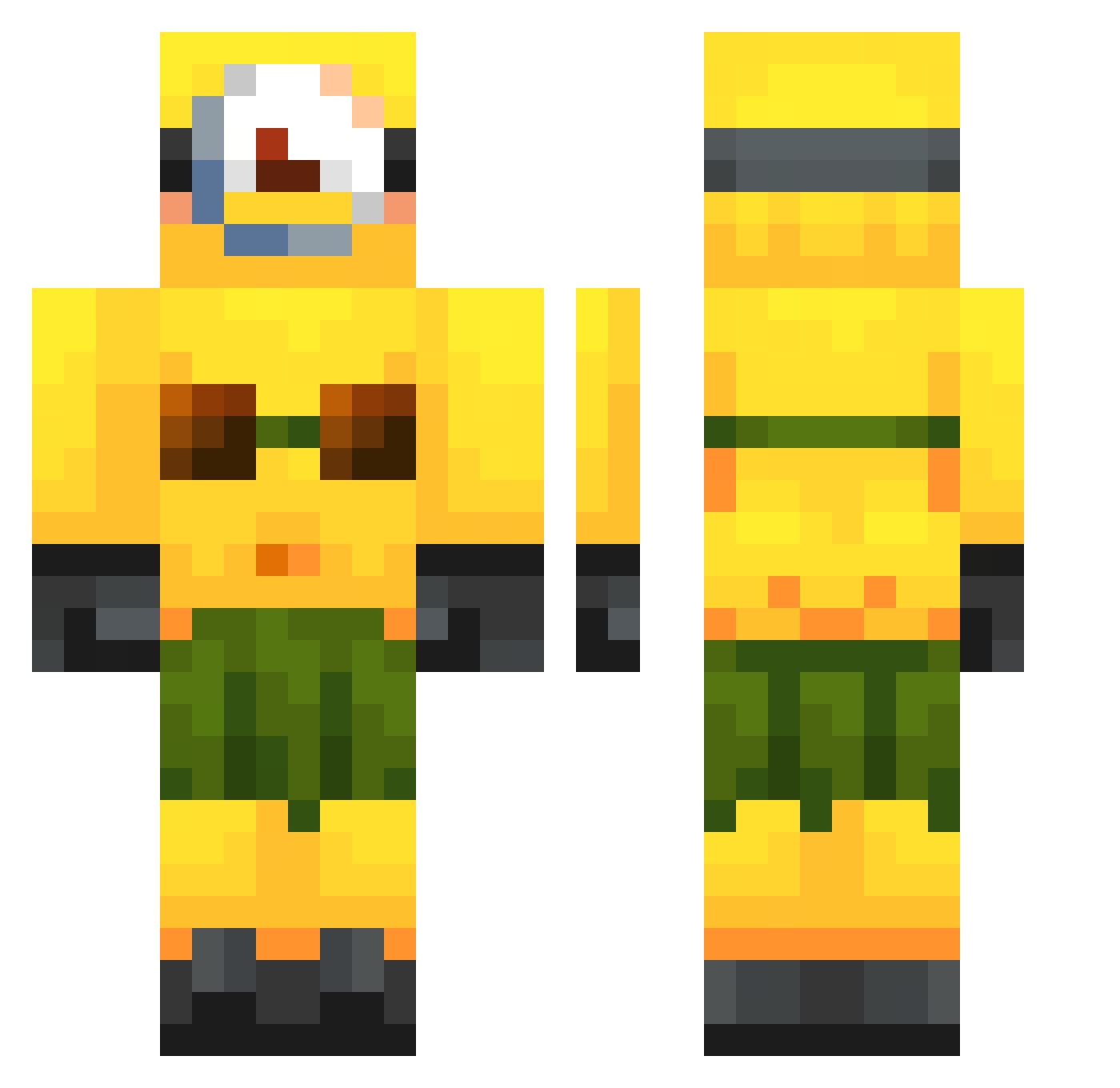
Current Minecraft skin of the player Creep9012, loaded from the official Mojang API. Rotate the 3D model with your mouse or finger, then download the skin as a PNG file and use it in Minecraft: Bedrock Edition or Java Edition for free. When Creep9012 changes their skin, this page updates automatically and the old skin stays in the history below.
Other players with this skin (321)
Creep9012 was the 21st player we have seen with this skin, first spotted on 03.08.2026. The same skin was seen on these players. Open a nickname to see their current skin and skin history.
 mariajuanas ItemRouter alftheman2010 GigaPerry Labe1le
 KokosnussJunge JoacoBettiol fable29 Ramitoide dayn123 CrazyBlake320 Adri_49_ FaKeRob1n traaaaaaaaaaans Donken9 LA_13 tough_kid2016 Gamermarvinb SKIBIDIWARIOR pk6003
 Toasted_Pickles junic7 playboxerino NIKITKA_MILK Ilovemyblondgf xJoeMama5 TPAXO3ABP gustavavi hotcopperingot LandRover42 friedziti YungTag bloopblooop Defyful stleeyuh snoopdoggna AlvaritoX2008 BossDeer8970835 APziii lukkinorvin glazedaero falim67 qooqls SaltySkater AXSOKOOL__ retrozerxx Adrianoto ollan4 xXHenriGHGXx abuelitabelikona XanderMelis Jaarda397 BeegPogga ejamejam ThiqChunk jepyyy Iloveblondgirls9 fruityghostonica
 BigMcMenuNoa B3N1AG4
More Minion Minecraft skins
How to install the Creep9012 skin
- Press the Download button above to save the skin as a PNG file.
- Minecraft: Bedrock Edition (PE): open the Dressing Room from the main menu (or tap your character → Edit Character), go to Classic Skins → Owned, press the + (new skin) button, choose the downloaded PNG and pick the Classic (Steve) model. Works on PC and mobile; consoles cannot import custom skins.
- Minecraft: Java Edition: open the Minecraft Launcher, go to the Skins tab, click New Skin, load the PNG, pick the Classic (Steve) model and press Save & Use. You can also upload it at minecraft.net → Profile → Change Skin.
The skin does not show up after import - what should I do?
Restart Minecraft and open the Dressing Room again - imported skins sometimes appear only after a restart. Also make sure you selected the imported skin and picked the Classic (Steve) model.
Which model should I choose, Classic or Slim?
This skin is designed for the Classic (Steve) model. If you pick the wrong model, the arms of the skin will look stretched or squeezed.
Is the skin of Creep9012 free to download?
Yes. Press Download, save the PNG file and use it in Minecraft: Bedrock Edition or Java Edition - no payment or registration needed. The skin also works on multiplayer servers and Realms.
More skins
Looking for more? Go back to all Minecraft skins and check the top skins of the week, month and all time, or find any player's skin by nickname.