
vladromnation - Minecraft Skins & Skin History
Current Minecraft skin of the player vladromnation, loaded from the official Mojang API. Rotate the 3D model with your mouse or finger, then download the skin as a PNG file and use it in Minecraft: Bedrock Edition or Java Edition for free. When vladromnation changes their skin, this page updates automatically and the old skin stays in the history below.
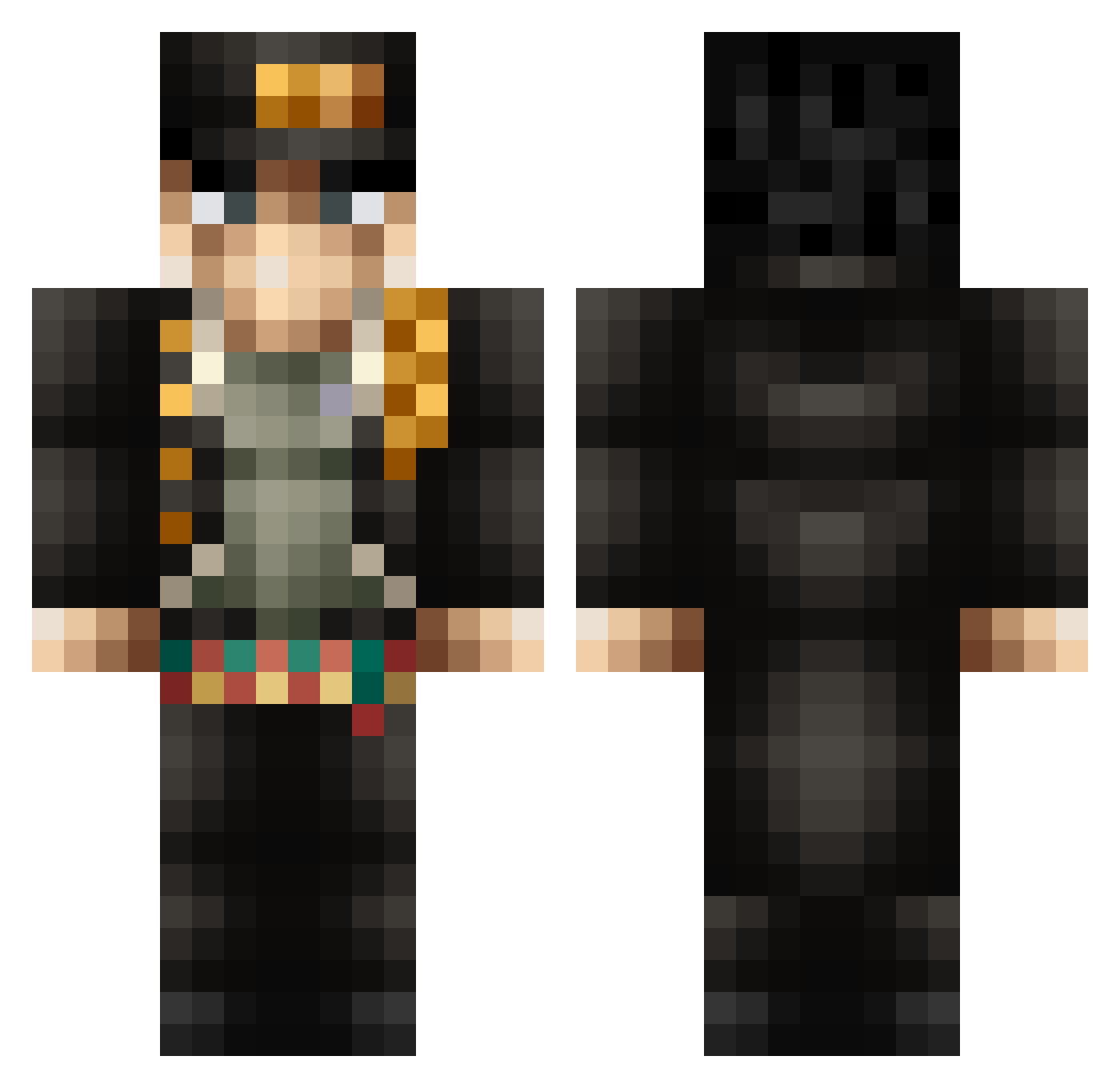
Other players with this skin (367)
vladromnation was the 22nd player we have seen with this skin, first spotted on 29.07.2026. The same skin was seen on these players. Open a nickname to see their current skin and skin history.
 soundwave06 AaronTruMachine Zixx666 Ninja_Descolado Anter704 Valentine3131 __AbysmaL__ TakeshiOhba goulagman Jotaro_ORA Mr_Mahn777 ItsMango77 TriHardTaco Joemamainyobum Namikkt MayBeboo Filos98 JFuneau SilverPepper210 l1mehat killerwarrior298 Cowakawahwi EdithPuthie7k SaintSanin The_Glitch07 MathCourse3 Mrdogo22 Tanque_8 Noflexxx
 Xjrrrr horchad akagami72 _XUE_ZHE_ Han_Sama_ Docteur_Ermite N1XK123 Shaynebourg06 SuminSicchi DENNYjost monkaeyari Mastervk34 Jotaro_Tokiyskii Desimplified djQjfxlql Avdol56 PushyViBeZ8 Hamikaze31 ASAPSCARY heckel32 ELDarkWS Kichus almaeks BleTui CoBalt14 depic55 amhaeng_eosa BlitzKrieger290 Dayne023 _onx grandslam123
More Jotaro Kujo Minecraft skins
How to install the vladromnation skin
- Press the Download button above to save the skin as a PNG file.
- Minecraft: Bedrock Edition (PE): open the Dressing Room from the main menu (or tap your character → Edit Character), go to Classic Skins → Owned, press the + (new skin) button, choose the downloaded PNG and pick the Classic (Steve) model. Works on PC and mobile; consoles cannot import custom skins.
- Minecraft: Java Edition: open the Minecraft Launcher, go to the Skins tab, click New Skin, load the PNG, pick the Classic (Steve) model and press Save & Use. You can also upload it at minecraft.net → Profile → Change Skin.
The skin does not show up after import - what should I do?
Restart Minecraft and open the Dressing Room again - imported skins sometimes appear only after a restart. Also make sure you selected the imported skin and picked the Classic (Steve) model.
Which model should I choose, Classic or Slim?
This skin is designed for the Classic (Steve) model. If you pick the wrong model, the arms of the skin will look stretched or squeezed.
Is the skin of vladromnation free to download?
Yes. Press Download, save the PNG file and use it in Minecraft: Bedrock Edition or Java Edition - no payment or registration needed. The skin also works on multiplayer servers and Realms.
More skins
Looking for more? Go back to all Minecraft skins and check the top skins of the week, month and all time, or find any player's skin by nickname.