
gideon_008 - Minecraft Skins & Skin History
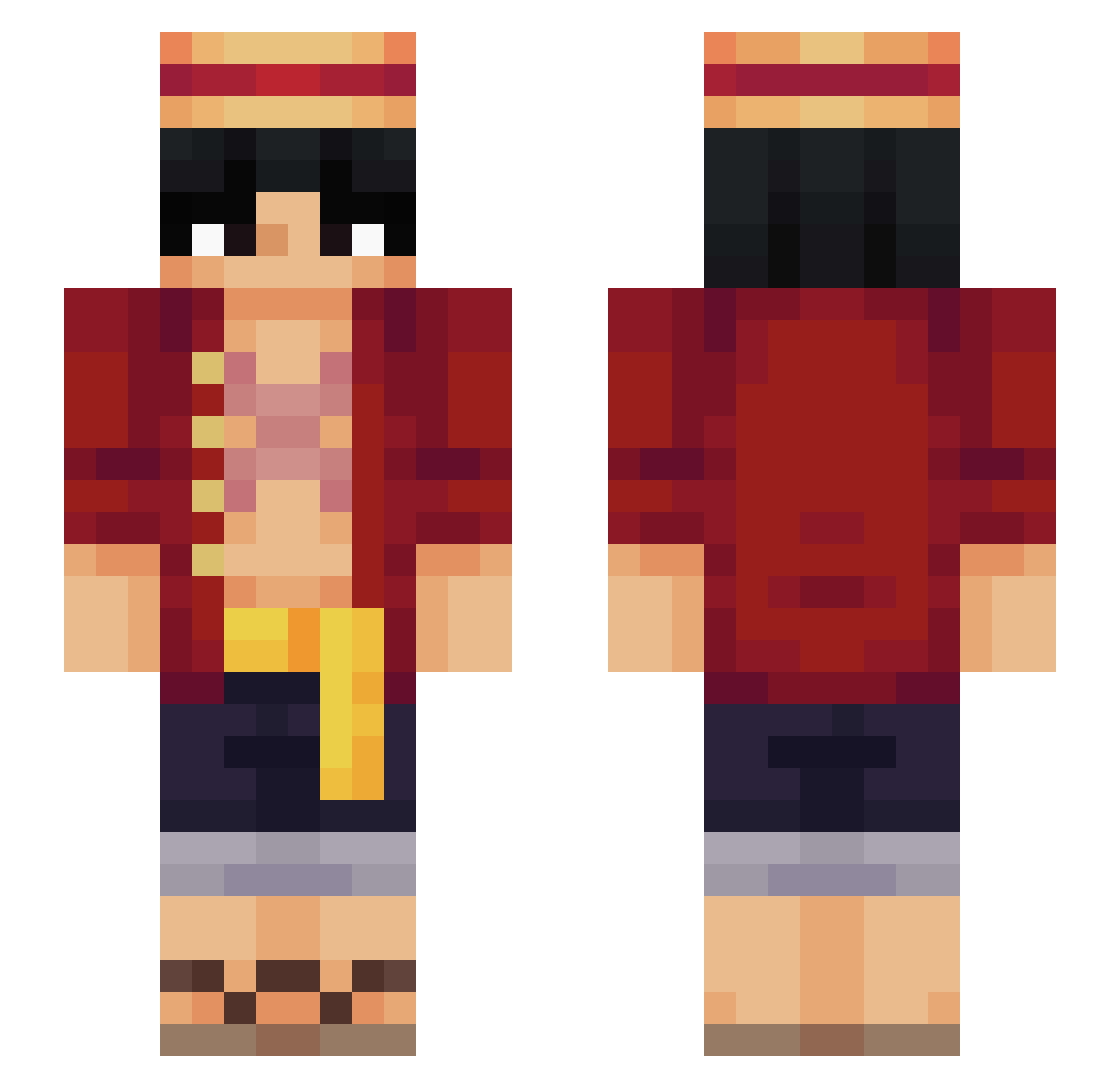
Current Minecraft skin of the player gideon_008, loaded from the official Mojang API. Rotate the 3D model with your mouse or finger, then download the skin as a PNG file and use it in Minecraft: Bedrock Edition or Java Edition for free. When gideon_008 changes their skin, this page updates automatically and the old skin stays in the history below.
Other players with this skin (569)
gideon_008 was the 261st player we have seen with this skin, first spotted on 16.09.2026. The same skin was seen on these players. Open a nickname to see their current skin and skin history.
 CrissDMonty Nytrax78 Digicall ball2104 GustaKun20 Nancyy222 word_waster Juanse_grr NottBryce _derickzinhograu thesuburbcowboy cyronez_ DEADMEN27 vaiper_k Valfyre Andr3sVolik0v BautiRey BlondeJoker6120 Devilsletuce Grogusin kente152 Kirtash11 brodie2033 habinhabin MugiwaraToy Link_302 Agent_Kowalski09 Taegyu91 AntoXVIII BananaJordan MonkeyDTussi Rhtys 67km Daynn NicoNick_ matt76869 Satex1337 Dilllldo Mathias7672 Rapsi kalkyrs y21iz NinjaRider1211 1ampain SandManGaara ATWOCK ronitito Mat33315 Zaxcrow ThiGrilo SLIoN_ HazzUT Guto_Lindo PaxB7 Suavesito95 Fur_BlooD ThatOneW33b sebastianldt Rainaroskg Gr0byy
More Monkey D Luffy Minecraft skins
See all 928 Monkey D Luffy skins
How to install the gideon_008 skin
- Press the Download button above to save the skin as a PNG file.
- Minecraft: Bedrock Edition (PE): open the Dressing Room from the main menu (or tap your character → Edit Character), go to Classic Skins → Owned, press the + (new skin) button, choose the downloaded PNG and pick the Slim (Alex) model. Works on PC and mobile; consoles cannot import custom skins.
- Minecraft: Java Edition: open the Minecraft Launcher, go to the Skins tab, click New Skin, load the PNG, pick the Slim (Alex) model and press Save & Use. You can also upload it at minecraft.net → Profile → Change Skin.
The skin does not show up after import - what should I do?
Restart Minecraft and open the Dressing Room again - imported skins sometimes appear only after a restart. Also make sure you selected the imported skin and picked the Slim (Alex) model.
Which model should I choose, Classic or Slim?
This skin is designed for the Slim (Alex) model. If you pick the wrong model, the arms of the skin will look stretched or squeezed.
Is the skin of gideon_008 free to download?
Yes. Press Download, save the PNG file and use it in Minecraft: Bedrock Edition or Java Edition - no payment or registration needed. The skin also works on multiplayer servers and Realms.
More skins
Looking for more? Go back to all Minecraft skins and check the top skins of the week, month and all time, or find any player's skin by nickname.