
Yue20040303 - Minecraft Skins & Skin History
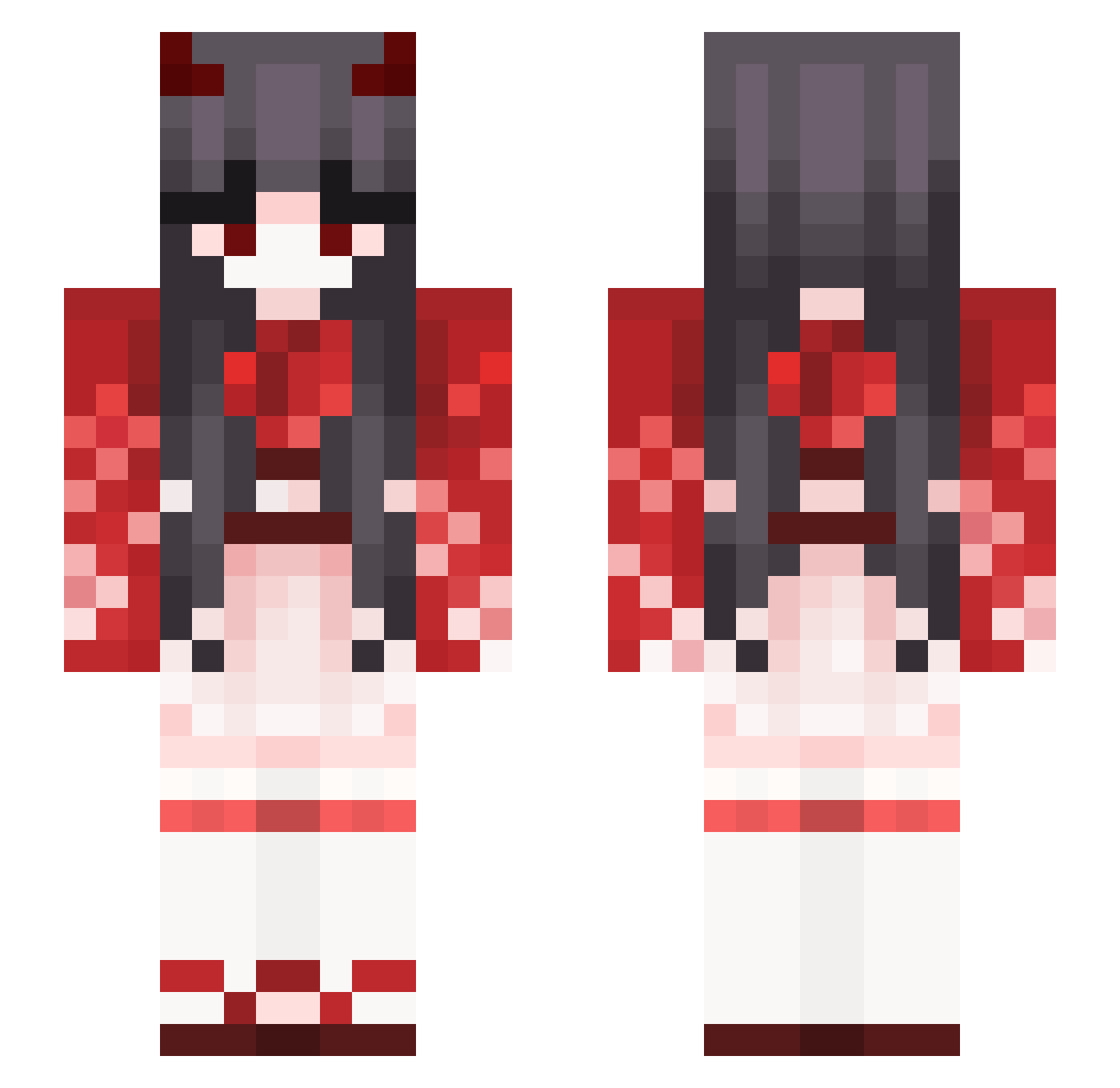
Current Minecraft skin of the player Yue20040303, loaded from the official Mojang API. Rotate the 3D model with your mouse or finger, then download the skin as a PNG file and use it in Minecraft: Bedrock Edition or Java Edition for free. When Yue20040303 changes their skin, this page updates automatically and the old skin stays in the history below.
Other players with this skin (387)
Yue20040303 was the 51st player we have seen with this skin, first spotted on 07.08.2026. The same skin was seen on these players. Open a nickname to see their current skin and skin history.
 Averydor Kubo__Nagisa
 Xavi_D_Moons SeyMoreClevage KriseZ abcda123 Ready_Set_Mutive majiang1 SaltandPeppi Sereskaaa Yukiww PreciousNine Emberis Mortis9999 Blackouo087 Bai_shang_meng petesquirrels Phikatcho pqyasAIRLINES Himetwyla69 lucewo Tantajon69 strawberrLn offixial_Liz Jamarionthe3rd ItsTsuki The_Matriark llDeku CastleSakura Chimichangachaz greatimus tiqouroquwruq lalalabatman axunchang Real_GuiwowNever reQulish
 TateyamaRin 0mii Jinny_0801 nkym157 RushSp imgabibc liugebi PeachPanda98 Cheeseballer22 Tammigomez Blockpoulin daybreaksword Racconcito FawnColoured KaputtesKind Spica3929 blondy1997 Wendy_8877 Nyilith TrinTrini Mulynn KandelKitty winboy1002 Tayber_Cook
More Demon Minecraft skins
How to install the Yue20040303 skin
- Press the Download button above to save the skin as a PNG file.
- Minecraft: Bedrock Edition (PE): open the Dressing Room from the main menu (or tap your character → Edit Character), go to Classic Skins → Owned, press the + (new skin) button, choose the downloaded PNG and pick the Slim (Alex) model. Works on PC and mobile; consoles cannot import custom skins.
- Minecraft: Java Edition: open the Minecraft Launcher, go to the Skins tab, click New Skin, load the PNG, pick the Slim (Alex) model and press Save & Use. You can also upload it at minecraft.net → Profile → Change Skin.
The skin does not show up after import - what should I do?
Restart Minecraft and open the Dressing Room again - imported skins sometimes appear only after a restart. Also make sure you selected the imported skin and picked the Slim (Alex) model.
Which model should I choose, Classic or Slim?
This skin is designed for the Slim (Alex) model. If you pick the wrong model, the arms of the skin will look stretched or squeezed.
Is the skin of Yue20040303 free to download?
Yes. Press Download, save the PNG file and use it in Minecraft: Bedrock Edition or Java Edition - no payment or registration needed. The skin also works on multiplayer servers and Realms.
More skins
Looking for more? Go back to all Minecraft skins and check the top skins of the week, month and all time, or find any player's skin by nickname.