
Vexpa_ - Minecraft Skins & Skin History
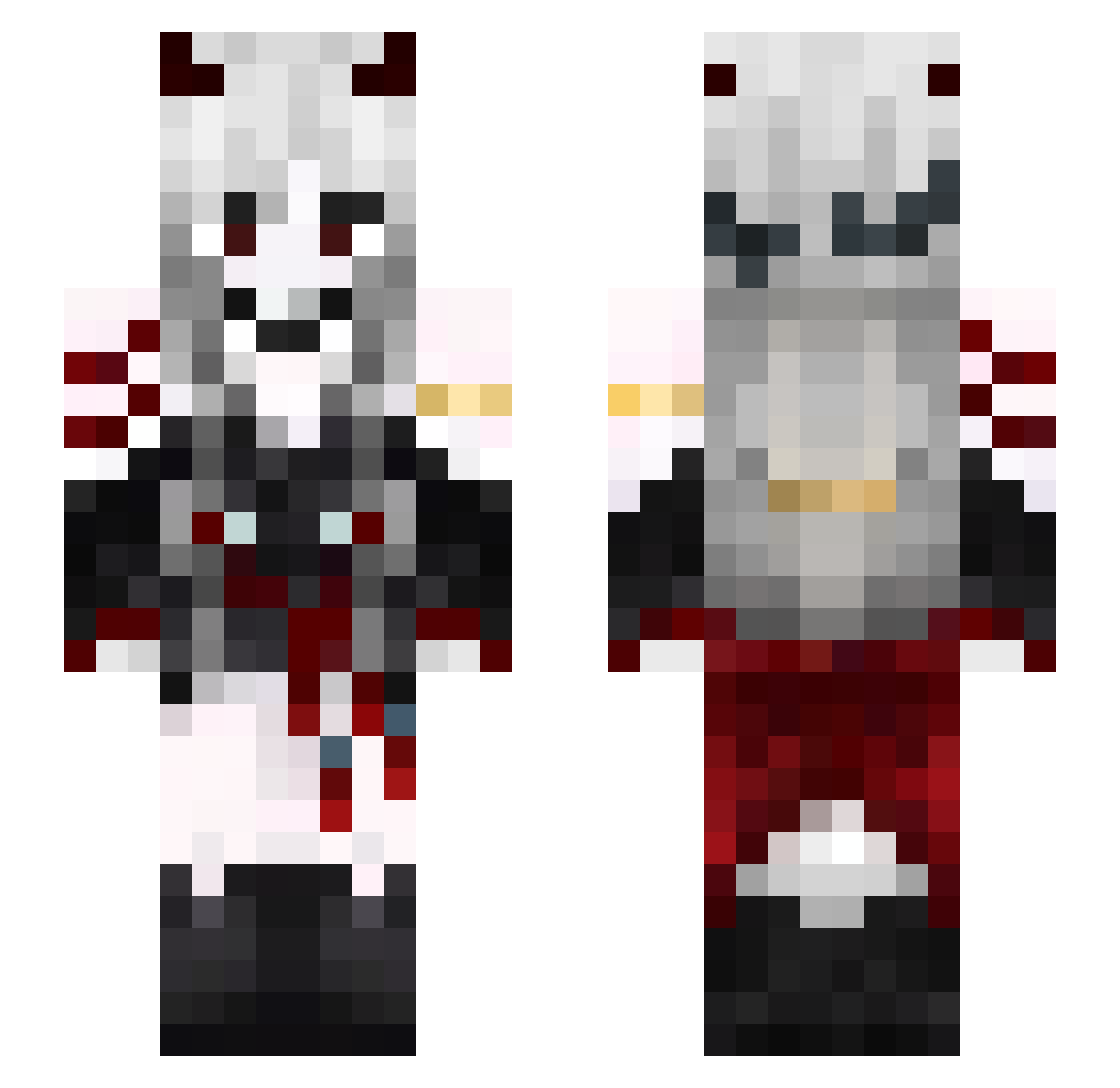
Current Minecraft skin of the player Vexpa_, loaded from the official Mojang API. Rotate the 3D model with your mouse or finger, then download the skin as a PNG file and use it in Minecraft: Bedrock Edition or Java Edition for free. When Vexpa_ changes their skin, this page updates automatically and the old skin stays in the history below.
Other players with this skin (581)
Vexpa_ was the 122nd player we have seen with this skin, first spotted on 18.08.2026. The same skin was seen on these players. Open a nickname to see their current skin and skin history.
 QOSUM Artempest001 Night_Agmong cereal0909 Dakudesu zekescigarette Kafka_AI Yixiang181
 Michael10Kaiser tzi_AKlEO_09_09 IRinokI BADcompany4584 dmsgk1104 TheSpiralGames Techlined yan19259 Hikaru7269 Emphhyr Adwey03 Nyluxx stu_04 zPlxa
 d2donutt VioletAlex Mu_Xue0 Meneerik Ruztly nicholas_chan02 DarkAngel17186 lepuqett Ghostly_noa nanala50 Apollo3013 EnderGemini ex1stencee akumeka xiaoyichangbugao DonNoLife Vondeheide Kahilius xiebai9527 Meng1191 donwete Nixie3558 Juulichan LaMouette__ Supani Asteriaa_00 dc151 theresa010 Alexandro999 _LiYkS Vampiryska ByulEclipse_
 AkiNotKnown sqdun ZahraaAM SMiNDZN61 Yumimoon Murbian
More Demon Minecraft skins
How to install the Vexpa_ skin
- Press the Download button above to save the skin as a PNG file.
- Minecraft: Bedrock Edition (PE): open the Dressing Room from the main menu (or tap your character → Edit Character), go to Classic Skins → Owned, press the + (new skin) button, choose the downloaded PNG and pick the Slim (Alex) model. Works on PC and mobile; consoles cannot import custom skins.
- Minecraft: Java Edition: open the Minecraft Launcher, go to the Skins tab, click New Skin, load the PNG, pick the Slim (Alex) model and press Save & Use. You can also upload it at minecraft.net → Profile → Change Skin.
The skin does not show up after import - what should I do?
Restart Minecraft and open the Dressing Room again - imported skins sometimes appear only after a restart. Also make sure you selected the imported skin and picked the Slim (Alex) model.
Which model should I choose, Classic or Slim?
This skin is designed for the Slim (Alex) model. If you pick the wrong model, the arms of the skin will look stretched or squeezed.
Is the skin of Vexpa_ free to download?
Yes. Press Download, save the PNG file and use it in Minecraft: Bedrock Edition or Java Edition - no payment or registration needed. The skin also works on multiplayer servers and Realms.
More skins
Looking for more? Go back to all Minecraft skins and check the top skins of the week, month and all time, or find any player's skin by nickname.