
Nutpunch - Minecraft Skins & Skin History
Current Minecraft skin of the player Nutpunch, loaded from the official Mojang API. Rotate the 3D model with your mouse or finger, then download the skin as a PNG file and use it in Minecraft: Bedrock Edition or Java Edition for free. When Nutpunch changes their skin, this page updates automatically and the old skin stays in the history below.
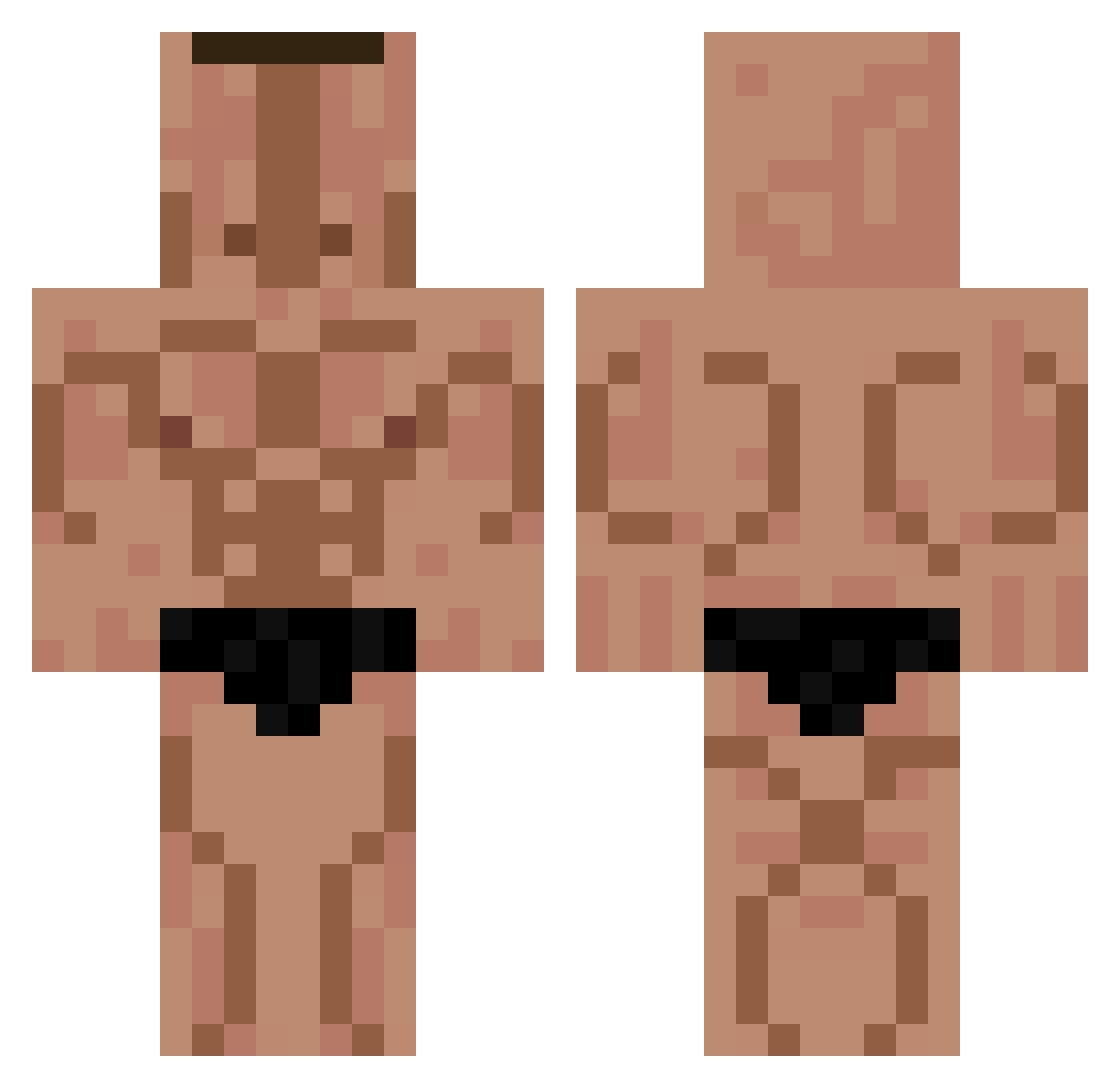
Other players with this skin (330)
Nutpunch was the 96th player we have seen with this skin, first spotted on 29.08.2026. The same skin was seen on these players. Open a nickname to see their current skin and skin history.
 Mopy__ Matvey0635 hgraf2000 SigmaMaks TimsWachteleier PoczekKulturysta Aiww1 Bochenus69 Emppi46 qsef135 Brayd1025 schnuxo don_alvaro67 1Chili Pietrucha_pl StumperSukkel Lorik307 DieButterbirne1 Gusclus korjs OooVape MRA_boi Glutin JSCI15 scove031 Maklinha DenIdCool _SM007_ TamboQueen Gerardsm09 Foxseis Wolfpackk Xenqqq Fricking_Heck Kuromoboko M4uro Olo1412 TowarzyszDozy
 gagaga11_26 Tzein BatuuuD SuperSully5 R0WNYG0SC ayanamiSTB phil_Fodong_ Sa1ntty Woojun12 Nexalty JatochWesleyTT Mike8
 NINJAgamer_123 Nissuer FabrizzioCs HighSmoketrees chikin2000 NotVeronica Alprazolam_50mg cokes_ovo eito1488 BRIANHPRO73
More Buff Minecraft skins
How to install the Nutpunch skin
- Press the Download button above to save the skin as a PNG file.
- Minecraft: Bedrock Edition (PE): open the Dressing Room from the main menu (or tap your character → Edit Character), go to Classic Skins → Owned, press the + (new skin) button, choose the downloaded PNG and pick the Classic (Steve) model. Works on PC and mobile; consoles cannot import custom skins.
- Minecraft: Java Edition: open the Minecraft Launcher, go to the Skins tab, click New Skin, load the PNG, pick the Classic (Steve) model and press Save & Use. You can also upload it at minecraft.net → Profile → Change Skin.
The skin does not show up after import - what should I do?
Restart Minecraft and open the Dressing Room again - imported skins sometimes appear only after a restart. Also make sure you selected the imported skin and picked the Classic (Steve) model.
Which model should I choose, Classic or Slim?
This skin is designed for the Classic (Steve) model. If you pick the wrong model, the arms of the skin will look stretched or squeezed.
Is the skin of Nutpunch free to download?
Yes. Press Download, save the PNG file and use it in Minecraft: Bedrock Edition or Java Edition - no payment or registration needed. The skin also works on multiplayer servers and Realms.
More skins
Looking for more? Go back to all Minecraft skins and check the top skins of the week, month and all time, or find any player's skin by nickname.