
Jemperor05 - Minecraft Skins & Skin History
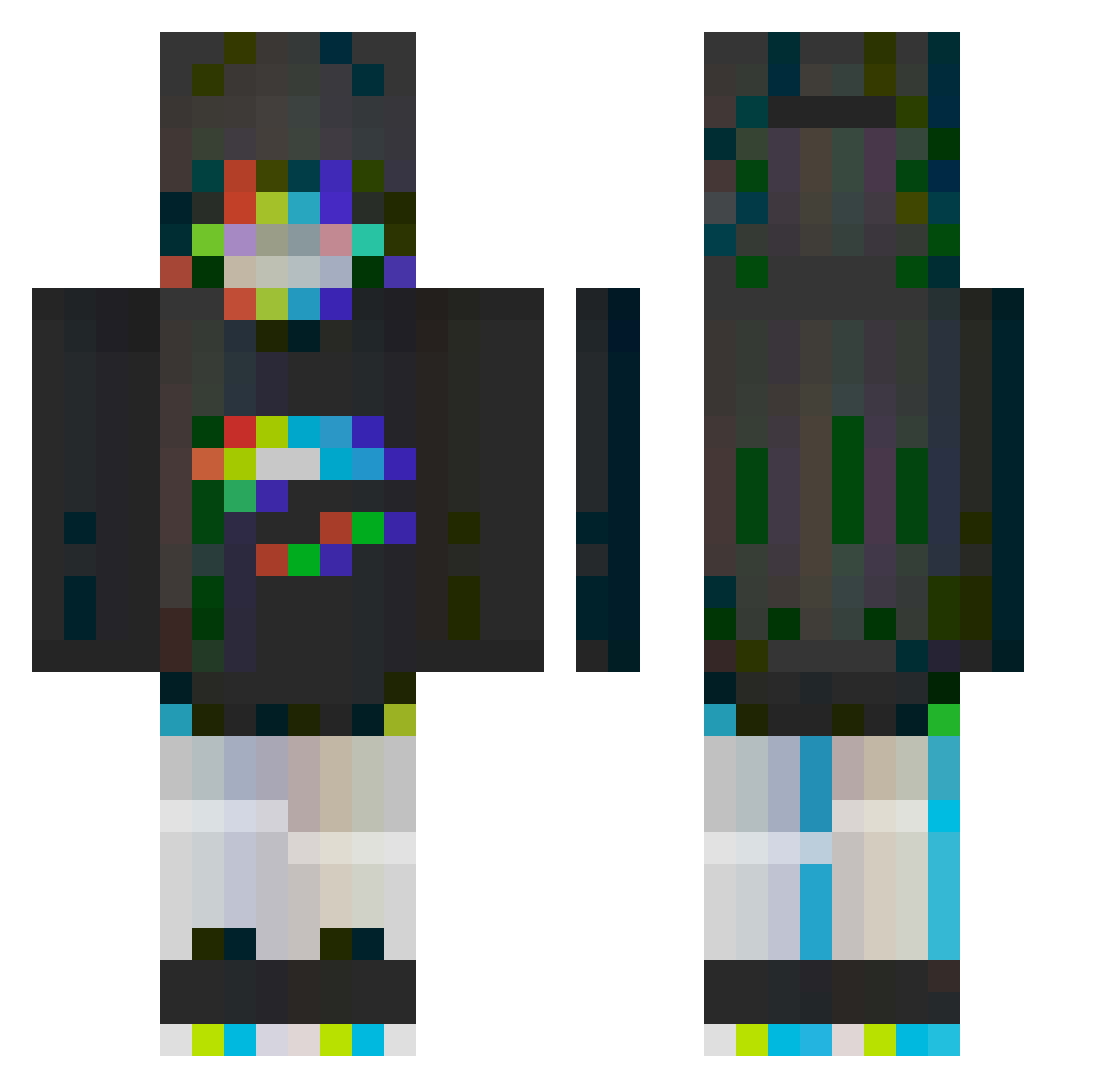
Current Minecraft skin of the player Jemperor05, loaded from the official Mojang API. Rotate the 3D model with your mouse or finger, then download the skin as a PNG file and use it in Minecraft: Bedrock Edition or Java Edition for free. When Jemperor05 changes their skin, this page updates automatically and the old skin stays in the history below.
Other players with this skin (245)
Jemperor05 was the 103rd player we have seen with this skin, first spotted on 01.09.2026. The same skin was seen on these players. Open a nickname to see their current skin and skin history.
 NirvanaMF nexish zirconfire Astentisen Reona_233 Kaxia_exe GamerXDN11 AnGa_E fyu_reee AlpacaNomics Zequess Xea_ finnisntreal TwTv_LLNealithe o0KomodoJo0o sss_nebula
 the_flock Arcia18 TheVoyZ Heru__ MidNight_64 Matricaria99 luvleekaotix jhop__ TrippyCart Geimhridh MINrnin 44444_44 Visionxry rana1826 ShirokiKatsuna Onzhu pizza_toaster Monozym ____Vendetta____ Tosker Skunk_Milk Naker21 cire1986 Shorks_ LifLop Rotopa Turu513 greenvy_ InoBeemo Cpt_Wirus2 dekl0l slenox05 StrawberryBoba_ Av3rage_ Kazamiyuukaa sganon MAISOW Radagast83 patricksprague el7omen blueaurorae s0apb00bles StockyKiki Indicaaaaa
More Glitch Minecraft skins
How to install the Jemperor05 skin
- Press the Download button above to save the skin as a PNG file.
- Minecraft: Bedrock Edition (PE): open the Dressing Room from the main menu (or tap your character → Edit Character), go to Classic Skins → Owned, press the + (new skin) button, choose the downloaded PNG and pick the Classic (Steve) model. Works on PC and mobile; consoles cannot import custom skins.
- Minecraft: Java Edition: open the Minecraft Launcher, go to the Skins tab, click New Skin, load the PNG, pick the Classic (Steve) model and press Save & Use. You can also upload it at minecraft.net → Profile → Change Skin.
The skin does not show up after import - what should I do?
Restart Minecraft and open the Dressing Room again - imported skins sometimes appear only after a restart. Also make sure you selected the imported skin and picked the Classic (Steve) model.
Which model should I choose, Classic or Slim?
This skin is designed for the Classic (Steve) model. If you pick the wrong model, the arms of the skin will look stretched or squeezed.
Is the skin of Jemperor05 free to download?
Yes. Press Download, save the PNG file and use it in Minecraft: Bedrock Edition or Java Edition - no payment or registration needed. The skin also works on multiplayer servers and Realms.
More skins
Looking for more? Go back to all Minecraft skins and check the top skins of the week, month and all time, or find any player's skin by nickname.