
I1WNZ - Minecraft Skins & Skin History
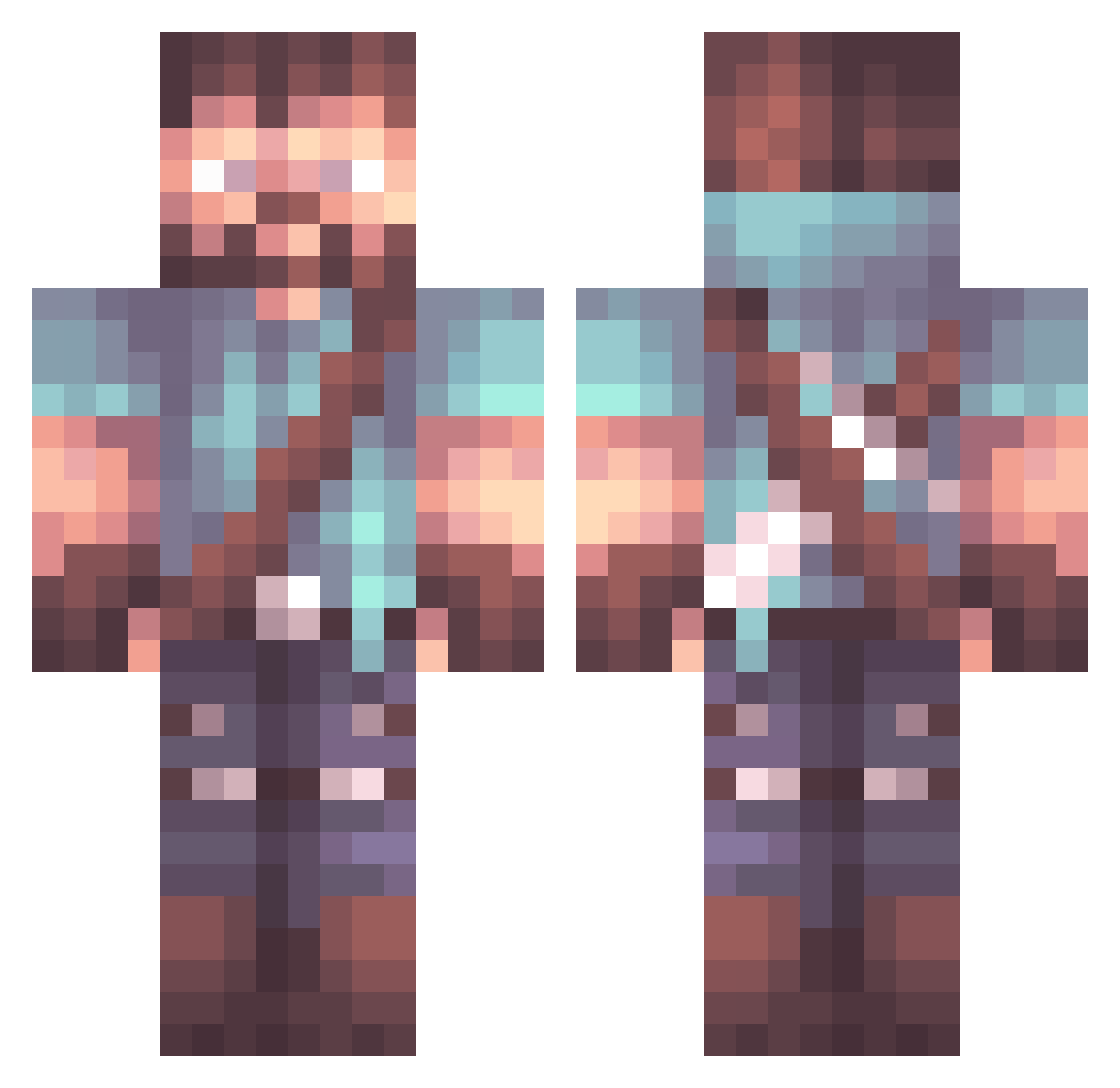
Current Minecraft skin of the player I1WNZ, loaded from the official Mojang API. Rotate the 3D model with your mouse or finger, then download the skin as a PNG file and use it in Minecraft: Bedrock Edition or Java Edition for free. When I1WNZ changes their skin, this page updates automatically and the old skin stays in the history below.
Other players with this skin (849)
I1WNZ was the 110th player we have seen with this skin, first spotted on 05.08.2026. The same skin was seen on these players. Open a nickname to see their current skin and skin history.
 Epicprodogs1 Soulseptem 16Helios Totallrandom Lord_Bluff kizurazgubai Milias117 DangerousDan20 NebulaCrusadeur UncommonCandy Entrecote11 xKICKDOWN Skinma McOptimusRhyme Mac4701 JimmyTheDaddy Zoulrion CEE32 ExtremeBee Ronnie_Dio HideOnJett Scotty_FYB Arsynik Weriel94 Skalriah allaglow Nxbelpistqle
 LadyWrecker Straungen scoutternate Ljudna ArturTendragon FilthyMcNasty503 larpynator333 LHBROS useskaforevil rhythaim Americancola Lavasko The_Chernobog SilverPoet64 finlry82674004 _Carlitus KubilayKara EltsJr FilipyesGame lollit OperationTime Chalavanth_ Delta9038 nailix Karlozs29 NathianWide AKIFpz Yojimbo07 barbed_tongue pipjt FYI_DOC13 CrazyBlocks9 Cyferek
More Herobrine Minecraft skins
How to install the I1WNZ skin
- Press the Download button above to save the skin as a PNG file.
- Minecraft: Bedrock Edition (PE): open the Dressing Room from the main menu (or tap your character → Edit Character), go to Classic Skins → Owned, press the + (new skin) button, choose the downloaded PNG and pick the Classic (Steve) model. Works on PC and mobile; consoles cannot import custom skins.
- Minecraft: Java Edition: open the Minecraft Launcher, go to the Skins tab, click New Skin, load the PNG, pick the Classic (Steve) model and press Save & Use. You can also upload it at minecraft.net → Profile → Change Skin.
The skin does not show up after import - what should I do?
Restart Minecraft and open the Dressing Room again - imported skins sometimes appear only after a restart. Also make sure you selected the imported skin and picked the Classic (Steve) model.
Which model should I choose, Classic or Slim?
This skin is designed for the Classic (Steve) model. If you pick the wrong model, the arms of the skin will look stretched or squeezed.
Is the skin of I1WNZ free to download?
Yes. Press Download, save the PNG file and use it in Minecraft: Bedrock Edition or Java Edition - no payment or registration needed. The skin also works on multiplayer servers and Realms.
More skins
Looking for more? Go back to all Minecraft skins and check the top skins of the week, month and all time, or find any player's skin by nickname.