
FRANCESCO9998 - Minecraft Skins & Skin History
Current Minecraft skin of the player FRANCESCO9998, loaded from the official Mojang API. Rotate the 3D model with your mouse or finger, then download the skin as a PNG file and use it in Minecraft: Bedrock Edition or Java Edition for free. When FRANCESCO9998 changes their skin, this page updates automatically and the old skin stays in the history below.
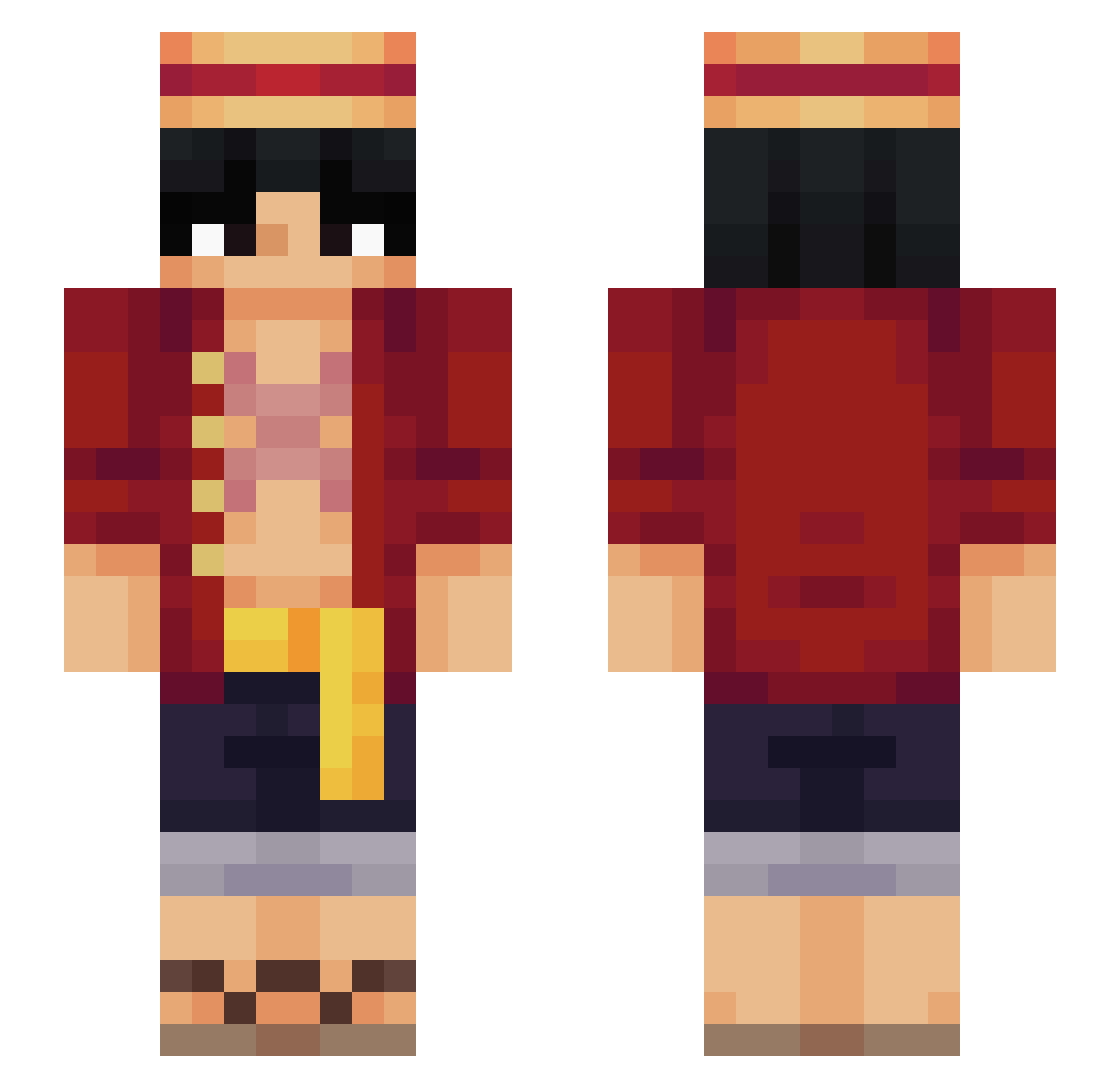
Other players with this skin (564)
FRANCESCO9998 was the 153rd player we have seen with this skin, first spotted on 22.08.2026. The same skin was seen on these players. Open a nickname to see their current skin and skin history.
 Japan_Snake Dicecode Hyziel POPPL3 1upin efe578 Muflon99 Cidyei Baboli19 Notch123455 ijun0_0 Slays07 IL_RE_DEI_PIRATI Darael410 ShinyDiamonds Skyrreze elbropinter7 AyNAxN loloooooooooooo JavierCHLE Vicsago Luphan aMaR5 WeLovePests Bburbuja LilPandaDarr aresitopapirey Kumasbn Neoz27 y0rkkk Alex_22Z HaHaGotcha BubatzNickl Nickchan IRYMCMNIK topofede_ dennysmvn Not_Vxvae xeriotic HorNEtest xKORxVioLEnCEx9
 Krengii Slytherin_biteuu xToTo_10 ImTobi2 Arevy36 Blaisser Skepping1 TACODEpastor99 brn98 kevpox xDan077 IlGot7 CheifKeeff Yamineiro Carbozo_212 Lempereur20 kytos1502 bbuurraakk NetherWartEater
More Monkey D Luffy Minecraft skins
See all 927 Monkey D Luffy skins
How to install the FRANCESCO9998 skin
- Press the Download button above to save the skin as a PNG file.
- Minecraft: Bedrock Edition (PE): open the Dressing Room from the main menu (or tap your character → Edit Character), go to Classic Skins → Owned, press the + (new skin) button, choose the downloaded PNG and pick the Slim (Alex) model. Works on PC and mobile; consoles cannot import custom skins.
- Minecraft: Java Edition: open the Minecraft Launcher, go to the Skins tab, click New Skin, load the PNG, pick the Slim (Alex) model and press Save & Use. You can also upload it at minecraft.net → Profile → Change Skin.
The skin does not show up after import - what should I do?
Restart Minecraft and open the Dressing Room again - imported skins sometimes appear only after a restart. Also make sure you selected the imported skin and picked the Slim (Alex) model.
Which model should I choose, Classic or Slim?
This skin is designed for the Slim (Alex) model. If you pick the wrong model, the arms of the skin will look stretched or squeezed.
Is the skin of FRANCESCO9998 free to download?
Yes. Press Download, save the PNG file and use it in Minecraft: Bedrock Edition or Java Edition - no payment or registration needed. The skin also works on multiplayer servers and Realms.
More skins
Looking for more? Go back to all Minecraft skins and check the top skins of the week, month and all time, or find any player's skin by nickname.