
zhengzx1234 - Minecraft Skins & Skin History
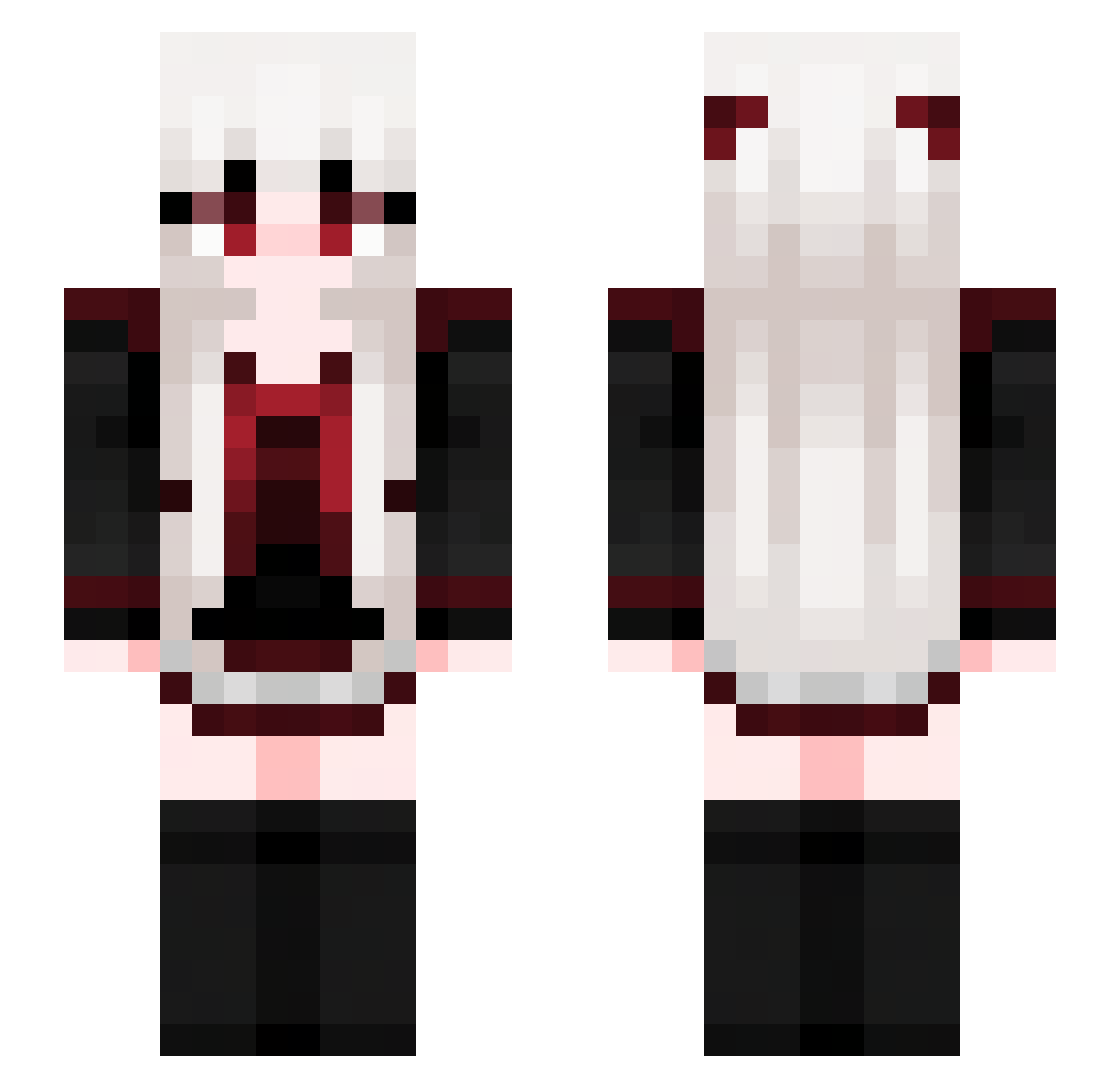
Current Minecraft skin of the player zhengzx1234, loaded from the official Mojang API. Rotate the 3D model with your mouse or finger, then download the skin as a PNG file and use it in Minecraft: Bedrock Edition or Java Edition for free. When zhengzx1234 changes their skin, this page updates automatically and the old skin stays in the history below.
Other players with this skin (713)
zhengzx1234 was the 442nd player we have seen with this skin, first spotted on 03.10.2026. The same skin was seen on these players. Open a nickname to see their current skin and skin history.
 ringo191819 knd_m shawany malwawence _TheFoxMan_ NovaCr12 shye11 Exissst ranintel Lunar_Skyfi Wercia_chan Azulgamer1 DebonairBeet403 JiuYuuu lanan52 BlazeSGR sdy9 dogdog87878787 SeraphFlame Iderlonexx Broshin ZhouZhou5 sunflowerarms muzi826 MochiiSama Floyd_LD juicybae 309_ supremer_r Tkark wine17yBidZMZYTq ___Songbird___ LuckyYer lanatay NungPang xyy112 mugi1119 N4zuk CrossFusionX superminseop MABRUN qiu_cha avineptunun_chan xixi0v0 9clo9w9n9 Desertbot Waipirion Munkichu The_Dark3129 DulceSuarez Cy_9 kkh0429 BeemKunglnwza007 X_Enya Fancyeee qiye7 sinseono Mochakissess MIKI00000000 buzhenyu
More Goth Minecraft skins
How to install the zhengzx1234 skin
- Press the Download button above to save the skin as a PNG file.
- Minecraft: Bedrock Edition (PE): open the Dressing Room from the main menu (or tap your character → Edit Character), go to Classic Skins → Owned, press the + (new skin) button, choose the downloaded PNG and pick the Slim (Alex) model. Works on PC and mobile; consoles cannot import custom skins.
- Minecraft: Java Edition: open the Minecraft Launcher, go to the Skins tab, click New Skin, load the PNG, pick the Slim (Alex) model and press Save & Use. You can also upload it at minecraft.net → Profile → Change Skin.
The skin does not show up after import - what should I do?
Restart Minecraft and open the Dressing Room again - imported skins sometimes appear only after a restart. Also make sure you selected the imported skin and picked the Slim (Alex) model.
Which model should I choose, Classic or Slim?
This skin is designed for the Slim (Alex) model. If you pick the wrong model, the arms of the skin will look stretched or squeezed.
Is the skin of zhengzx1234 free to download?
Yes. Press Download, save the PNG file and use it in Minecraft: Bedrock Edition or Java Edition - no payment or registration needed. The skin also works on multiplayer servers and Realms.
More skins
Looking for more? Go back to all Minecraft skins and check the top skins of the week, month and all time, or find any player's skin by nickname.