
svyatu_k - Minecraft Skins & Skin History
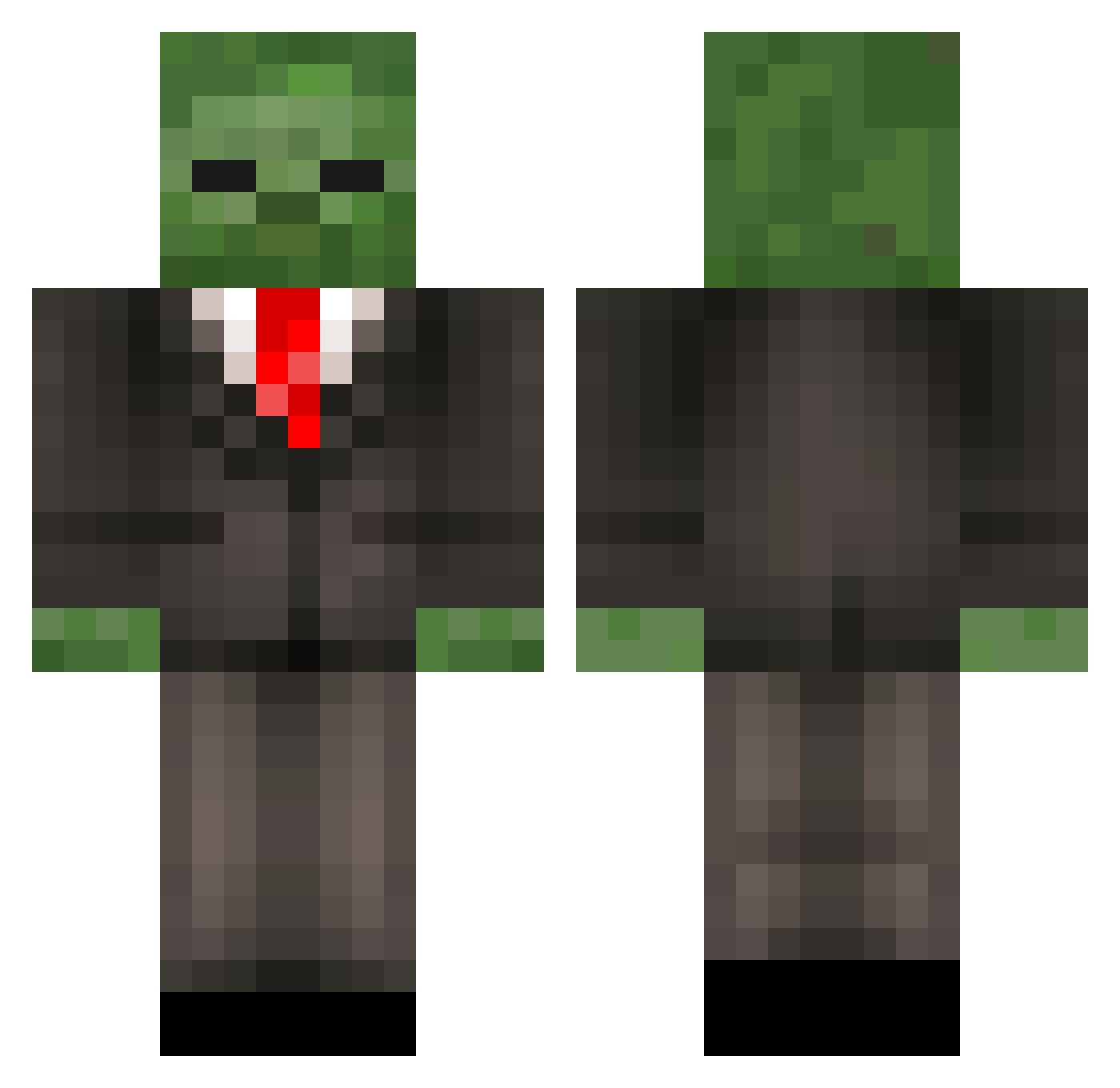
Current Minecraft skin of the player svyatu_k, loaded from the official Mojang API. Rotate the 3D model with your mouse or finger, then download the skin as a PNG file and use it in Minecraft: Bedrock Edition or Java Edition for free. When svyatu_k changes their skin, this page updates automatically and the old skin stays in the history below.
Other players with this skin (200)
svyatu_k was the 124th player we have seen with this skin, first spotted on 29.09.2026. The same skin was seen on these players. Open a nickname to see their current skin and skin history.
 ORANGEdude1234 Zombie_Gaming xiaohuang7 PlayerHipper Trash12X Mr_Aek parkmankang PoorCatDad 1125z MoreMorpheus ComeToSleep jjzombiekiller thebombjake MrFriesTheX StupidMCuser21 lopolgi Oliver_BO XiaoqingXu7777 Mutapata JormaKuusYsi Thirtysupirior7 XXYWQF MarsMotley YungSundanceKid ILoveBigNaturals zzy114514 brfunes dododdo Twist_Orion Blossom335 XCYZD DAO_ZI_ _Marvos97_ DeepFelling rkashyap TheAzureNoodle rogamergec vegetablebird38 admafia Cherrylikeu BlueWhiteguy Vinny33O4 BobaFett2937 mulilo1 Hitsugy_YT Phantojo ITHESKYI Misfit136 TinyNation69 Herman_Sherman Guardian357 Eddieda2 boybigduang Resourcefulness three27 Leroysinclair TaikiHamano l29_ WillemDafoeFan0 Silly_Alarm
More Zombie Minecraft skins
How to install the svyatu_k skin
- Press the Download button above to save the skin as a PNG file.
- Minecraft: Bedrock Edition (PE): open the Dressing Room from the main menu (or tap your character → Edit Character), go to Classic Skins → Owned, press the + (new skin) button, choose the downloaded PNG and pick the Classic (Steve) model. Works on PC and mobile; consoles cannot import custom skins.
- Minecraft: Java Edition: open the Minecraft Launcher, go to the Skins tab, click New Skin, load the PNG, pick the Classic (Steve) model and press Save & Use. You can also upload it at minecraft.net → Profile → Change Skin.
The skin does not show up after import - what should I do?
Restart Minecraft and open the Dressing Room again - imported skins sometimes appear only after a restart. Also make sure you selected the imported skin and picked the Classic (Steve) model.
Which model should I choose, Classic or Slim?
This skin is designed for the Classic (Steve) model. If you pick the wrong model, the arms of the skin will look stretched or squeezed.
Is the skin of svyatu_k free to download?
Yes. Press Download, save the PNG file and use it in Minecraft: Bedrock Edition or Java Edition - no payment or registration needed. The skin also works on multiplayer servers and Realms.
More skins
Looking for more? Go back to all Minecraft skins and check the top skins of the week, month and all time, or find any player's skin by nickname.