
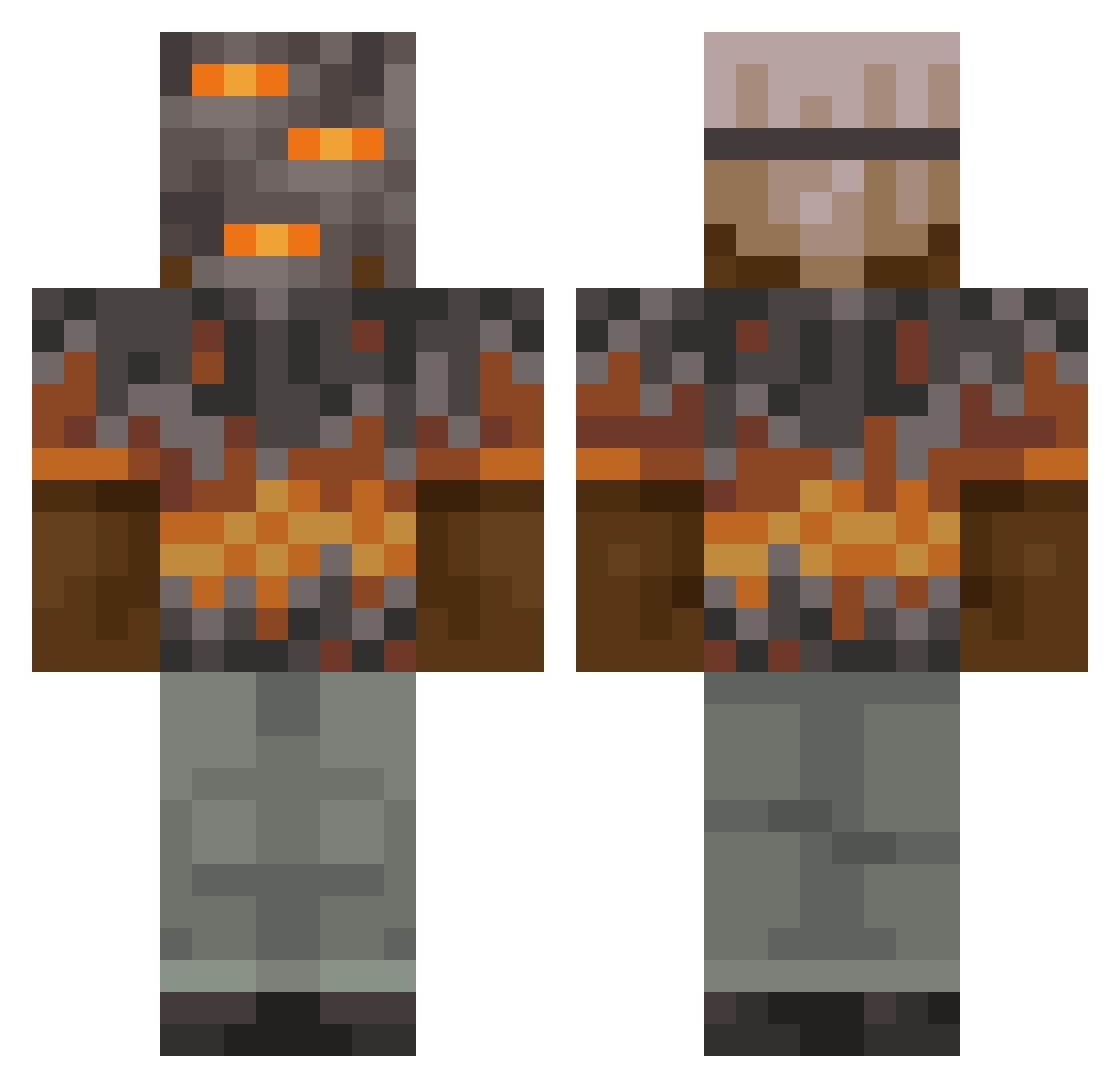
Current Minecraft skin of the player egBlockBuster1, loaded from the official Mojang API. Rotate the 3D model with your mouse or finger, then download the skin as a PNG file and use it in Minecraft: Bedrock Edition or Java Edition for free. When egBlockBuster1 changes their skin, this page updates automatically and the old skin stays in the history below.
Other players with this skin (788)
egBlockBuster1 was the 743rd player we have seen with this skin, first spotted on 12.10.2026. The same skin was seen on these players. Open a nickname to see their current skin and skin history.
 Brandan567 Mp12_ tywife Baboonski4370 KubaJak007 Smax1616 EindbaasD zBaccarat ALASTOR_1121 DEATHESCAPE12 ShermTuffticles Luccqq loonkz Squirtle419 EdGoodman gkfq DrK_43 yamz2333 7amza_69 ScaredGoose xSetii Not_rockypro1 yusufboi hoo130130 HOvaneAD CartiCar CHICKENJOCKEY422 MossenMackan AloneEnchh trisc1 Babyjules2013 dybs_ kasawik Crispy_Wings beefblaster007 fdemir Unknownthread12 GamerBoy78338 LetsgoBabster donnerzwerg1337 craftylogamine2 jefreydammer GreaseBag101 Boots1865 Bigboyryry GlassofRice BLOCK_N_DASH_809 beasthaunter EXECALEB FancyGamer2414 SkyAiay 3MPL3H K1ngtre Crydes Rumpelruebe GABS051 raveKZ2dy5Mr marmiss CarlTheOnly blocks_king
More Rock Minecraft skins
How to install the egBlockBuster1 skin
- Press the Download button above to save the skin as a PNG file.
- Minecraft: Bedrock Edition (PE): open the Dressing Room from the main menu (or tap your character → Edit Character), go to Classic Skins → Owned, press the + (new skin) button, choose the downloaded PNG and pick the Classic (Steve) model. Works on PC and mobile; consoles cannot import custom skins.
- Minecraft: Java Edition: open the Minecraft Launcher, go to the Skins tab, click New Skin, load the PNG, pick the Classic (Steve) model and press Save & Use. You can also upload it at minecraft.net → Profile → Change Skin.
The skin does not show up after import - what should I do?
Restart Minecraft and open the Dressing Room again - imported skins sometimes appear only after a restart. Also make sure you selected the imported skin and picked the Classic (Steve) model.
Which model should I choose, Classic or Slim?
This skin is designed for the Classic (Steve) model. If you pick the wrong model, the arms of the skin will look stretched or squeezed.
Is the skin of egBlockBuster1 free to download?
Yes. Press Download, save the PNG file and use it in Minecraft: Bedrock Edition or Java Edition - no payment or registration needed. The skin also works on multiplayer servers and Realms.
More skins
Looking for more? Go back to all Minecraft skins and check the top skins of the week, month and all time, or find any player's skin by nickname.