
Xphone1908 - Minecraft Skins & Skin History
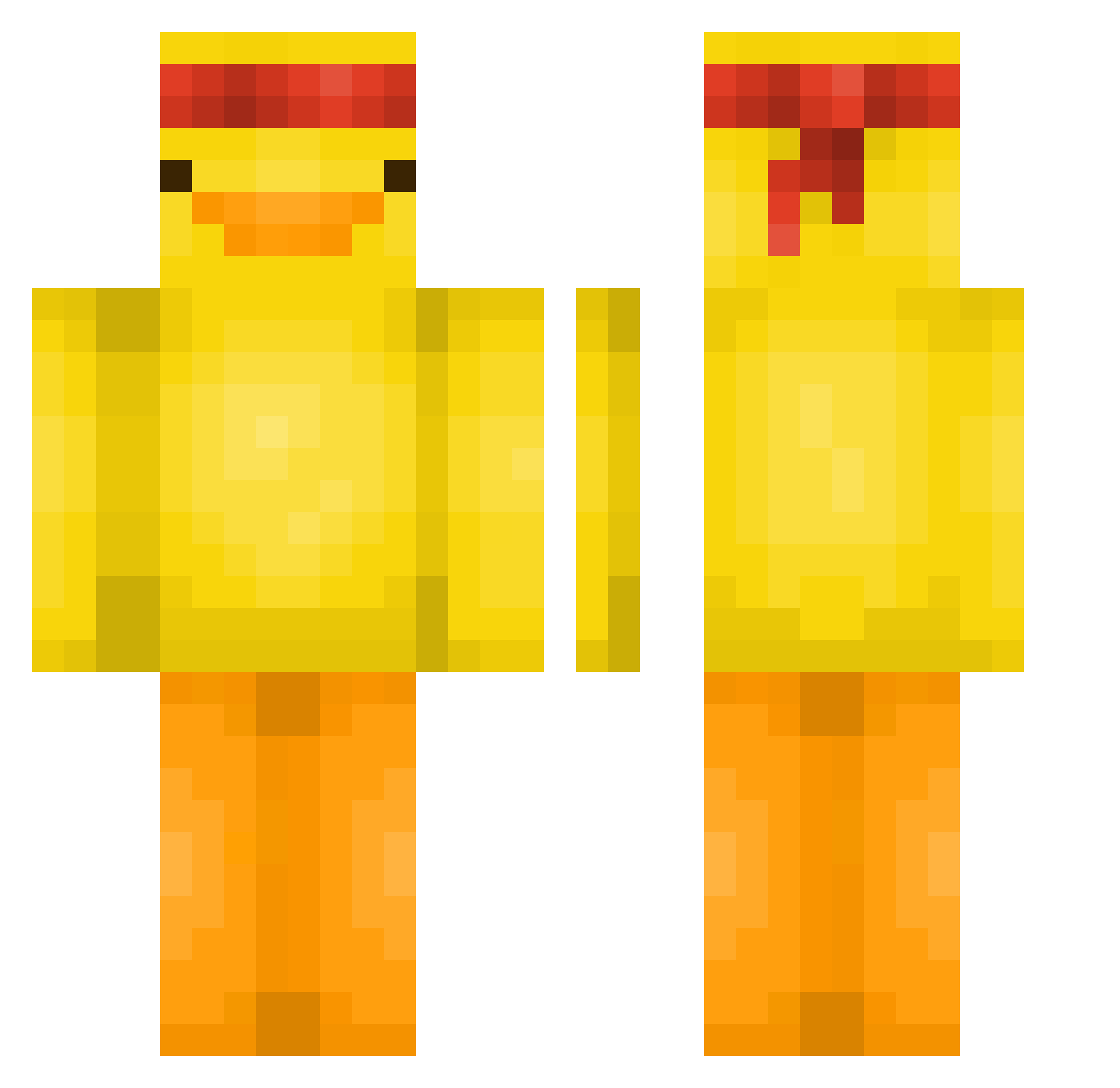
Current Minecraft skin of the player Xphone1908, loaded from the official Mojang API. Rotate the 3D model with your mouse or finger, then download the skin as a PNG file and use it in Minecraft: Bedrock Edition or Java Edition for free. When Xphone1908 changes their skin, this page updates automatically and the old skin stays in the history below.
Other players with this skin (581)
Xphone1908 was the 9th player we have seen with this skin, first spotted on 26.07.2026. The same skin was seen on these players. Open a nickname to see their current skin and skin history.
 Momos3hd Tribaaa PottuMies88 _elbongo_ MattHatter19 securedata TupacSock AleT_04 killerbananas11 LarsBeekhuizen22 deallatenomorehi Jackal1910 PunyMAC DDukDDakMen yee2424 SF_RIGED Zalloss mukddung PrimalSon cornbread_queen ElmersGlue7 paavelii annecorbasi EmiliaGHG01 THETHICCBOI04 Hyyp3r_ Notnerwah knhc Aribooooo xu3ennnn Todor_69 Polar0306 StepBROObey JujustuKaisen AlexKCA FeelingHoppy imaburito564 KimberlySanchez0 FlyingLlamas Shadowkillr1904 B00bRoss sofipastel
 noam864 MiquelFM Stembi UnicornLand15 Das_Meer NotKyedon ImSnowxyy MTD8691 diodio12 FalconPawnchU KyngBubz khaxy Shhhkaka Davinic _zUmox Tsunami_Kerem SmileeBoii randomised456
More Duck Minecraft skins
How to install the Xphone1908 skin
- Press the Download button above to save the skin as a PNG file.
- Minecraft: Bedrock Edition (PE): open the Dressing Room from the main menu (or tap your character → Edit Character), go to Classic Skins → Owned, press the + (new skin) button, choose the downloaded PNG and pick the Classic (Steve) model. Works on PC and mobile; consoles cannot import custom skins.
- Minecraft: Java Edition: open the Minecraft Launcher, go to the Skins tab, click New Skin, load the PNG, pick the Classic (Steve) model and press Save & Use. You can also upload it at minecraft.net → Profile → Change Skin.
The skin does not show up after import - what should I do?
Restart Minecraft and open the Dressing Room again - imported skins sometimes appear only after a restart. Also make sure you selected the imported skin and picked the Classic (Steve) model.
Which model should I choose, Classic or Slim?
This skin is designed for the Classic (Steve) model. If you pick the wrong model, the arms of the skin will look stretched or squeezed.
Is the skin of Xphone1908 free to download?
Yes. Press Download, save the PNG file and use it in Minecraft: Bedrock Edition or Java Edition - no payment or registration needed. The skin also works on multiplayer servers and Realms.
More skins
Looking for more? Go back to all Minecraft skins and check the top skins of the week, month and all time, or find any player's skin by nickname.