
VianHez - Minecraft Skins & Skin History
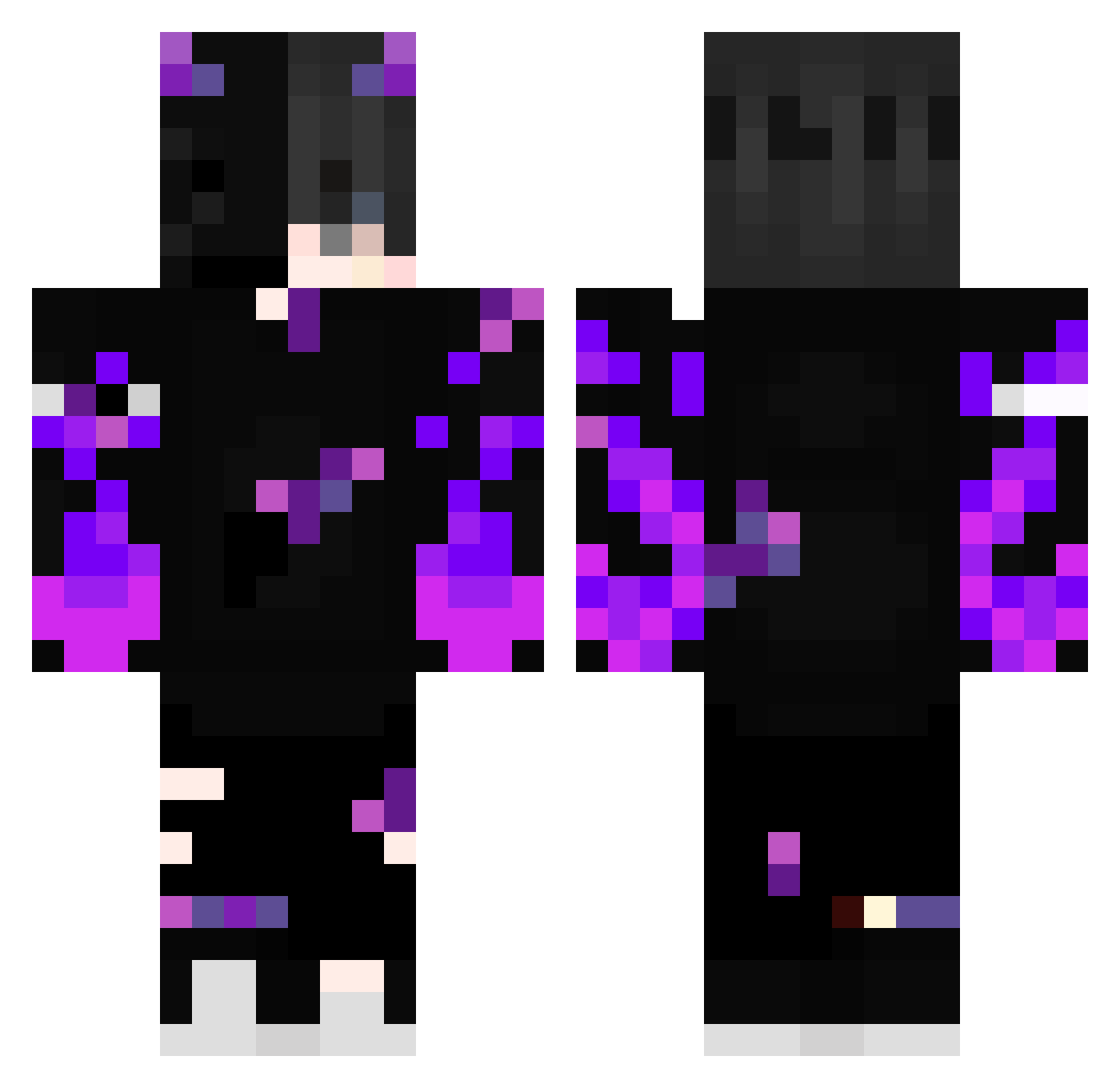
Current Minecraft skin of the player VianHez, loaded from the official Mojang API. Rotate the 3D model with your mouse or finger, then download the skin as a PNG file and use it in Minecraft: Bedrock Edition or Java Edition for free. When VianHez changes their skin, this page updates automatically and the old skin stays in the history below.
Other players with this skin (388)
VianHez was the 146th player we have seen with this skin, first spotted on 03.09.2026. The same skin was seen on these players. Open a nickname to see their current skin and skin history.
 kGMammal KaelTheFool BlattKlaus LegionTDP Zackszx16 DumplingsCarter Rigobertxz Avalon_10 PiLlBoY183 CAPTNtr6 Vrixk0 Little_wooky Psych0117 TheJoshy12 Rxbxn999 DarkLuck97 cocolu172
 HueHueHueHue123 RathodLost Juan9731 RIP_Dragonny L0r3n17 juan4513 LinhNQXKl0107 Gazoux092 Kotorie89
 stoneriver1022 ItsRealLegend_ FUZOGAMINGYT JSales__ Juuunisss Redshadow999 Thedarkred0227 alan62658 SushiAle007 22KEVIN01 Dracula_Alucard soldierGDyFn Dodgeking1339 tzi_s4WU1_07_06 AnKa_ElEdGe Arthurlino11 biscouh Andychou0206 Joa25 Soldat503 rivstar357
 SkyFallZer0 PopyBoy0 Doskaree_ Renaiest UV_GAMING Halil390 BrawlloxYT niklas5642 _OMERO_ Skully_27 WolfSpider11 M4yconBR
 Becerra43
More Demon Minecraft skins
How to install the VianHez skin
- Press the Download button above to save the skin as a PNG file.
- Minecraft: Bedrock Edition (PE): open the Dressing Room from the main menu (or tap your character → Edit Character), go to Classic Skins → Owned, press the + (new skin) button, choose the downloaded PNG and pick the Classic (Steve) model. Works on PC and mobile; consoles cannot import custom skins.
- Minecraft: Java Edition: open the Minecraft Launcher, go to the Skins tab, click New Skin, load the PNG, pick the Classic (Steve) model and press Save & Use. You can also upload it at minecraft.net → Profile → Change Skin.
The skin does not show up after import - what should I do?
Restart Minecraft and open the Dressing Room again - imported skins sometimes appear only after a restart. Also make sure you selected the imported skin and picked the Classic (Steve) model.
Which model should I choose, Classic or Slim?
This skin is designed for the Classic (Steve) model. If you pick the wrong model, the arms of the skin will look stretched or squeezed.
Is the skin of VianHez free to download?
Yes. Press Download, save the PNG file and use it in Minecraft: Bedrock Edition or Java Edition - no payment or registration needed. The skin also works on multiplayer servers and Realms.
More skins
Looking for more? Go back to all Minecraft skins and check the top skins of the week, month and all time, or find any player's skin by nickname.