
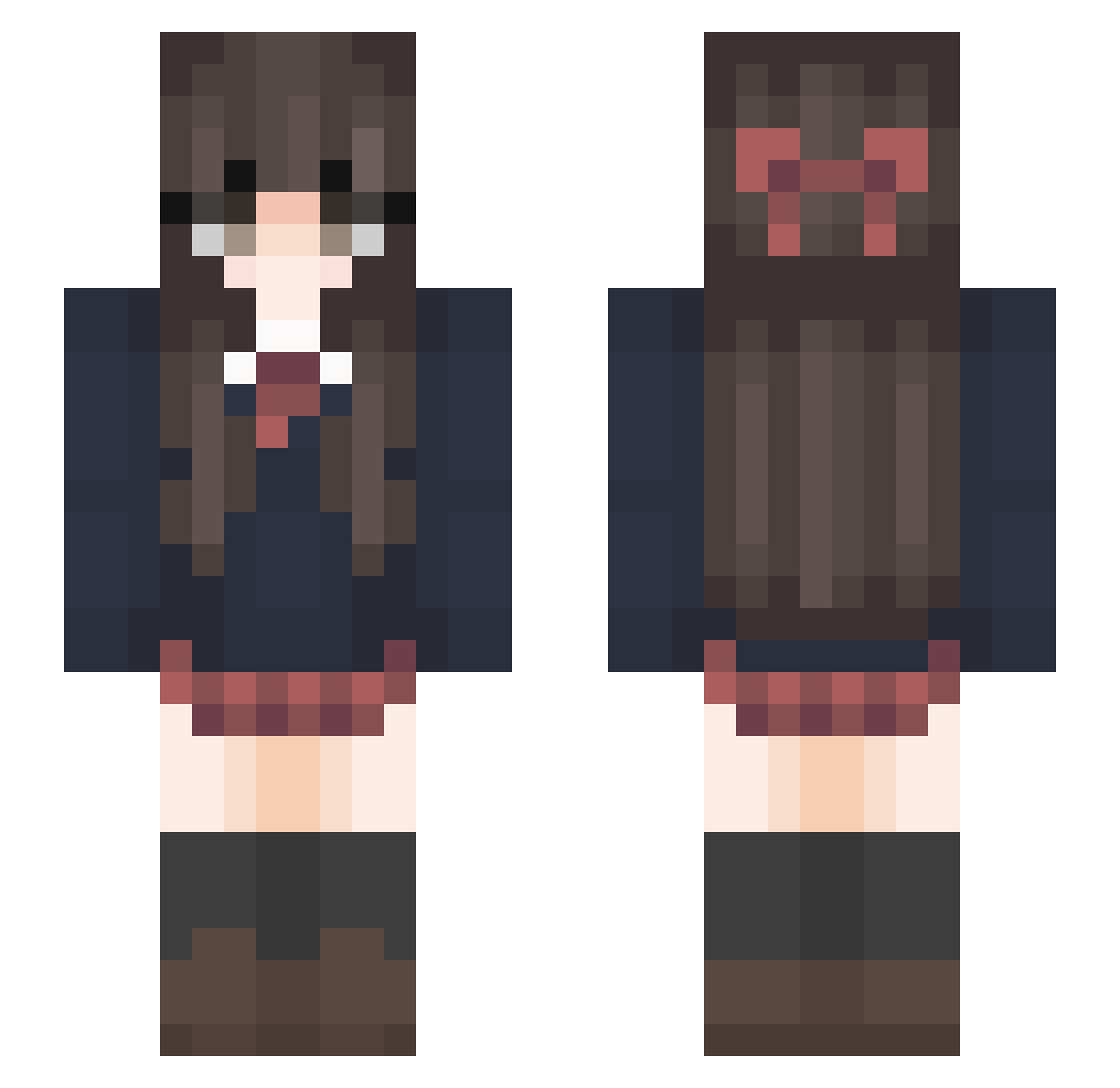
Current Minecraft skin of the player TuM0WkA, loaded from the official Mojang API. Rotate the 3D model with your mouse or finger, then download the skin as a PNG file and use it in Minecraft: Bedrock Edition or Java Edition for free. When TuM0WkA changes their skin, this page updates automatically and the old skin stays in the history below.
Other players with this skin (185)
TuM0WkA was the 83rd player we have seen with this skin, first spotted on 28.08.2026. The same skin was seen on these players. Open a nickname to see their current skin and skin history.
 SilenceKotori __rachel_ ichimaru0128 ikan78 EveningGames Skapie1234 sonhador Plaisanterie LuVikk Marlynha Snow98234234 strawberrystraws GenericUsrnam ChengXiao0715 meeowclairee hopelessmarti DrecrX_YT xarqy__ Bz_ALXD trvnn h2ofusion randomdare sempai2519 luina7 shiranui1212 ash_kitty09 AfterOcean Koyoil MADAO_The_Origin maithex zoesophia
 mumuovo11 AnhTran1123 DainaDonut kim_sunmin Barings cOldYdrEam Lalicore FluidMrA JK1464 metro0333 Yunnie123 rebecca109 Saucy_Nachos Vogelie Anmoul_QWQ PinkMi0 brooklynkids _ellieeee Zuzu92 MicroMiner77 Woingenau666 masterkkj MistyAlexis YoungRaiden R3fU nyangda CallMeDaddyUWU wither519 MYFISH_
More Bow Minecraft skins
How to install the TuM0WkA skin
- Press the Download button above to save the skin as a PNG file.
- Minecraft: Bedrock Edition (PE): open the Dressing Room from the main menu (or tap your character → Edit Character), go to Classic Skins → Owned, press the + (new skin) button, choose the downloaded PNG and pick the Slim (Alex) model. Works on PC and mobile; consoles cannot import custom skins.
- Minecraft: Java Edition: open the Minecraft Launcher, go to the Skins tab, click New Skin, load the PNG, pick the Slim (Alex) model and press Save & Use. You can also upload it at minecraft.net → Profile → Change Skin.
The skin does not show up after import - what should I do?
Restart Minecraft and open the Dressing Room again - imported skins sometimes appear only after a restart. Also make sure you selected the imported skin and picked the Slim (Alex) model.
Which model should I choose, Classic or Slim?
This skin is designed for the Slim (Alex) model. If you pick the wrong model, the arms of the skin will look stretched or squeezed.
Is the skin of TuM0WkA free to download?
Yes. Press Download, save the PNG file and use it in Minecraft: Bedrock Edition or Java Edition - no payment or registration needed. The skin also works on multiplayer servers and Realms.
More skins
Looking for more? Go back to all Minecraft skins and check the top skins of the week, month and all time, or find any player's skin by nickname.