
T3mUw0rkur - Minecraft Skins & Skin History
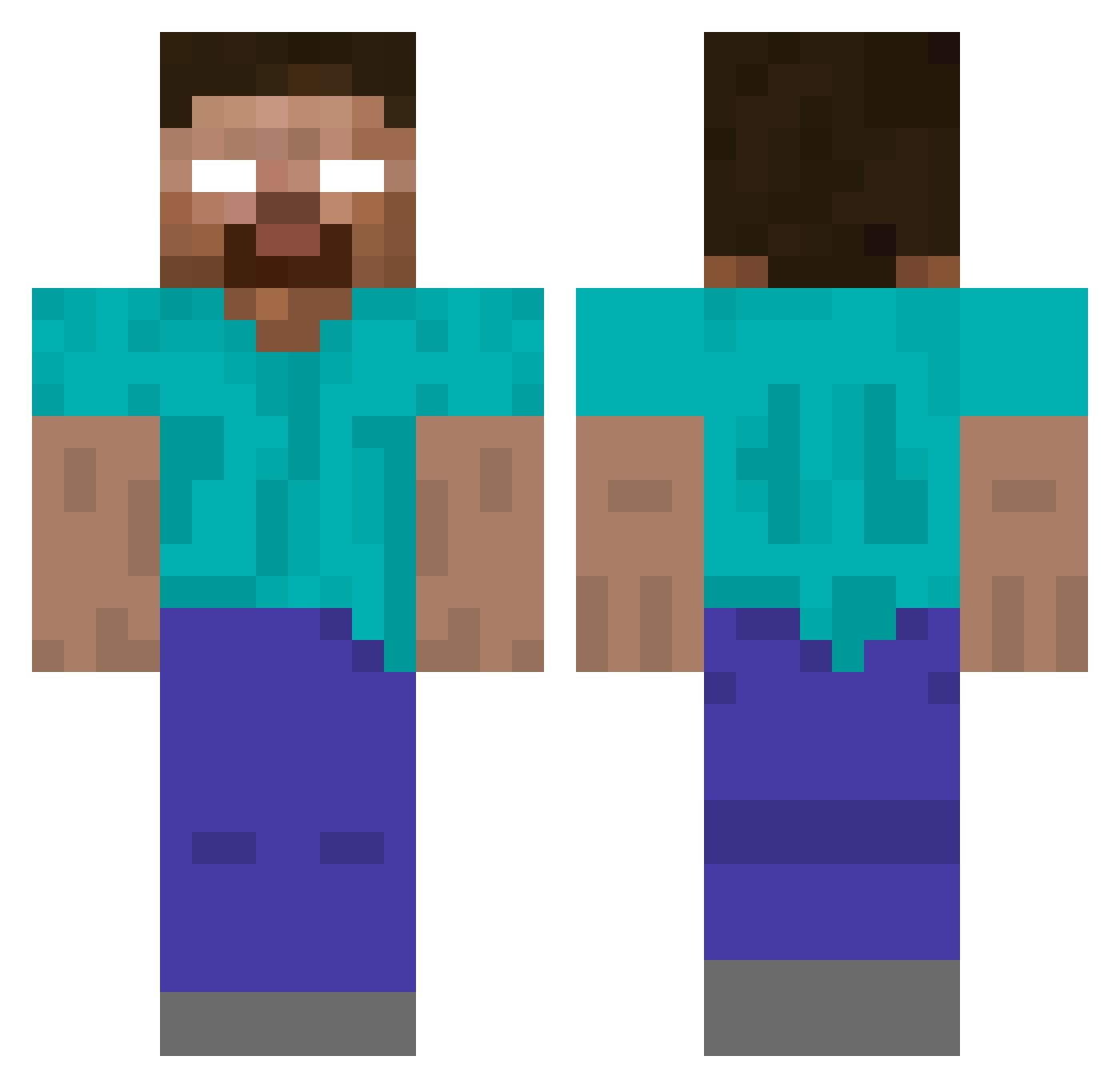
Current Minecraft skin of the player T3mUw0rkur, loaded from the official Mojang API. Rotate the 3D model with your mouse or finger, then download the skin as a PNG file and use it in Minecraft: Bedrock Edition or Java Edition for free. When T3mUw0rkur changes their skin, this page updates automatically and the old skin stays in the history below.
Other players with this skin (184)
T3mUw0rkur was the 54th player we have seen with this skin, first spotted on 20.08.2026. The same skin was seen on these players. Open a nickname to see their current skin and skin history.
 atesbaba123 tomtalksstuff icelech777 tjdbf t0e4zy pz95k erdegen_husky782 CollectedX_ Tomsko
 SELIM_PETE XFusionXV mickymike123 RedPistola Zigr Gaming_Kitty1616
 Armin2015078 Traaays Maragrizz sebuary Marslian furyingfox DwN_sykzee
 Abraham6532 17198393107 Backstrap Bobo_s1 HABIBI_EXE aunedi Genriresu TANISH6981 SamTeddy
 spasticity Coolgamer562380 NeverLoseMC MagicMonkey_ ErimArda FlushToZero 22IQ_Gamer Jawpanu FindianaJones LarpLuca _decimal whrmq Kingneutrum2007 whyU_gae purpleflames Highuser HunnidPercent Rdm_Raptor eonrique pethamenas toniekapi_12 gercekmafya its_emill Zack1948 Mpli hearobrian kdku
 iwygone Spenge
More Herobrine Minecraft skins
How to install the T3mUw0rkur skin
- Press the Download button above to save the skin as a PNG file.
- Minecraft: Bedrock Edition (PE): open the Dressing Room from the main menu (or tap your character → Edit Character), go to Classic Skins → Owned, press the + (new skin) button, choose the downloaded PNG and pick the Classic (Steve) model. Works on PC and mobile; consoles cannot import custom skins.
- Minecraft: Java Edition: open the Minecraft Launcher, go to the Skins tab, click New Skin, load the PNG, pick the Classic (Steve) model and press Save & Use. You can also upload it at minecraft.net → Profile → Change Skin.
The skin does not show up after import - what should I do?
Restart Minecraft and open the Dressing Room again - imported skins sometimes appear only after a restart. Also make sure you selected the imported skin and picked the Classic (Steve) model.
Which model should I choose, Classic or Slim?
This skin is designed for the Classic (Steve) model. If you pick the wrong model, the arms of the skin will look stretched or squeezed.
Is the skin of T3mUw0rkur free to download?
Yes. Press Download, save the PNG file and use it in Minecraft: Bedrock Edition or Java Edition - no payment or registration needed. The skin also works on multiplayer servers and Realms.
More skins
Looking for more? Go back to all Minecraft skins and check the top skins of the week, month and all time, or find any player's skin by nickname.