
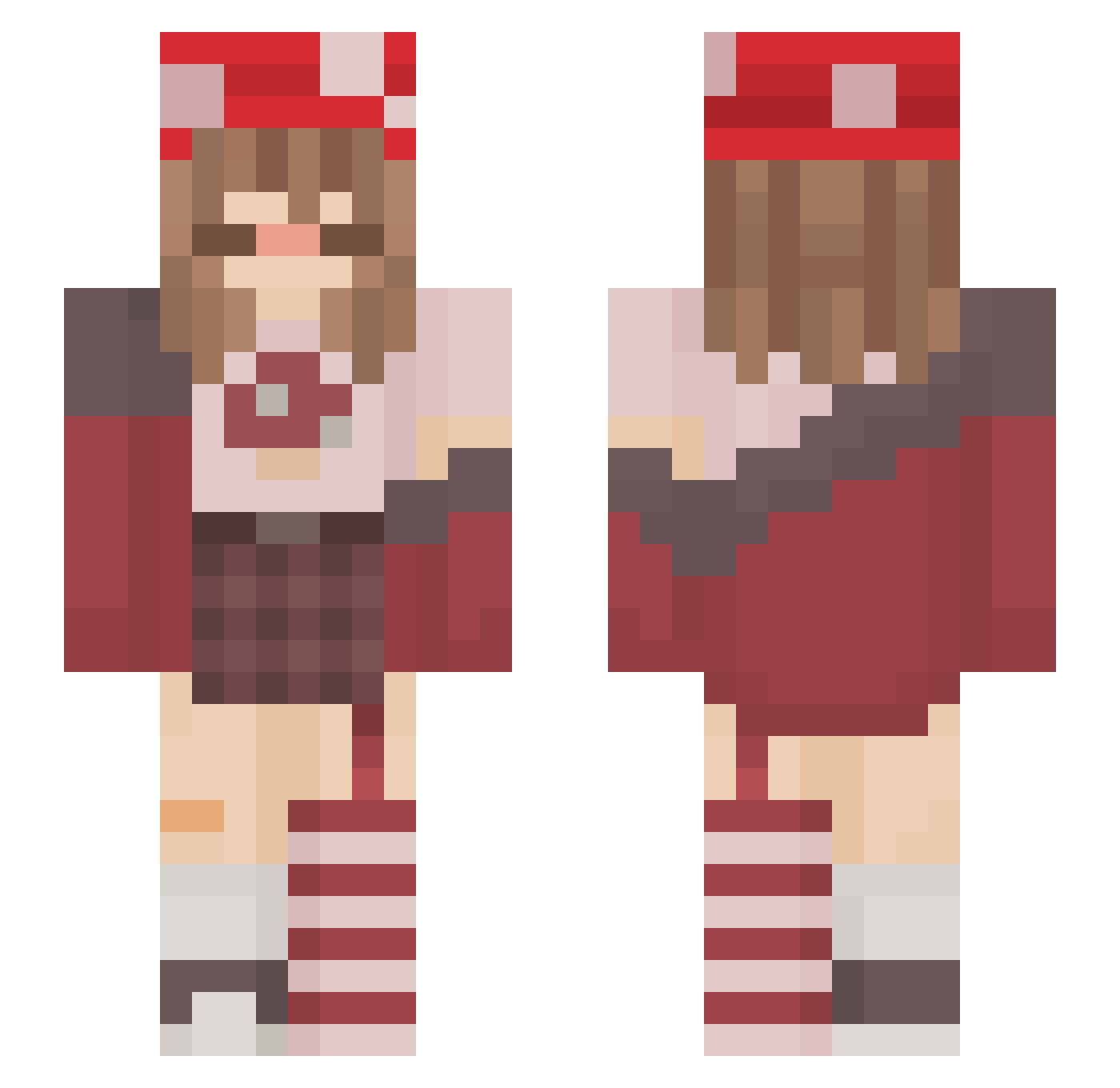
Current Minecraft skin of the player Strawberry_Lilac, loaded from the official Mojang API. Rotate the 3D model with your mouse or finger, then download the skin as a PNG file and use it in Minecraft: Bedrock Edition or Java Edition for free. When Strawberry_Lilac changes their skin, this page updates automatically and the old skin stays in the history below.
Other players with this skin (172)
Strawberry_Lilac was the 84th player we have seen with this skin, first spotted on 10.09.2026. The same skin was seen on these players. Open a nickname to see their current skin and skin history.
 Fr0ggy_xX Tamsiin Chocomonster2097 holythiccnoses NAITZA nabworld NeoLucien kiyal327 dampt0wels_ Outcast341 NanamiSea Ellie_dB XiMochii M3lon_Heart Xx_LaThug_xX Jinxedfairyy Filipis213 Serventia EndaNight Edgy_Hell_Demon cheWink _nii__ babybeeqt caelum_707
 ivneys Ludde8120 leviacil Eris_05 tiffanyxym CutGNarutoUwU10 Mushro00ms JoeM2004 graciegray10 flyingdevilfish jelliifsh Suki912 Luthiii nostxlgia_12 Shizuko2610 bxbynora ninenis Fish8887 cybrfreak lil_cami Candy_Cane_Chaos gabixxxx12 EvaKaktus shro0mu Theorya AngelicFinn Bonfyasf Karlapida xngelikmisfit
 Losiie RemyTheRatIsHot _Saylen Albercikowy butteredturtle hailey_iscool Ittybitty823
More Mushroom Minecraft skins
How to install the Strawberry_Lilac skin
- Press the Download button above to save the skin as a PNG file.
- Minecraft: Bedrock Edition (PE): open the Dressing Room from the main menu (or tap your character → Edit Character), go to Classic Skins → Owned, press the + (new skin) button, choose the downloaded PNG and pick the Slim (Alex) model. Works on PC and mobile; consoles cannot import custom skins.
- Minecraft: Java Edition: open the Minecraft Launcher, go to the Skins tab, click New Skin, load the PNG, pick the Slim (Alex) model and press Save & Use. You can also upload it at minecraft.net → Profile → Change Skin.
The skin does not show up after import - what should I do?
Restart Minecraft and open the Dressing Room again - imported skins sometimes appear only after a restart. Also make sure you selected the imported skin and picked the Slim (Alex) model.
Which model should I choose, Classic or Slim?
This skin is designed for the Slim (Alex) model. If you pick the wrong model, the arms of the skin will look stretched or squeezed.
Is the skin of Strawberry_Lilac free to download?
Yes. Press Download, save the PNG file and use it in Minecraft: Bedrock Edition or Java Edition - no payment or registration needed. The skin also works on multiplayer servers and Realms.
More skins
Looking for more? Go back to all Minecraft skins and check the top skins of the week, month and all time, or find any player's skin by nickname.