
lil_cami - Minecraft Skins & Skin History
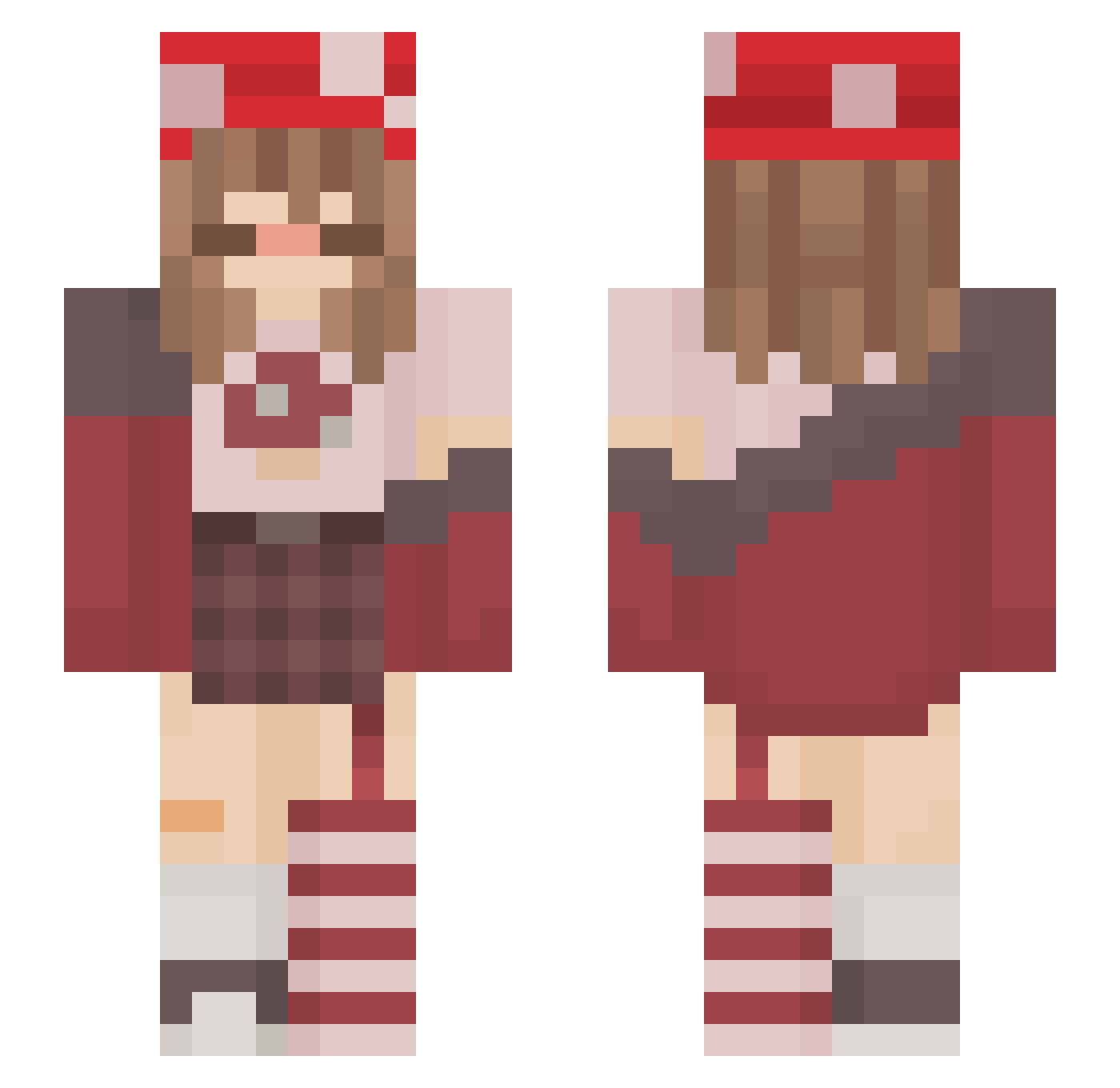
Current Minecraft skin of the player lil_cami, loaded from the official Mojang API. Rotate the 3D model with your mouse or finger, then download the skin as a PNG file and use it in Minecraft: Bedrock Edition or Java Edition for free. When lil_cami changes their skin, this page updates automatically and the old skin stays in the history below.
Other players with this skin (217)
lil_cami was the 68th player we have seen with this skin, first spotted on 29.08.2026. The same skin was seen on these players. Open a nickname to see their current skin and skin history.
 gabixxxx12 shro0mu ninenis Theorya AngelicFinn Luthiii xngelikmisfit
 Losiie RemyTheRatIsHot _Saylen Personal101 jelliifsh maaand JoeM2004 Not_Nik0 SAM_GAMER_TVCH Nefrtale_ Fourthdemention
 ivneys caelum_707 _nii__ Bolinho_13 menacingish YuukiBay BryonyThomas nxwangxl Serventia imA_mushroom Xx_LaThug_xX anapauluk star_nemesis XiMochii Ellie_dB GalaxyErrorPanda Niyah24_ CottageGeek Ella_The_Snowman Outcast341 lukisspukis dampt0wels_ silkke nabworld Tamsiin Strawberry_Lilac Fr0ggy_xX sunarami Chocomonster2097 holythiccnoses NAITZA NeoLucien MIISIKA kiyal327
 falcoluvr
 Under_UwU lolo83550 NanamiSea M3lon_Heart froogl princessboob Iris2021
More Mushroom Minecraft skins
How to install the lil_cami skin
- Press the Download button above to save the skin as a PNG file.
- Minecraft: Bedrock Edition (PE): open the Dressing Room from the main menu (or tap your character → Edit Character), go to Classic Skins → Owned, press the + (new skin) button, choose the downloaded PNG and pick the Slim (Alex) model. Works on PC and mobile; consoles cannot import custom skins.
- Minecraft: Java Edition: open the Minecraft Launcher, go to the Skins tab, click New Skin, load the PNG, pick the Slim (Alex) model and press Save & Use. You can also upload it at minecraft.net → Profile → Change Skin.
The skin does not show up after import - what should I do?
Restart Minecraft and open the Dressing Room again - imported skins sometimes appear only after a restart. Also make sure you selected the imported skin and picked the Slim (Alex) model.
Which model should I choose, Classic or Slim?
This skin is designed for the Slim (Alex) model. If you pick the wrong model, the arms of the skin will look stretched or squeezed.
Is the skin of lil_cami free to download?
Yes. Press Download, save the PNG file and use it in Minecraft: Bedrock Edition or Java Edition - no payment or registration needed. The skin also works on multiplayer servers and Realms.
More skins
Looking for more? Go back to all Minecraft skins and check the top skins of the week, month and all time, or find any player's skin by nickname.