
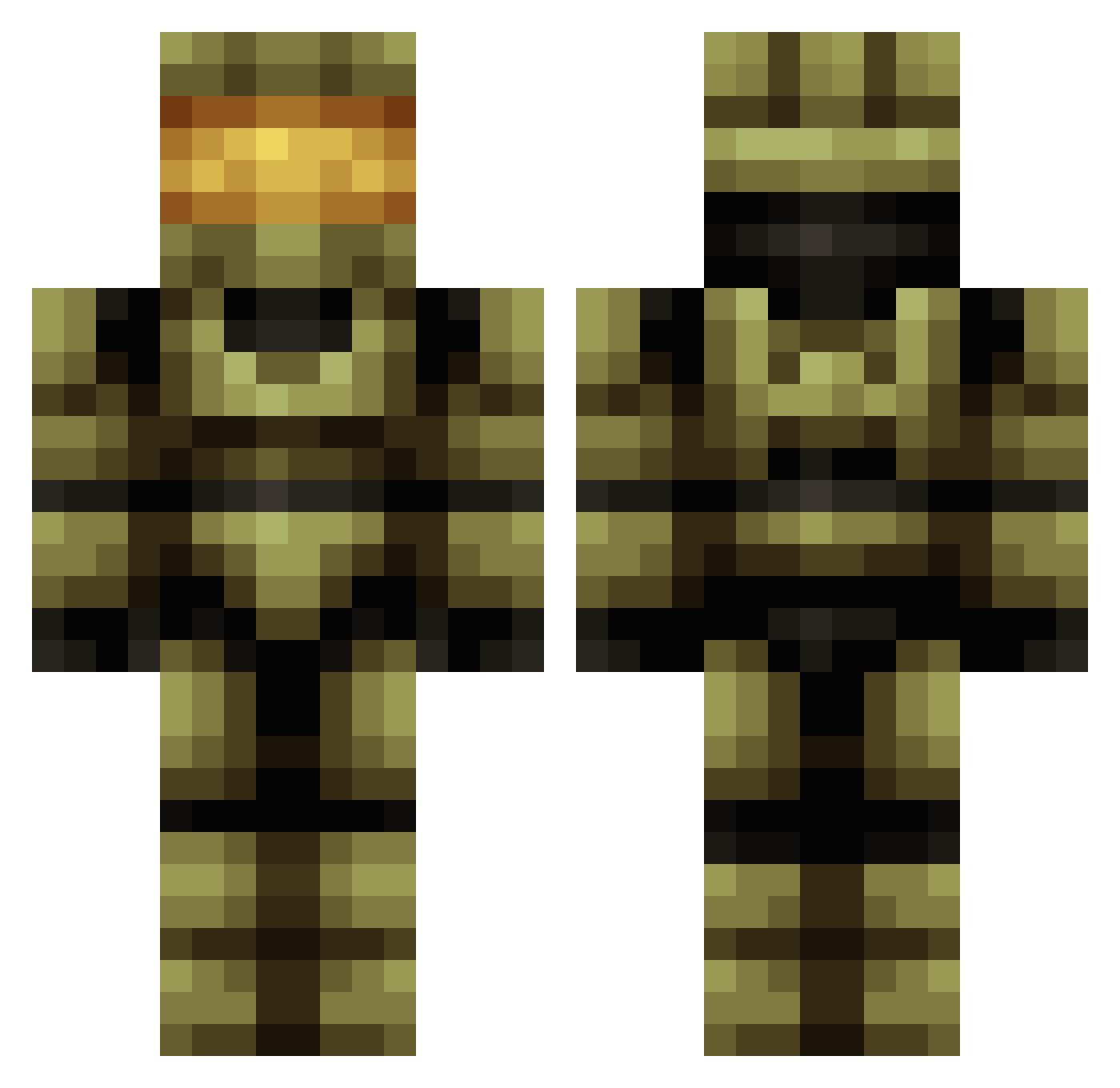
Current Minecraft skin of the player RoMAnIA_roMANIa, loaded from the official Mojang API. Rotate the 3D model with your mouse or finger, then download the skin as a PNG file and use it in Minecraft: Bedrock Edition or Java Edition for free. When RoMAnIA_roMANIa changes their skin, this page updates automatically and the old skin stays in the history below.
Other players with this skin (506)
RoMAnIA_roMANIa was the 367th player we have seen with this skin, first spotted on 27.09.2026. The same skin was seen on these players. Open a nickname to see their current skin and skin history.
 nebmac johnnydjones10 Marleymen Melquiades730 AlonzoC coocie0808 EmployingBeef2 ringerringer JML013 Stiggz Tiaram prince_lingling ProfessorDogg SwagNato2000 Soundcart TeamBallistic79 Coltdavid5 gatorsman328 Midvinterblot FruityNugs JEDIFRYE brutetuba Pino_b Lord_ArGoSh TrueKAV mkjimmym r3chterTwix Phantom1212_ Sedrick64 slashervrgr evilmonkey2789 Sniper0412 Acey_Wacey ISlipperyI phdbeast21 bunchofdoodoo PrometheusFree Boeings EliBWenger Jmac108 CyberSamurai chewblocka55 flyboy07 Brucesnake Helakon Masterchief188 Bubby_12 ExPo_GamingXx_YT alexandraCDC Ironman_JP Andmann blockblockblock6 coldblood775 conniejay Im_Reham DeadloxXxXx Cambraz1 Sxrb SupremeCalBoi TVgamesNL
More Master Chief Minecraft skins
See all 446 Master Chief skins
How to install the RoMAnIA_roMANIa skin
- Press the Download button above to save the skin as a PNG file.
- Minecraft: Bedrock Edition (PE): open the Dressing Room from the main menu (or tap your character → Edit Character), go to Classic Skins → Owned, press the + (new skin) button, choose the downloaded PNG and pick the Classic (Steve) model. Works on PC and mobile; consoles cannot import custom skins.
- Minecraft: Java Edition: open the Minecraft Launcher, go to the Skins tab, click New Skin, load the PNG, pick the Classic (Steve) model and press Save & Use. You can also upload it at minecraft.net → Profile → Change Skin.
The skin does not show up after import - what should I do?
Restart Minecraft and open the Dressing Room again - imported skins sometimes appear only after a restart. Also make sure you selected the imported skin and picked the Classic (Steve) model.
Which model should I choose, Classic or Slim?
This skin is designed for the Classic (Steve) model. If you pick the wrong model, the arms of the skin will look stretched or squeezed.
Is the skin of RoMAnIA_roMANIa free to download?
Yes. Press Download, save the PNG file and use it in Minecraft: Bedrock Edition or Java Edition - no payment or registration needed. The skin also works on multiplayer servers and Realms.
More skins
Looking for more? Go back to all Minecraft skins and check the top skins of the week, month and all time, or find any player's skin by nickname.