
RedCloud112 - Minecraft Skins & Skin History
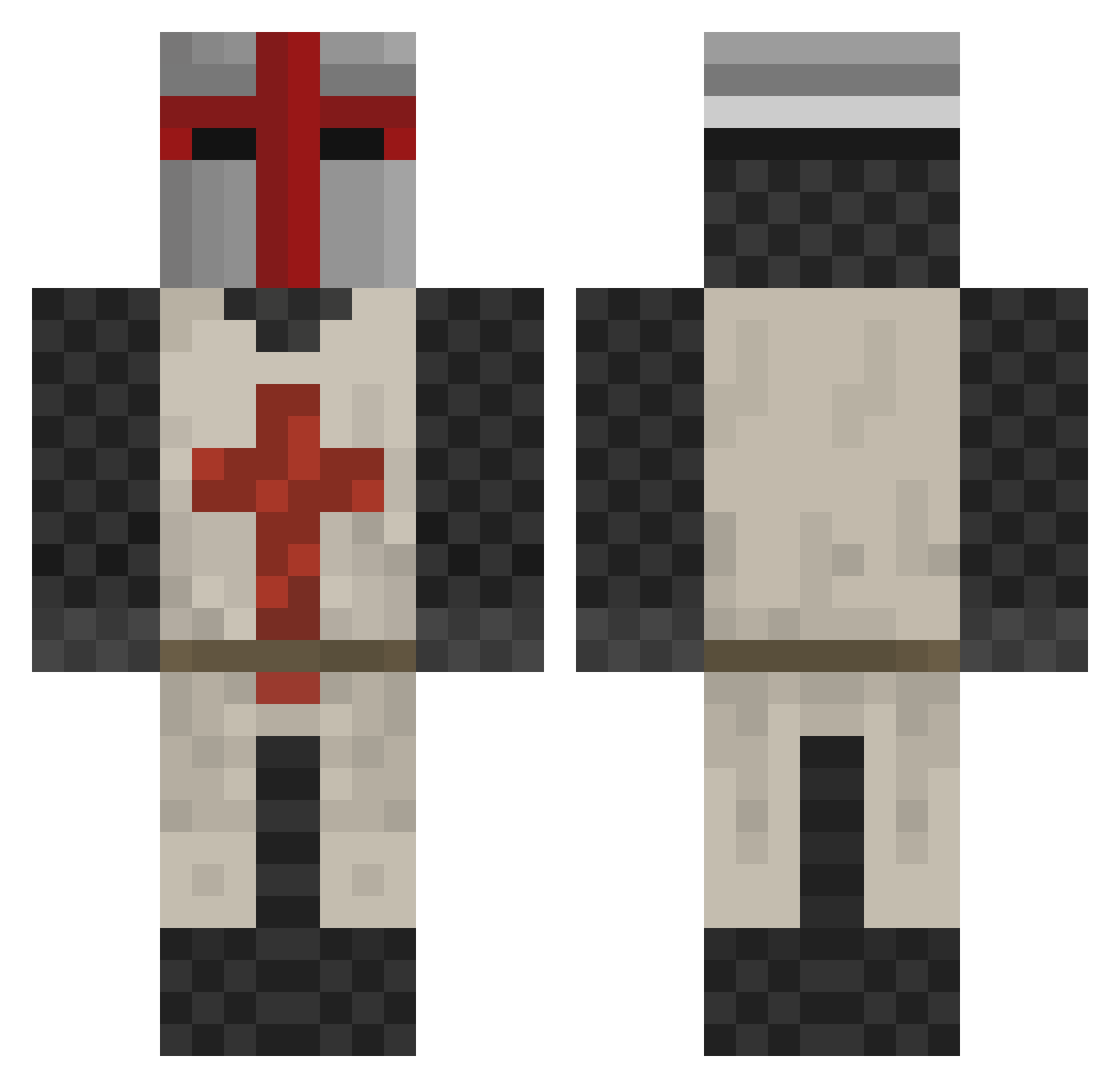
Current Minecraft skin of the player RedCloud112, loaded from the official Mojang API. Rotate the 3D model with your mouse or finger, then download the skin as a PNG file and use it in Minecraft: Bedrock Edition or Java Edition for free. When RedCloud112 changes their skin, this page updates automatically and the old skin stays in the history below.
Other players with this skin (167)
RedCloud112 was the 38th player we have seen with this skin, first spotted on 20.08.2026. The same skin was seen on these players. Open a nickname to see their current skin and skin history.
 AsainJesus Poopdolla6969 TheFakeMiko ItDoBeMallen Natslu tblue24 SigmaFrootLoops BrainDeadChimp Pavse s4nsmiley 2004_Alex Shard_M duuchod Oculus_audi PalleManden Dime_Captain CodeNinjaLR1 r1cefield warisgood Auto151 LegatusLuka LordKhajiit alesaurusrex Kaxis__ Dahdeee brown_main Ronarudo21 mst3kfan Void_Nom4d marvloedUGE IMax21 BruhMeme69 Vengeful_George KickedCape30340 Priest0802 Legodude99999999 NotoriousNiels Gligan Mr_Pixel__ schmogmog sovereign_d ATOMZBLUE Praetoriate Fire_Swat7 GamersLucc CalebC113 killm79 mihomywaifu Enraged_Gamer Captain_Kirk98 Hollywoodgangsta HappyWings6656 SuchtBoB77 devxro WHYNK Nicodomus WanderingGameDev Suedi00 Chromaland kimamen
More Crusader Minecraft skins
How to install the RedCloud112 skin
- Press the Download button above to save the skin as a PNG file.
- Minecraft: Bedrock Edition (PE): open the Dressing Room from the main menu (or tap your character → Edit Character), go to Classic Skins → Owned, press the + (new skin) button, choose the downloaded PNG and pick the Classic (Steve) model. Works on PC and mobile; consoles cannot import custom skins.
- Minecraft: Java Edition: open the Minecraft Launcher, go to the Skins tab, click New Skin, load the PNG, pick the Classic (Steve) model and press Save & Use. You can also upload it at minecraft.net → Profile → Change Skin.
The skin does not show up after import - what should I do?
Restart Minecraft and open the Dressing Room again - imported skins sometimes appear only after a restart. Also make sure you selected the imported skin and picked the Classic (Steve) model.
Which model should I choose, Classic or Slim?
This skin is designed for the Classic (Steve) model. If you pick the wrong model, the arms of the skin will look stretched or squeezed.
Is the skin of RedCloud112 free to download?
Yes. Press Download, save the PNG file and use it in Minecraft: Bedrock Edition or Java Edition - no payment or registration needed. The skin also works on multiplayer servers and Realms.
More skins
Looking for more? Go back to all Minecraft skins and check the top skins of the week, month and all time, or find any player's skin by nickname.