
RatMouseDumb - Minecraft Skins & Skin History
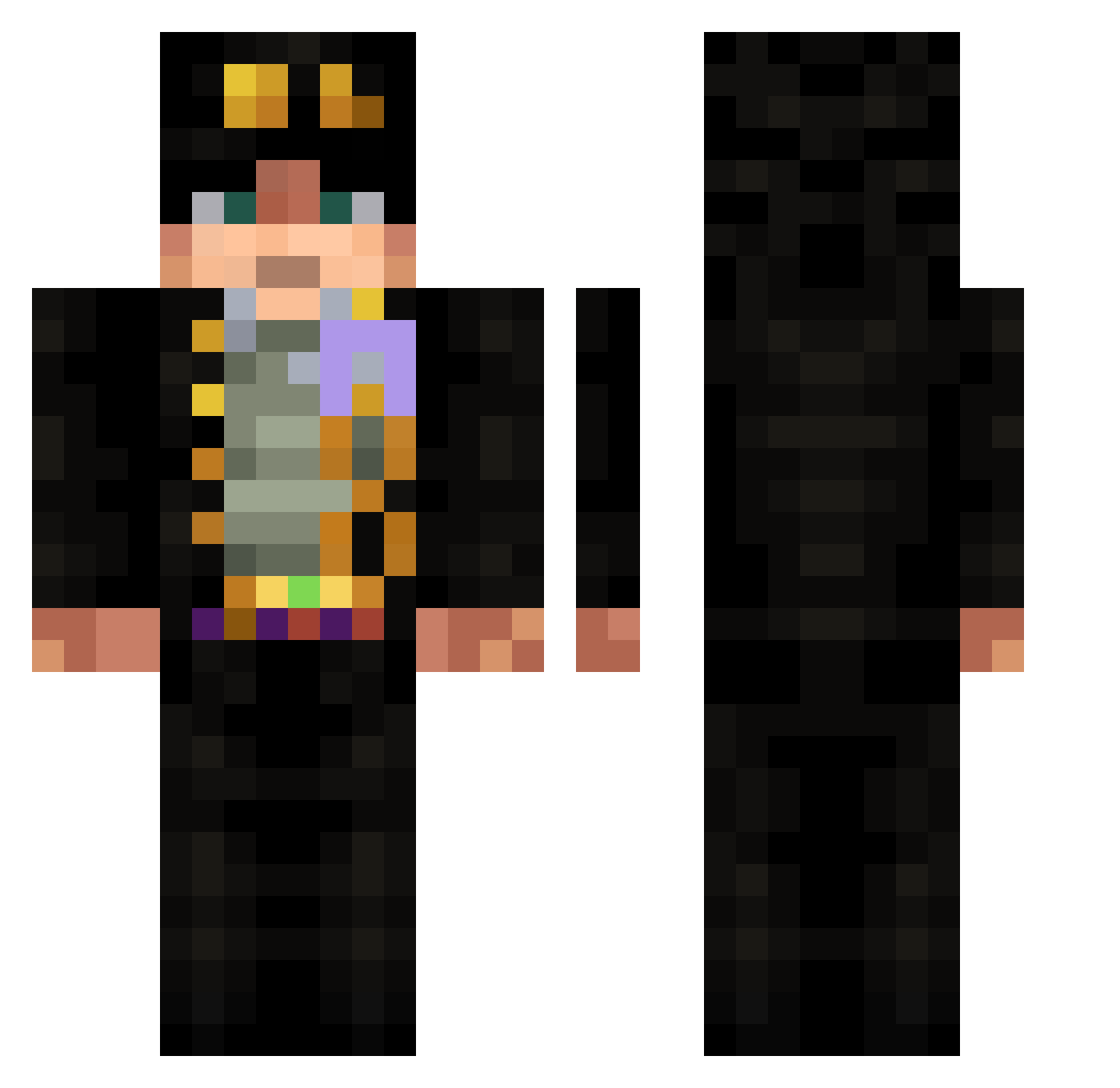
Current Minecraft skin of the player RatMouseDumb, loaded from the official Mojang API. Rotate the 3D model with your mouse or finger, then download the skin as a PNG file and use it in Minecraft: Bedrock Edition or Java Edition for free. When RatMouseDumb changes their skin, this page updates automatically and the old skin stays in the history below.
Other players with this skin (532)
RatMouseDumb was the 64th player we have seen with this skin, first spotted on 05.08.2026. The same skin was seen on these players. Open a nickname to see their current skin and skin history.
 RMELOT ZolAlex bugatti0907 Marci_167 LucasPark929 melekjlassi Zen_O_Max Kaiser_m21 Misterkabe TheFool2001 omega_tv_off Naw3r ImmortalSnail HaMmOoD_991 GnomeBoyfriend ouga_chihaya Ra7men06
 Galasar107 dashuaige3 J27z LePCF SHOTMAN93 magmas11 Tainhax DrZambu VisitsOne kateveri
 SouljaBoy2007 cxtry Poopooless WasabiTrout Gunther___ adtm1234 juujas Miles_Hype Pepopas Artimka68 Himok03 Louande SkengbeerMeneer hsgwtgh TheTalster wolfSpirir508411 SAN7INO bulka_bl Bratkis Traplic HarishCr7 TheOneEyed109 hadespuppy SignorScotch Youcc Piferson freak3301
 Sambruce0215 waiw Belial_ph Hopae_ sssww Mogameslx
More Jotaro Kujo Minecraft skins
How to install the RatMouseDumb skin
- Press the Download button above to save the skin as a PNG file.
- Minecraft: Bedrock Edition (PE): open the Dressing Room from the main menu (or tap your character → Edit Character), go to Classic Skins → Owned, press the + (new skin) button, choose the downloaded PNG and pick the Classic (Steve) model. Works on PC and mobile; consoles cannot import custom skins.
- Minecraft: Java Edition: open the Minecraft Launcher, go to the Skins tab, click New Skin, load the PNG, pick the Classic (Steve) model and press Save & Use. You can also upload it at minecraft.net → Profile → Change Skin.
The skin does not show up after import - what should I do?
Restart Minecraft and open the Dressing Room again - imported skins sometimes appear only after a restart. Also make sure you selected the imported skin and picked the Classic (Steve) model.
Which model should I choose, Classic or Slim?
This skin is designed for the Classic (Steve) model. If you pick the wrong model, the arms of the skin will look stretched or squeezed.
Is the skin of RatMouseDumb free to download?
Yes. Press Download, save the PNG file and use it in Minecraft: Bedrock Edition or Java Edition - no payment or registration needed. The skin also works on multiplayer servers and Realms.
More skins
Looking for more? Go back to all Minecraft skins and check the top skins of the week, month and all time, or find any player's skin by nickname.