
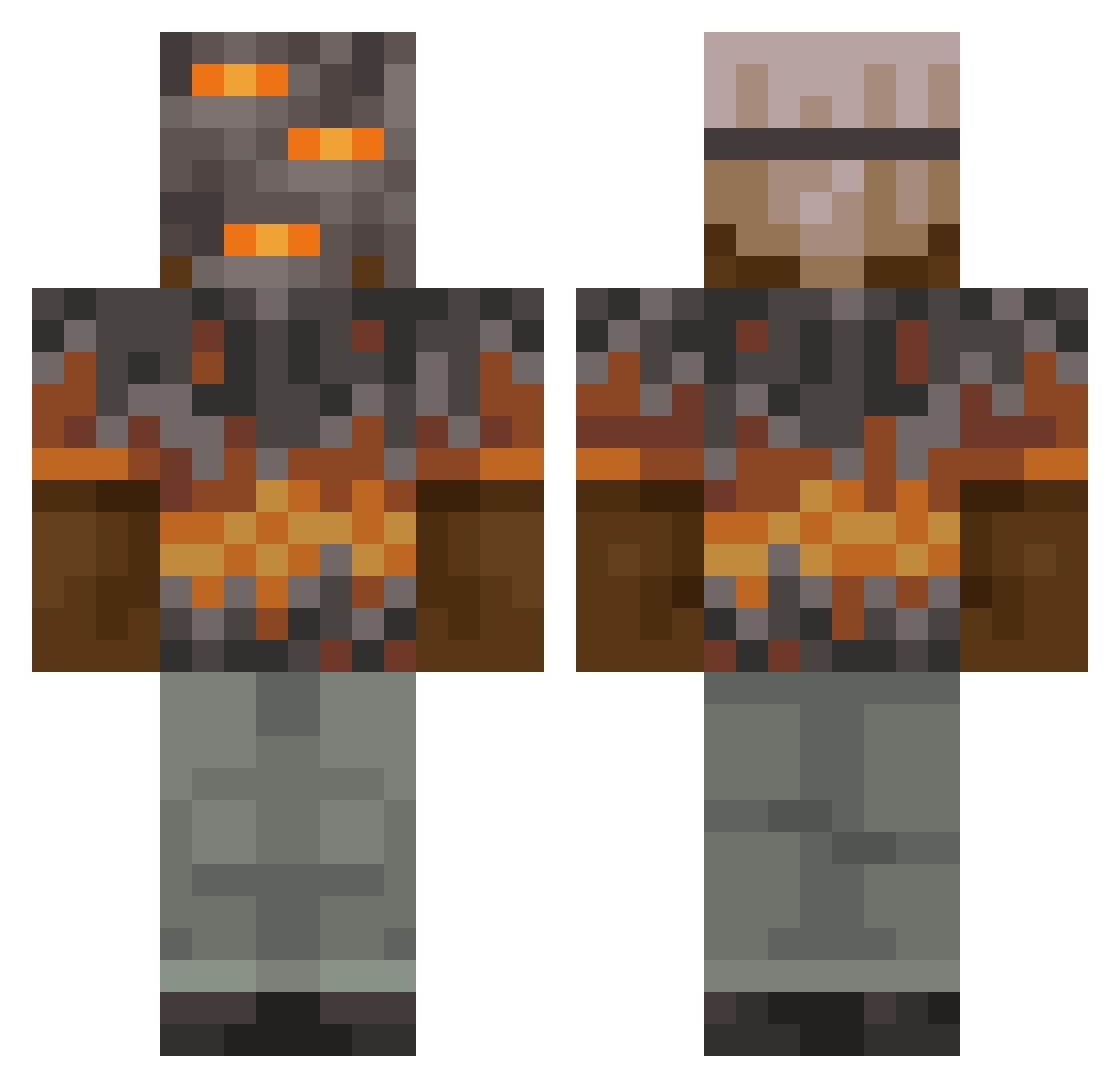
Current Minecraft skin of the player Rapis001, loaded from the official Mojang API. Rotate the 3D model with your mouse or finger, then download the skin as a PNG file and use it in Minecraft: Bedrock Edition or Java Edition for free. When Rapis001 changes their skin, this page updates automatically and the old skin stays in the history below.
Other players with this skin (788)
Rapis001 was the 634th player we have seen with this skin, first spotted on 02.10.2026. The same skin was seen on these players. Open a nickname to see their current skin and skin history.
 RomanusTNT Bigolnuts01 Sigma_Trollface Fearless_Jaden Anexius_Maximuse keremovic04 Cat80CZ GraafGrootGleuf ANTHONYTHEPROGOD g4298ry Christian375248 Qydscheff Vrext skylergriddygoat Ashesinks Zatorii Eastwest2 Fire_Wave_ BANANAB011 SomeroTy GrimmReaper1424 hollowknight0423 szafri syu2415 white_void130 Tezmo98 PizzaMathew cosmin2009 _NotBoltz_ TheScout_FromTF2 math345123 ramenlord10 UWSFireOpal DYLANTHEVILLLAN olkix SSAKDUK FizzyPaper58316 vvikip shxdow_soul leejunhpp Hoot227 alex3434343434 16SCHNITZEL12 KRAL1432 blader0512 sslushy Kaezin gumball0914 Trevuttion redzoneus12 PUPSIKLEO qwerty10980 prince_leio DreamHacker3601 Ben95c MajorKampfkeks witherfighter123 Luc4SG4m3R beesechurgeer budzyes
More Rock Minecraft skins
How to install the Rapis001 skin
- Press the Download button above to save the skin as a PNG file.
- Minecraft: Bedrock Edition (PE): open the Dressing Room from the main menu (or tap your character → Edit Character), go to Classic Skins → Owned, press the + (new skin) button, choose the downloaded PNG and pick the Classic (Steve) model. Works on PC and mobile; consoles cannot import custom skins.
- Minecraft: Java Edition: open the Minecraft Launcher, go to the Skins tab, click New Skin, load the PNG, pick the Classic (Steve) model and press Save & Use. You can also upload it at minecraft.net → Profile → Change Skin.
The skin does not show up after import - what should I do?
Restart Minecraft and open the Dressing Room again - imported skins sometimes appear only after a restart. Also make sure you selected the imported skin and picked the Classic (Steve) model.
Which model should I choose, Classic or Slim?
This skin is designed for the Classic (Steve) model. If you pick the wrong model, the arms of the skin will look stretched or squeezed.
Is the skin of Rapis001 free to download?
Yes. Press Download, save the PNG file and use it in Minecraft: Bedrock Edition or Java Edition - no payment or registration needed. The skin also works on multiplayer servers and Realms.
More skins
Looking for more? Go back to all Minecraft skins and check the top skins of the week, month and all time, or find any player's skin by nickname.