
Particle17 - Minecraft Skins & Skin History
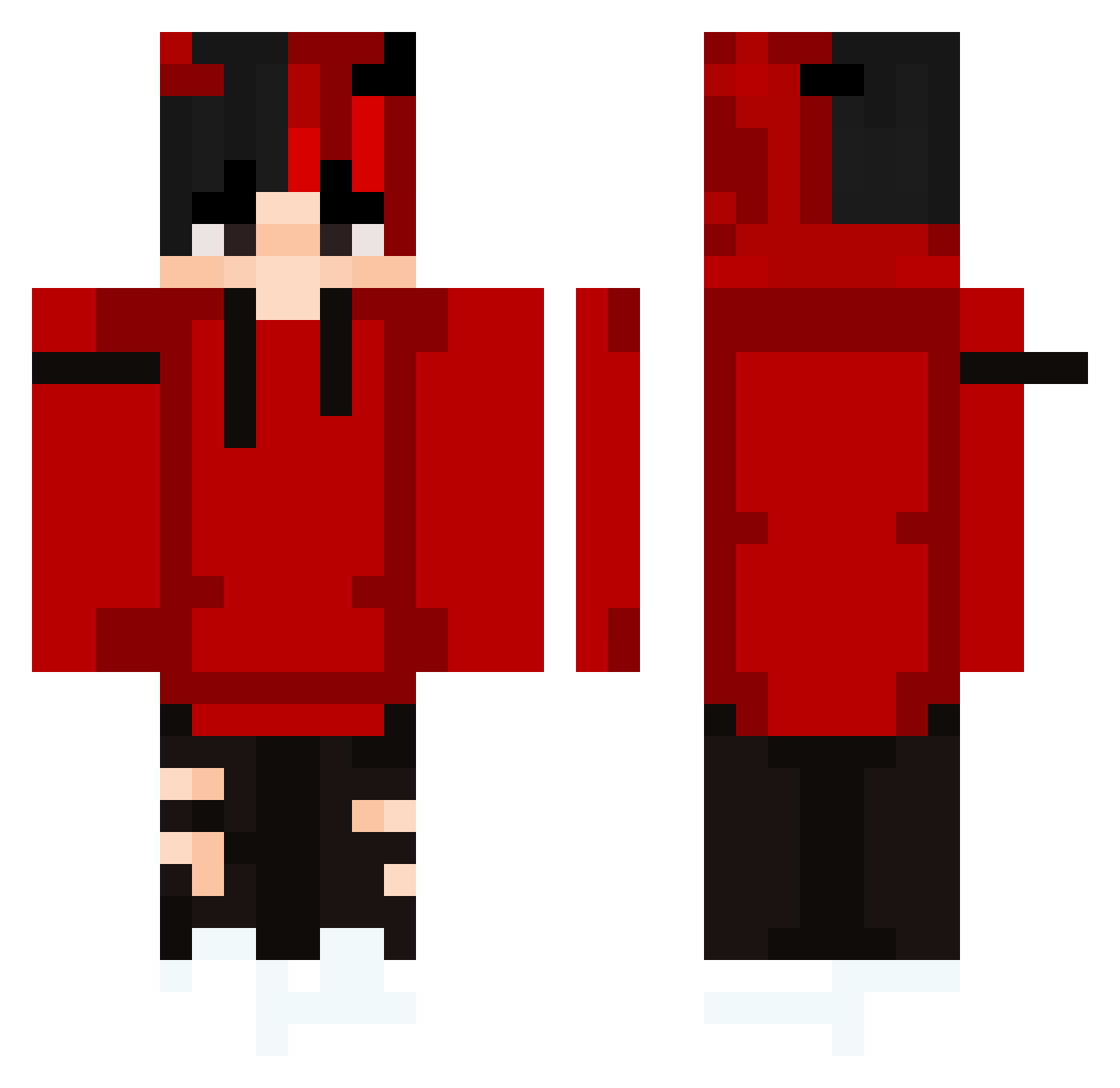
Current Minecraft skin of the player Particle17, loaded from the official Mojang API. Rotate the 3D model with your mouse or finger, then download the skin as a PNG file and use it in Minecraft: Bedrock Edition or Java Edition for free. When Particle17 changes their skin, this page updates automatically and the old skin stays in the history below.
Other players with this skin (364)
Particle17 was the 47th player we have seen with this skin, first spotted on 11.08.2026. The same skin was seen on these players. Open a nickname to see their current skin and skin history.
 KyomenX justinlai0812 _Drakan_ ItzPhantomAlt MeMessZ samertamer321 CoffeeHolic5665 Devil0413 psychosammyy Megazoem s_t_a_c_c_a_t_o BrentonPlayzz Zorrle001 BadEquation guiga07 FrezzY200 AroSyk IsaqueLisboa King2108 Krychacz1337 Gustavin17 Hanwall2
 xotjs bin134 lightfader69 wcrld YigitKorkmazx_ Aurah0 zStatikzz shubh50329 RvGIN jonesburgi jenny221009 TERROORR BloodG34 omar_sans2 LiLZuleq Blurs69 Breenseaturtle Rozen66 Patrix__PV vmgk DNA_Cimarron oSKAAARx llEliasXD SpaceFoh79 RedDog_ SkyyyHD GamaXss KraZG Jace_Silverfang iTzMegalor MiniKobrah Qwea Shmoen2007 Trogloglo YaBoyTiffany8 Icy_mattias draxco13127 Vnlichtinstein
More Horns Minecraft skins
How to install the Particle17 skin
- Press the Download button above to save the skin as a PNG file.
- Minecraft: Bedrock Edition (PE): open the Dressing Room from the main menu (or tap your character → Edit Character), go to Classic Skins → Owned, press the + (new skin) button, choose the downloaded PNG and pick the Classic (Steve) model. Works on PC and mobile; consoles cannot import custom skins.
- Minecraft: Java Edition: open the Minecraft Launcher, go to the Skins tab, click New Skin, load the PNG, pick the Classic (Steve) model and press Save & Use. You can also upload it at minecraft.net → Profile → Change Skin.
The skin does not show up after import - what should I do?
Restart Minecraft and open the Dressing Room again - imported skins sometimes appear only after a restart. Also make sure you selected the imported skin and picked the Classic (Steve) model.
Which model should I choose, Classic or Slim?
This skin is designed for the Classic (Steve) model. If you pick the wrong model, the arms of the skin will look stretched or squeezed.
Is the skin of Particle17 free to download?
Yes. Press Download, save the PNG file and use it in Minecraft: Bedrock Edition or Java Edition - no payment or registration needed. The skin also works on multiplayer servers and Realms.
More skins
Looking for more? Go back to all Minecraft skins and check the top skins of the week, month and all time, or find any player's skin by nickname.