
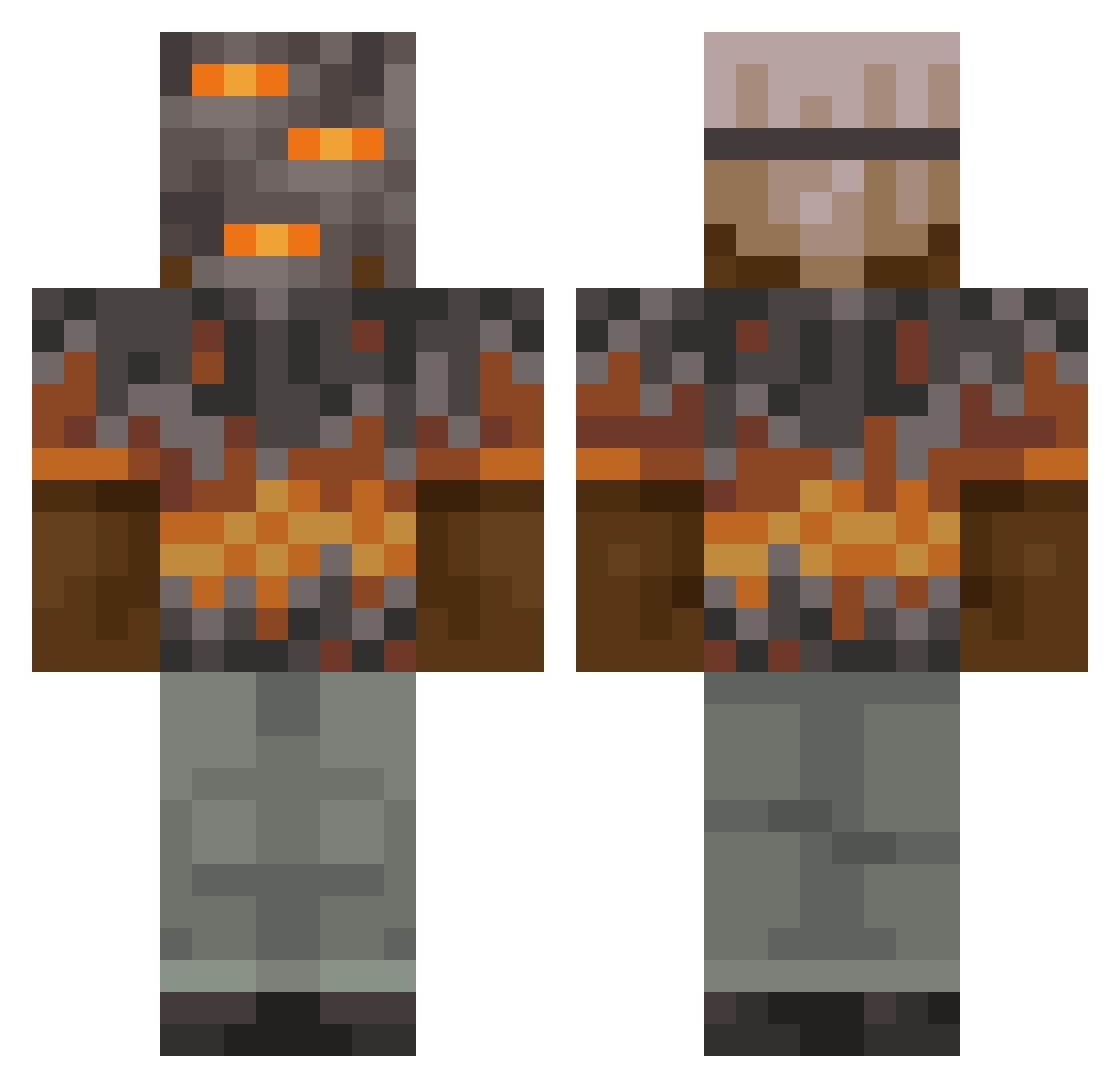
Current Minecraft skin of the player OrazioPvP, loaded from the official Mojang API. Rotate the 3D model with your mouse or finger, then download the skin as a PNG file and use it in Minecraft: Bedrock Edition or Java Edition for free. When OrazioPvP changes their skin, this page updates automatically and the old skin stays in the history below.
Other players with this skin (790)
OrazioPvP was the 493rd player we have seen with this skin, first spotted on 19.09.2026. The same skin was seen on these players. Open a nickname to see their current skin and skin history.
 alllb3rt Wasureta_ tony_17__ Block_head10 Deadstar1424259 monkeyman824 AodaXNaruto siwoo0715 ryssathedino mangomanhasaplan cresstd TillmanV qvnu LAYTH999 Jason_craft74 gtdawe bigpapap0866 RoBoXX22 LuKy1191 xclusive2311 Flashblue42 BritBoi98 AdzGR edutellez vay9877 MadCharlie8921 TrillTommy68 daecccc kuosha_ sseojin2 Loligo3 seba8008 idontnob ArchieIsVeryDum GeorgeSummer NermalPerson Lucaschanel12 CrazyNojusLTU R1s_ katyaminet nahorgs Musket_Eater Soggygandhi whisperwind01 Ghostbuster1414 qqazr LiukJ abseim Crinmi BoomShakaLaka13 wisii BassMaster69420 hsoto21 screemer99 Elrizera Blackbear2023 BjornSmeets2001 ksyzISchefTXMIj Cookie_minerFRFR ColdBlooded532
More Rock Minecraft skins
How to install the OrazioPvP skin
- Press the Download button above to save the skin as a PNG file.
- Minecraft: Bedrock Edition (PE): open the Dressing Room from the main menu (or tap your character → Edit Character), go to Classic Skins → Owned, press the + (new skin) button, choose the downloaded PNG and pick the Classic (Steve) model. Works on PC and mobile; consoles cannot import custom skins.
- Minecraft: Java Edition: open the Minecraft Launcher, go to the Skins tab, click New Skin, load the PNG, pick the Classic (Steve) model and press Save & Use. You can also upload it at minecraft.net → Profile → Change Skin.
The skin does not show up after import - what should I do?
Restart Minecraft and open the Dressing Room again - imported skins sometimes appear only after a restart. Also make sure you selected the imported skin and picked the Classic (Steve) model.
Which model should I choose, Classic or Slim?
This skin is designed for the Classic (Steve) model. If you pick the wrong model, the arms of the skin will look stretched or squeezed.
Is the skin of OrazioPvP free to download?
Yes. Press Download, save the PNG file and use it in Minecraft: Bedrock Edition or Java Edition - no payment or registration needed. The skin also works on multiplayer servers and Realms.
More skins
Looking for more? Go back to all Minecraft skins and check the top skins of the week, month and all time, or find any player's skin by nickname.