
MCW3SS - Minecraft Skins & Skin History
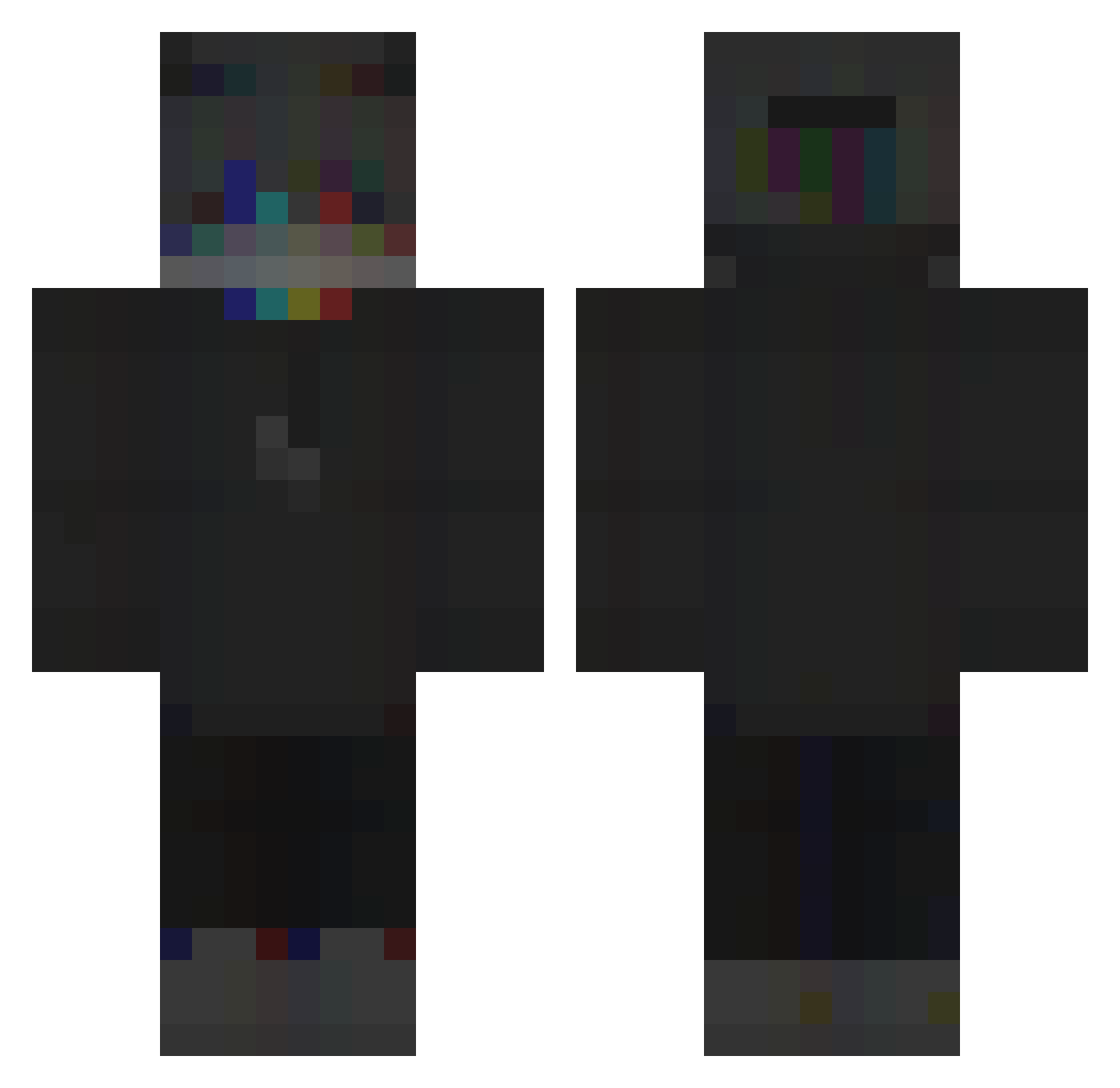
Current Minecraft skin of the player MCW3SS, loaded from the official Mojang API. Rotate the 3D model with your mouse or finger, then download the skin as a PNG file and use it in Minecraft: Bedrock Edition or Java Edition for free. When MCW3SS changes their skin, this page updates automatically and the old skin stays in the history below.
Other players with this skin (123)
MCW3SS was the 16th player we have seen with this skin, first spotted on 09.08.2026. The same skin was seen on these players. Open a nickname to see their current skin and skin history.
 fr3z1x DragonPixells y3ti_ AxTeRiizKo NebulaLake _ImNotSorry_ Vojt_ STruAS vaqzzzSW kumpelfifi FunnyKing07 Npziin Lukas_101
 Fawn_Delmee Leducha_ SlodkaKarolinka CHECKINGxELLA Nierealistyczny Colin1965AFDFCH
 ozux_x Lajka_ Naxyvel Pichubber CKC_lol
 069s PedroPaulo_MC iFake_ Iuc1d Vestiq justdarkevo OJairo07 MARAS725 Satrillano Gizuka Disaffect OgSeduxi LichtD yuuhvh Toenslave _273 ItsKylost Onlineplaya THE__RIO KoCiAk69XD moonightt PixelMaster3D hilal79 TideWorthy GH_Mina xXLyDaKaXx x9c Itemlimit SquishyButterLeg Striley zRangeG0D StarDrt Sofrimentos NOMIS1215 Groenzo Jskesk
More Glitch Minecraft skins
How to install the MCW3SS skin
- Press the Download button above to save the skin as a PNG file.
- Minecraft: Bedrock Edition (PE): open the Dressing Room from the main menu (or tap your character → Edit Character), go to Classic Skins → Owned, press the + (new skin) button, choose the downloaded PNG and pick the Classic (Steve) model. Works on PC and mobile; consoles cannot import custom skins.
- Minecraft: Java Edition: open the Minecraft Launcher, go to the Skins tab, click New Skin, load the PNG, pick the Classic (Steve) model and press Save & Use. You can also upload it at minecraft.net → Profile → Change Skin.
The skin does not show up after import - what should I do?
Restart Minecraft and open the Dressing Room again - imported skins sometimes appear only after a restart. Also make sure you selected the imported skin and picked the Classic (Steve) model.
Which model should I choose, Classic or Slim?
This skin is designed for the Classic (Steve) model. If you pick the wrong model, the arms of the skin will look stretched or squeezed.
Is the skin of MCW3SS free to download?
Yes. Press Download, save the PNG file and use it in Minecraft: Bedrock Edition or Java Edition - no payment or registration needed. The skin also works on multiplayer servers and Realms.
More skins
Looking for more? Go back to all Minecraft skins and check the top skins of the week, month and all time, or find any player's skin by nickname.