
King_Crafty123 - Minecraft Skins & Skin History
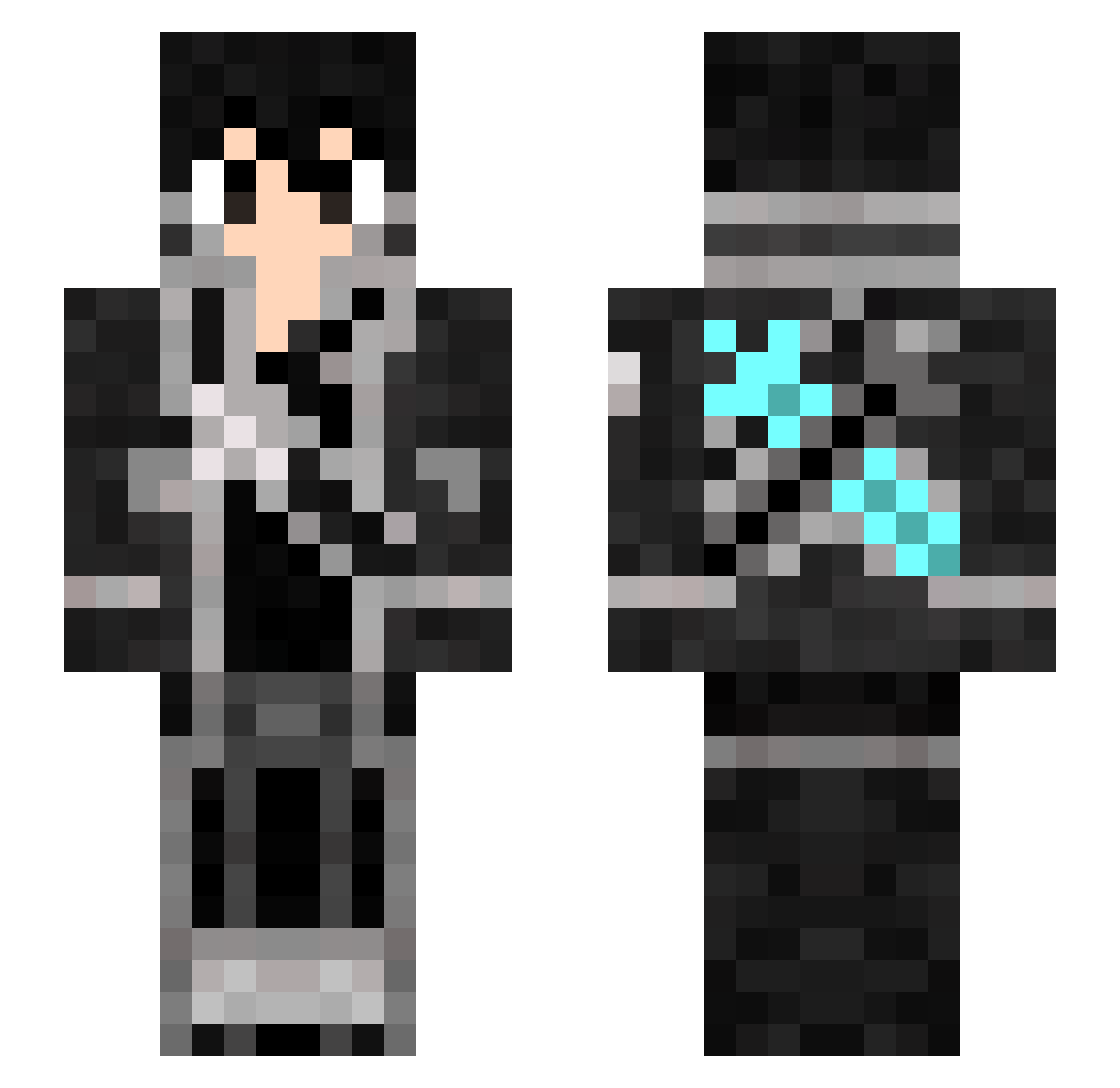
Current Minecraft skin of the player King_Crafty123, loaded from the official Mojang API. Rotate the 3D model with your mouse or finger, then download the skin as a PNG file and use it in Minecraft: Bedrock Edition or Java Edition for free. When King_Crafty123 changes their skin, this page updates automatically and the old skin stays in the history below.
Other players with this skin (317)
King_Crafty123 was the 32nd player we have seen with this skin, first spotted on 06.08.2026. The same skin was seen on these players. Open a nickname to see their current skin and skin history.
 theRaven9455 thusan23 IlaxG4ming C4BrrT sskpeter Mathuzada a4lv_r0 kkeevviinn135 NYY_0302 Accropvp guguinha1820 Cangrong_Wu Ice_niramit_2 Binki97 JesusAlcoolitrao snowwoods Bowen0127 bianhua0623 BruceLin1027 ian_ss nununuxy firebluelink
 Mistha_Nick MarphTheCow ISTEM93 Mewshmallow shank465 pdDaniel14 GusOb Wizzyhydra pekopekoooooo 4tLed
 MegaPatches wesonboss tawasy Fiebalz King_Leech joshika39 S0SDrizzle xAcqua PNG_R4VEN Desbox323 iorinrin0312 SkyEdo57 Ariazri Bobodawg50 ShockedEmerald jrkill432 233JOJO PCE022 Eternity_Nator alexaqsantiago tomtomticket issa4499 xXxOreIsSoloxXx DistortedRayne Tibow01 Bencevokxd12000
 hotcat1014 kirito5577
More Kirito Minecraft skins
How to install the King_Crafty123 skin
- Press the Download button above to save the skin as a PNG file.
- Minecraft: Bedrock Edition (PE): open the Dressing Room from the main menu (or tap your character → Edit Character), go to Classic Skins → Owned, press the + (new skin) button, choose the downloaded PNG and pick the Slim (Alex) model. Works on PC and mobile; consoles cannot import custom skins.
- Minecraft: Java Edition: open the Minecraft Launcher, go to the Skins tab, click New Skin, load the PNG, pick the Slim (Alex) model and press Save & Use. You can also upload it at minecraft.net → Profile → Change Skin.
The skin does not show up after import - what should I do?
Restart Minecraft and open the Dressing Room again - imported skins sometimes appear only after a restart. Also make sure you selected the imported skin and picked the Slim (Alex) model.
Which model should I choose, Classic or Slim?
This skin is designed for the Slim (Alex) model. If you pick the wrong model, the arms of the skin will look stretched or squeezed.
Is the skin of King_Crafty123 free to download?
Yes. Press Download, save the PNG file and use it in Minecraft: Bedrock Edition or Java Edition - no payment or registration needed. The skin also works on multiplayer servers and Realms.
More skins
Looking for more? Go back to all Minecraft skins and check the top skins of the week, month and all time, or find any player's skin by nickname.