
Jingywingy - Minecraft Skins & Skin History
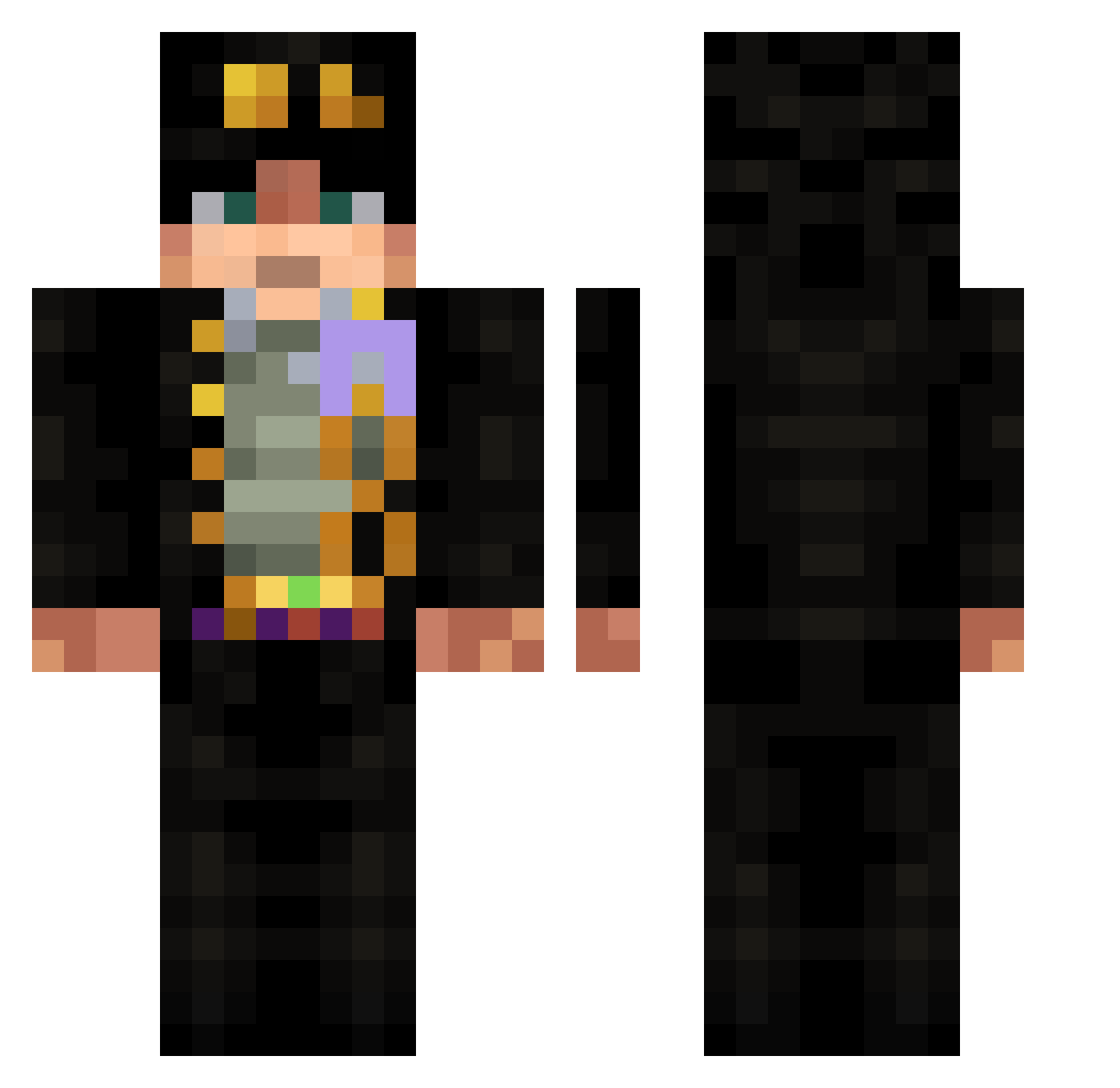
Current Minecraft skin of the player Jingywingy, loaded from the official Mojang API. Rotate the 3D model with your mouse or finger, then download the skin as a PNG file and use it in Minecraft: Bedrock Edition or Java Edition for free. When Jingywingy changes their skin, this page updates automatically and the old skin stays in the history below.
Other players with this skin (532)
Jingywingy was the 196th player we have seen with this skin, first spotted on 29.08.2026. The same skin was seen on these players. Open a nickname to see their current skin and skin history.
 Ladoxab2
 tsjby RIFconnexion TheGGguy03 R3miNdSem Mista2004 goodTao sk3pticc SpaceBurritoV3 CritOKSYR Tywnit galavas2008 leos_fry Maximillidan FuuuSu RadesDel Drefist Dan1elc0 band1003 Meegi_5 Fujiyas Lil_Pako PixelTraction Kerem_3 UriangersW1f3 ClROCMAN icecalamba liuguanyi52 minorcraft113 RenegadeX22 Trbluefiregaming Azrea1 amii03
 Dusimit WarriorSupreme Taymo58 oussamaXD_1 niiicoly xid360 kOMA457 Alim_tr Juanteam8 Lenseer reyroh porkythatguy S0MEC00KIE wynwy Roazhh JKJOO1 superhero3r Lc1111Ln Felix624 JohnnyDangerSSJ ObiEllis1 windchimes _ElFiru TheN1ko_ zman_ahmd ZombiAlieno ManxLove
More Jotaro Kujo Minecraft skins
How to install the Jingywingy skin
- Press the Download button above to save the skin as a PNG file.
- Minecraft: Bedrock Edition (PE): open the Dressing Room from the main menu (or tap your character → Edit Character), go to Classic Skins → Owned, press the + (new skin) button, choose the downloaded PNG and pick the Classic (Steve) model. Works on PC and mobile; consoles cannot import custom skins.
- Minecraft: Java Edition: open the Minecraft Launcher, go to the Skins tab, click New Skin, load the PNG, pick the Classic (Steve) model and press Save & Use. You can also upload it at minecraft.net → Profile → Change Skin.
The skin does not show up after import - what should I do?
Restart Minecraft and open the Dressing Room again - imported skins sometimes appear only after a restart. Also make sure you selected the imported skin and picked the Classic (Steve) model.
Which model should I choose, Classic or Slim?
This skin is designed for the Classic (Steve) model. If you pick the wrong model, the arms of the skin will look stretched or squeezed.
Is the skin of Jingywingy free to download?
Yes. Press Download, save the PNG file and use it in Minecraft: Bedrock Edition or Java Edition - no payment or registration needed. The skin also works on multiplayer servers and Realms.
More skins
Looking for more? Go back to all Minecraft skins and check the top skins of the week, month and all time, or find any player's skin by nickname.