
Indeedpenguin - Minecraft Skins & Skin History
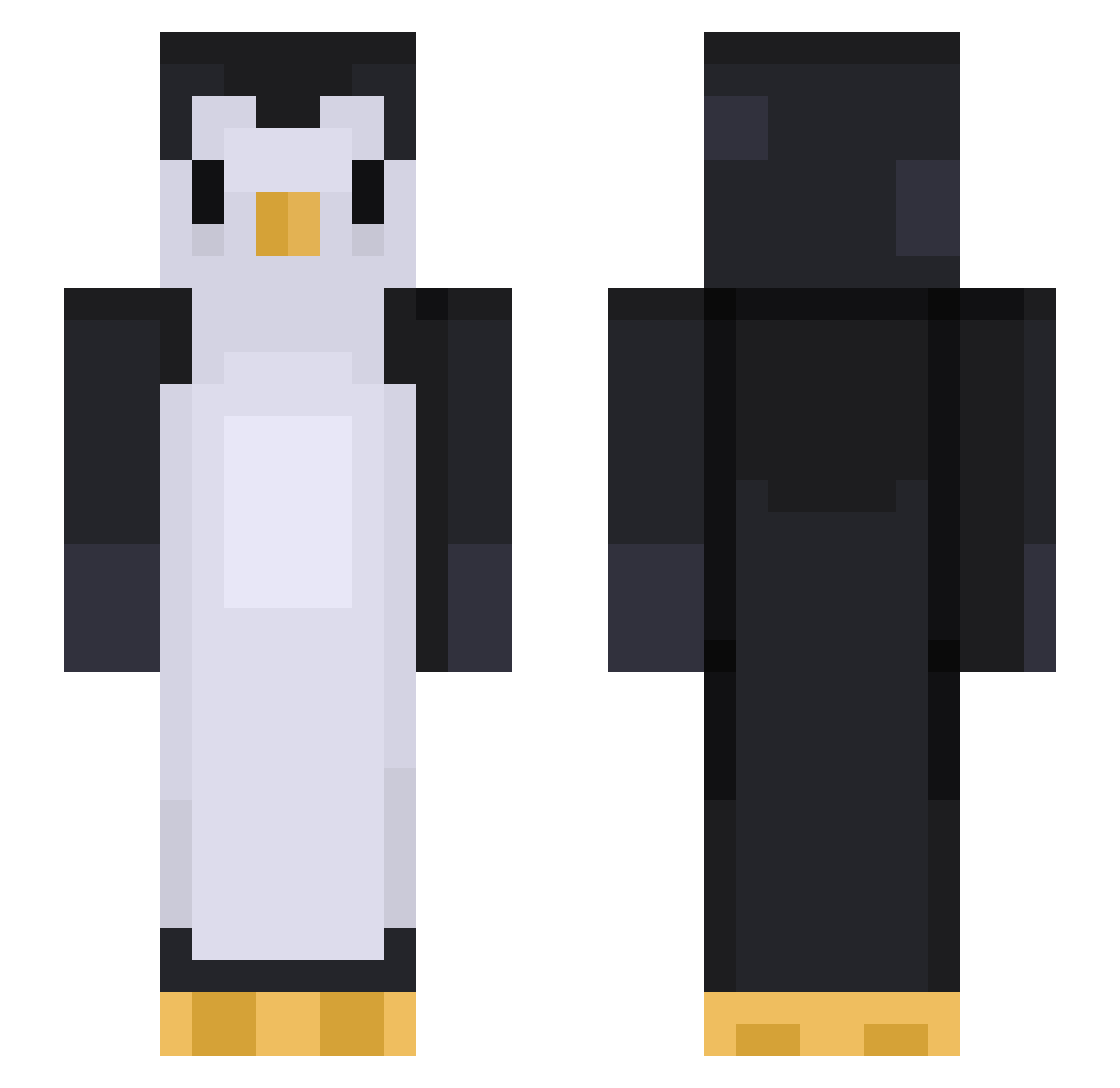
Current Minecraft skin of the player Indeedpenguin, loaded from the official Mojang API. Rotate the 3D model with your mouse or finger, then download the skin as a PNG file and use it in Minecraft: Bedrock Edition or Java Edition for free. When Indeedpenguin changes their skin, this page updates automatically and the old skin stays in the history below.
Other players with this skin (452)
Indeedpenguin was the 72nd player we have seen with this skin, first spotted on 12.08.2026. The same skin was seen on these players. Open a nickname to see their current skin and skin history.
 penguininhat Checkclean YULii1208 Ryry8907 totoelcapo Walterovski
 S0BY troyyyyyy Ashri09 maxiloup728 Yowies voltamagee Brottslingen Tch3rn0byl zimtechmeister PoopSmasher1000 Orion_The_Star_4 JAZ17 RoianRainbows HelpfulDruid cochon612 Emrey_Sivrey Daniyoshi04 Vexfee PartyAnimal28 joao_francisco09 moszczy lilkitkat1 Lucklessmc febe1303 milktbabi GivingCri ahart7271 Tedofafa Mr_Wubba tyakaaa NoName285827619 SoctopusZero klau555 Porkweenus BIG_Neph ajdamko92 PinguinDesTodes BUWU97 MODORIE CraftTechnic8720 Gang_Hu_ni_11 juankreedx soccer1608 EwilioD JAEOWO yuuya1111 Osmaa Prinds
 Clutch531175 PerPear WayneA ThatVibrato samura_ BardiParty
More Animal Minecraft skins
How to install the Indeedpenguin skin
- Press the Download button above to save the skin as a PNG file.
- Minecraft: Bedrock Edition (PE): open the Dressing Room from the main menu (or tap your character → Edit Character), go to Classic Skins → Owned, press the + (new skin) button, choose the downloaded PNG and pick the Slim (Alex) model. Works on PC and mobile; consoles cannot import custom skins.
- Minecraft: Java Edition: open the Minecraft Launcher, go to the Skins tab, click New Skin, load the PNG, pick the Slim (Alex) model and press Save & Use. You can also upload it at minecraft.net → Profile → Change Skin.
The skin does not show up after import - what should I do?
Restart Minecraft and open the Dressing Room again - imported skins sometimes appear only after a restart. Also make sure you selected the imported skin and picked the Slim (Alex) model.
Which model should I choose, Classic or Slim?
This skin is designed for the Slim (Alex) model. If you pick the wrong model, the arms of the skin will look stretched or squeezed.
Is the skin of Indeedpenguin free to download?
Yes. Press Download, save the PNG file and use it in Minecraft: Bedrock Edition or Java Edition - no payment or registration needed. The skin also works on multiplayer servers and Realms.
More skins
Looking for more? Go back to all Minecraft skins and check the top skins of the week, month and all time, or find any player's skin by nickname.