
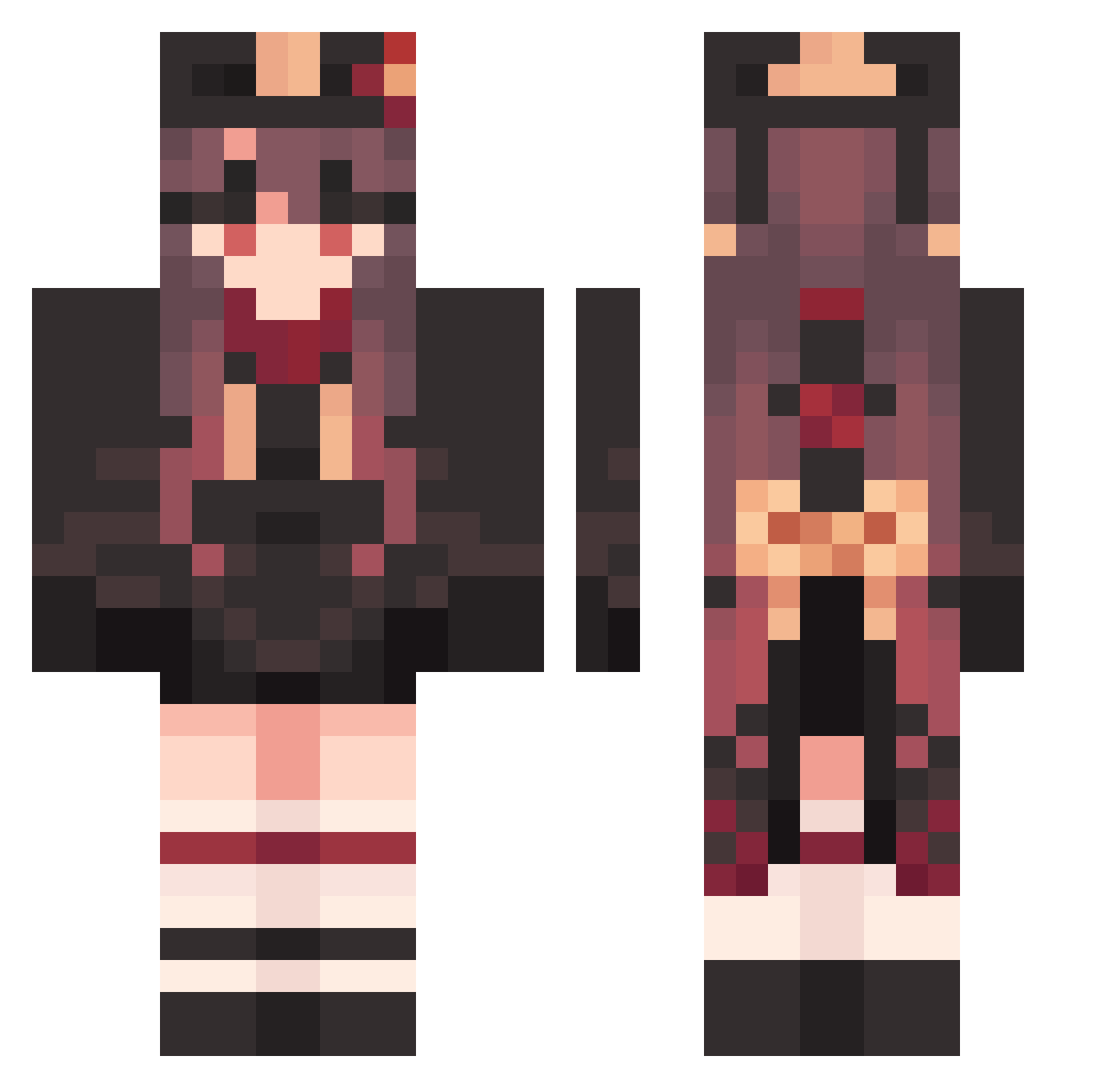
Current Minecraft skin of the player Hutao_GbwzRbR964, loaded from the official Mojang API. Rotate the 3D model with your mouse or finger, then download the skin as a PNG file and use it in Minecraft: Bedrock Edition or Java Edition for free. When Hutao_GbwzRbR964 changes their skin, this page updates automatically and the old skin stays in the history below.
Other players with this skin (1212)
Hutao_GbwzRbR964 was the 99th player we have seen with this skin, first spotted on 31.07.2026. The same skin was seen on these players. Open a nickname to see their current skin and skin history.
 LunaProd Hutao_dbKSHfO196 ilo959 BadSnotty681 Hutao_PYM386 yiliudian KingOfTheWolf Hutao_GeQIBWu648 RA_MIR Mr_Zagadochnik Hutao_AyNiPgJ294 jiaqinghe CaringIllegal432 GFlyery Hutao_TgFlbPw416 kanon07 Jicamazul Hutao_wOPGmon725 FutureHissing127 ucE953 EarlyGrieving805 vtI854 GroovyUnarmed295 PeriheIi0n BloodyAnnoyed875 CalmWholesale555
 Eluise SloppyPerfect700 SdToWN_ Miratain czI821 EwE958 whL887 TanFallacious137 TanVictorious191 SkinnyAwesome990 Hutao_KTWPJYY253 yezhiqiu520 VerdantBrainy763 LargeConcerned80 HelpfulJoyous803 SuMeng1234 PainfulLiving593
 SkyeLynae Themage114514 Hutao_bnslrxP579 Hutao_UNgnDVo341 next_kill_ Kattebone DapperDashing239 casto7777 shirokin LushDependent472 Endorphin44 Redstone777 nue648 GlibTruculent301 discriminatoryP Talacuache Hutao_PHoYSMI252
More Hu Tao Minecraft skins
How to install the Hutao_GbwzRbR964 skin
- Press the Download button above to save the skin as a PNG file.
- Minecraft: Bedrock Edition (PE): open the Dressing Room from the main menu (or tap your character → Edit Character), go to Classic Skins → Owned, press the + (new skin) button, choose the downloaded PNG and pick the Classic (Steve) model. Works on PC and mobile; consoles cannot import custom skins.
- Minecraft: Java Edition: open the Minecraft Launcher, go to the Skins tab, click New Skin, load the PNG, pick the Classic (Steve) model and press Save & Use. You can also upload it at minecraft.net → Profile → Change Skin.
The skin does not show up after import - what should I do?
Restart Minecraft and open the Dressing Room again - imported skins sometimes appear only after a restart. Also make sure you selected the imported skin and picked the Classic (Steve) model.
Which model should I choose, Classic or Slim?
This skin is designed for the Classic (Steve) model. If you pick the wrong model, the arms of the skin will look stretched or squeezed.
Is the skin of Hutao_GbwzRbR964 free to download?
Yes. Press Download, save the PNG file and use it in Minecraft: Bedrock Edition or Java Edition - no payment or registration needed. The skin also works on multiplayer servers and Realms.
More skins
Looking for more? Go back to all Minecraft skins and check the top skins of the week, month and all time, or find any player's skin by nickname.