
Gleann00 - Minecraft Skins & Skin History
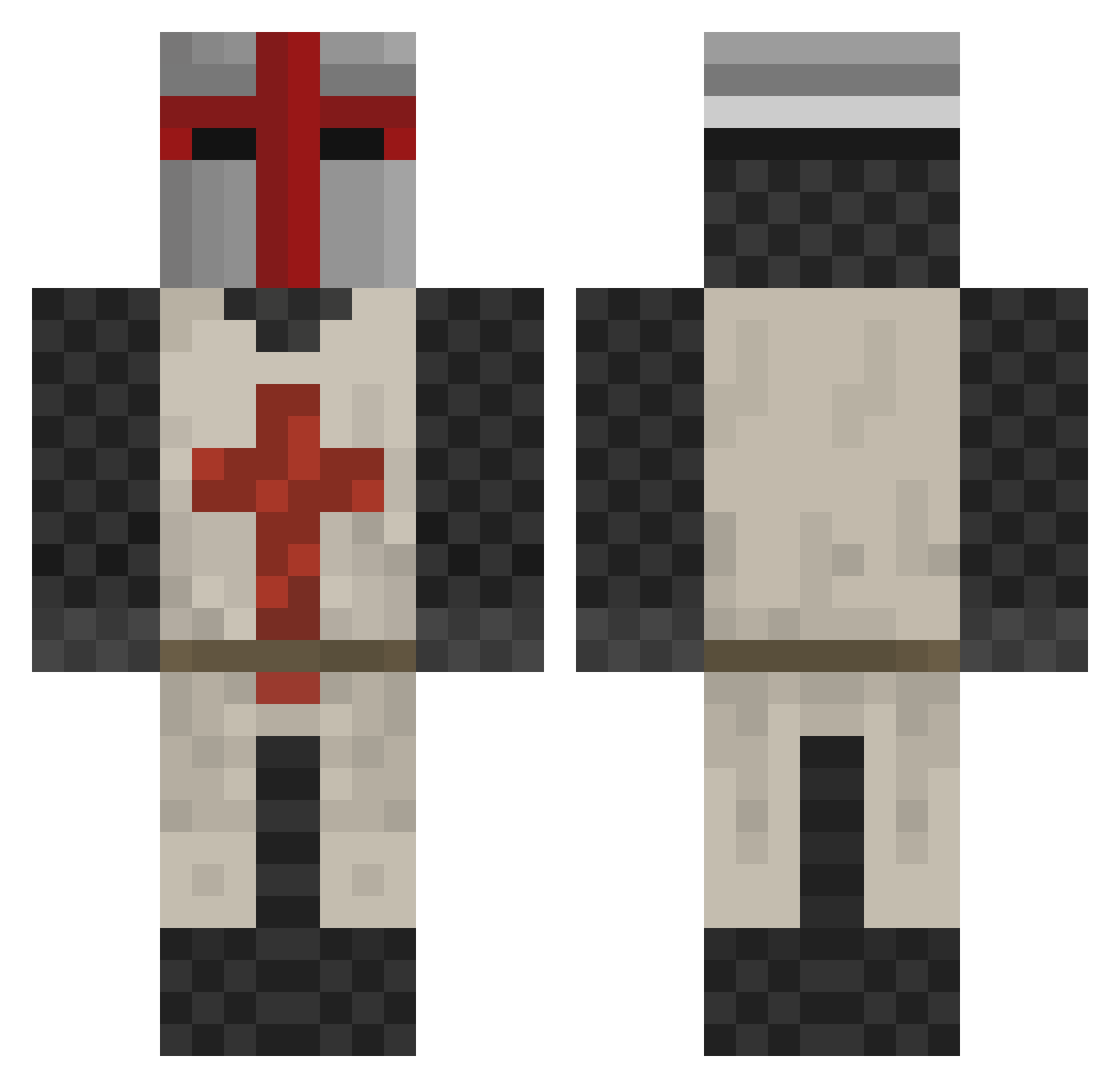
Current Minecraft skin of the player Gleann00, loaded from the official Mojang API. Rotate the 3D model with your mouse or finger, then download the skin as a PNG file and use it in Minecraft: Bedrock Edition or Java Edition for free. When Gleann00 changes their skin, this page updates automatically and the old skin stays in the history below.
Other players with this skin (167)
Gleann00 was the 149th player we have seen with this skin, first spotted on 22.10.2026. The same skin was seen on these players. Open a nickname to see their current skin and skin history.
 King_Arthur952 Hank1408 yiyeming deadwar918 hoppel23 KingRoddyRicch JohnOfTheCross Soshwa seanburgers AJ_Tiefenback Large_Autism DanecekM Swisschez8800 tgads Scrubs4Life PureFrederick Easton110304 PilouBeGood Lavery_ Me_aka_Me yosidy JeanJacketJosh stanislaw2009 rawwar931 Deadman660000 Grillades schiav_ TheOnlyEgg QuickDrawWP chefzilla TlB0l dbzdanny ITBMW ktdashkt tpville UltimateCrusade GhostBB_ RAIDER607 dashfury Der_Sebbel GS13555 Spir1t_18 BabiMare cutter2000 SaintCubes pichenick Beeaars AverseGazelle97 Vetoran21 Thornbird _OROC_ Isidor44 lowesunn SONOFMAN098 F3lix55 Horazon Life5041 Lmass123 Cymuru LukeSkywater
More Crusader Minecraft skins
How to install the Gleann00 skin
- Press the Download button above to save the skin as a PNG file.
- Minecraft: Bedrock Edition (PE): open the Dressing Room from the main menu (or tap your character → Edit Character), go to Classic Skins → Owned, press the + (new skin) button, choose the downloaded PNG and pick the Classic (Steve) model. Works on PC and mobile; consoles cannot import custom skins.
- Minecraft: Java Edition: open the Minecraft Launcher, go to the Skins tab, click New Skin, load the PNG, pick the Classic (Steve) model and press Save & Use. You can also upload it at minecraft.net → Profile → Change Skin.
The skin does not show up after import - what should I do?
Restart Minecraft and open the Dressing Room again - imported skins sometimes appear only after a restart. Also make sure you selected the imported skin and picked the Classic (Steve) model.
Which model should I choose, Classic or Slim?
This skin is designed for the Classic (Steve) model. If you pick the wrong model, the arms of the skin will look stretched or squeezed.
Is the skin of Gleann00 free to download?
Yes. Press Download, save the PNG file and use it in Minecraft: Bedrock Edition or Java Edition - no payment or registration needed. The skin also works on multiplayer servers and Realms.
More skins
Looking for more? Go back to all Minecraft skins and check the top skins of the week, month and all time, or find any player's skin by nickname.