
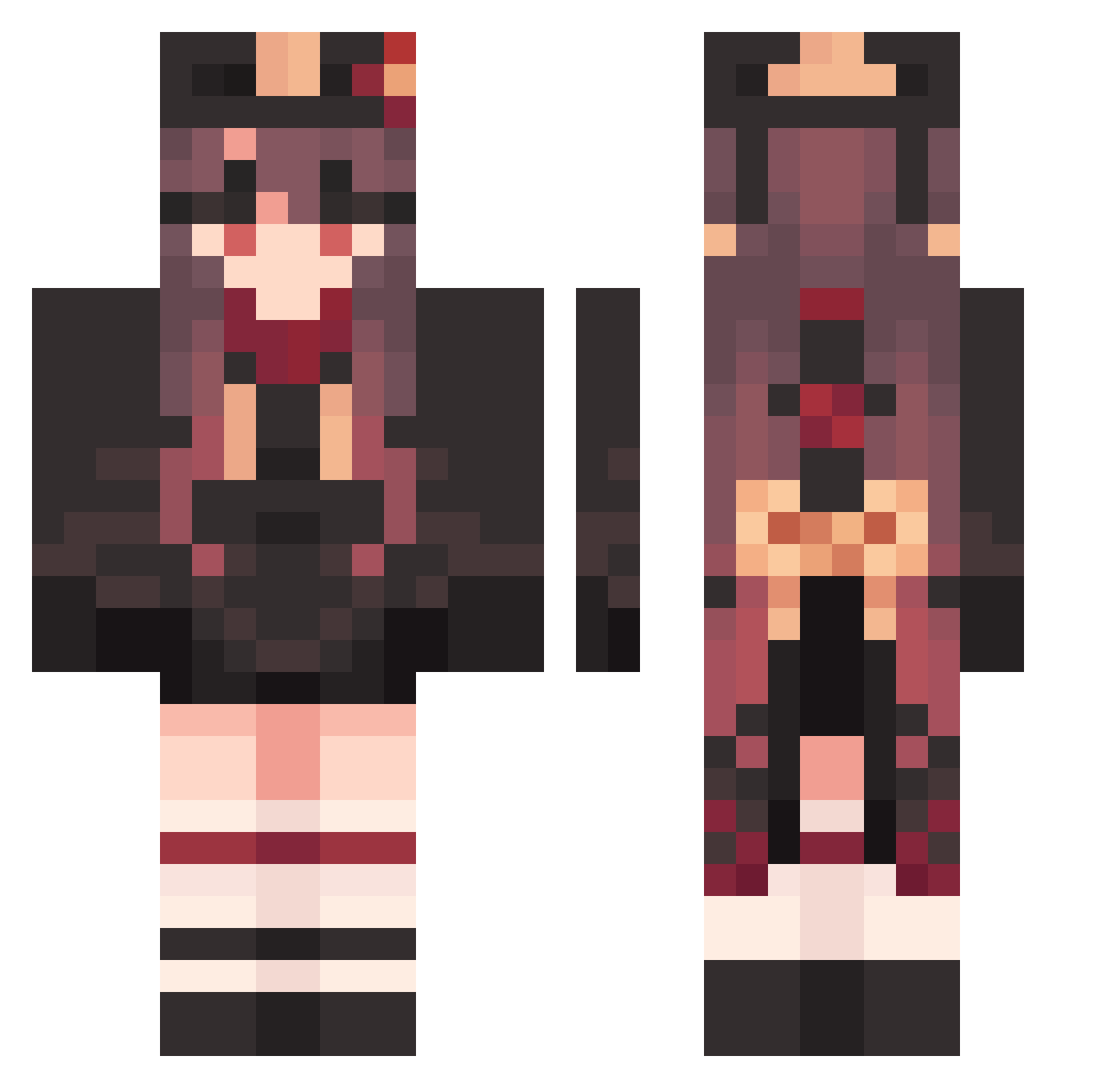
Current Minecraft skin of the player DependentLate195, loaded from the official Mojang API. Rotate the 3D model with your mouse or finger, then download the skin as a PNG file and use it in Minecraft: Bedrock Edition or Java Edition for free. When DependentLate195 changes their skin, this page updates automatically and the old skin stays in the history below.
Other players with this skin (1215)
DependentLate195 was the 432nd player we have seen with this skin, first spotted on 25.08.2026. The same skin was seen on these players. Open a nickname to see their current skin and skin history.
 RabidMerciful133 KJm308 UnsightlyEqual62 Cernacho OlC272 WichOwO_ CuriousBrainy885 Pantsi Biohaza I_YoUr_CaT Shairuz 1nor1 LowSad775 ImportedItchy404 Hutao_gdk432 xXAkenoXx DelicateSpotted9 Hutao_syqJgIP634 FreverZ aVG924 Hutao_MLTeisx722 TenseComplete322 SkillfulAjar389 CoolLiterate722 TediousTricky446 TackyTerrific431 liuyuxuannb m0rumsu PuzzlingRight243 32617 Hutao_PWwNZrA382 Hutao_TDvjqFC912 Fan_ting Yzy_HCY326 Hutao_VQbBeVG216 HOOMBABA _Hoddie_ KnowingHollow733 DortHit_7i28dbw2 Hutao_cytzzod980 ImportantGoofy96 PoliticalVast830 diamagnetism cocoatyan Papupin yuhuan666 CatNine079 miyreki Kahilou_ PuzzledPolite101 alrair VoreGamer99 guo88 AllegedSilent626 TNT_freeze sirasu0211 D_03_109 DeadBoring252 BurlyYielding614 CodePlayer22
More Hu Tao Minecraft skins
How to install the DependentLate195 skin
- Press the Download button above to save the skin as a PNG file.
- Minecraft: Bedrock Edition (PE): open the Dressing Room from the main menu (or tap your character → Edit Character), go to Classic Skins → Owned, press the + (new skin) button, choose the downloaded PNG and pick the Classic (Steve) model. Works on PC and mobile; consoles cannot import custom skins.
- Minecraft: Java Edition: open the Minecraft Launcher, go to the Skins tab, click New Skin, load the PNG, pick the Classic (Steve) model and press Save & Use. You can also upload it at minecraft.net → Profile → Change Skin.
The skin does not show up after import - what should I do?
Restart Minecraft and open the Dressing Room again - imported skins sometimes appear only after a restart. Also make sure you selected the imported skin and picked the Classic (Steve) model.
Which model should I choose, Classic or Slim?
This skin is designed for the Classic (Steve) model. If you pick the wrong model, the arms of the skin will look stretched or squeezed.
Is the skin of DependentLate195 free to download?
Yes. Press Download, save the PNG file and use it in Minecraft: Bedrock Edition or Java Edition - no payment or registration needed. The skin also works on multiplayer servers and Realms.
More skins
Looking for more? Go back to all Minecraft skins and check the top skins of the week, month and all time, or find any player's skin by nickname.