
61_TwizzTss - Minecraft Skins & Skin History
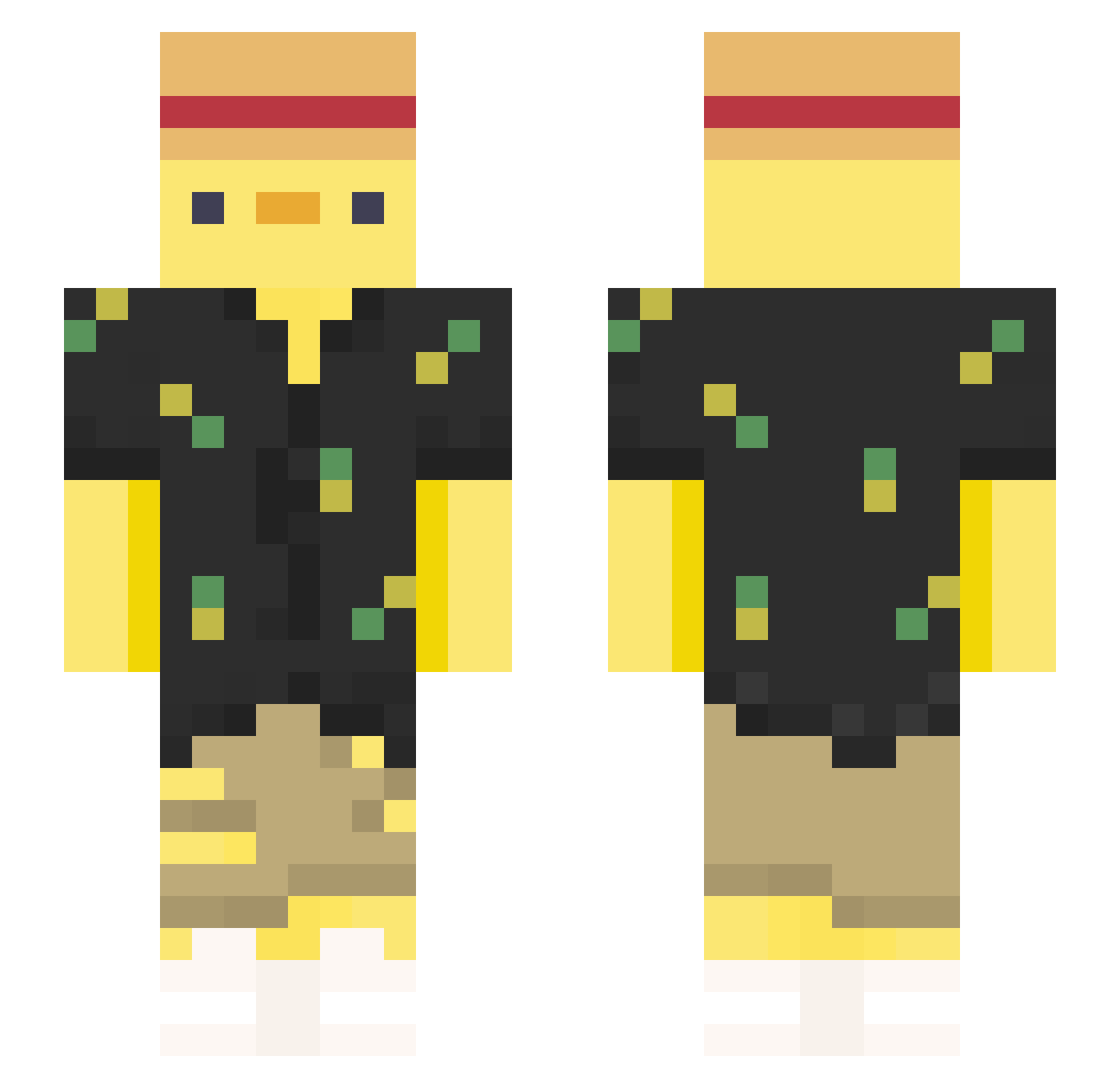
Current Minecraft skin of the player 61_TwizzTss, loaded from the official Mojang API. Rotate the 3D model with your mouse or finger, then download the skin as a PNG file and use it in Minecraft: Bedrock Edition or Java Edition for free. When 61_TwizzTss changes their skin, this page updates automatically and the old skin stays in the history below.
Other players with this skin (328)
61_TwizzTss was the 79th player we have seen with this skin, first spotted on 18.08.2026. The same skin was seen on these players. Open a nickname to see their current skin and skin history.
 XxbntzxX kai2454 MrBread91 Pow3rR4ng3rRul3 amaciszek EntaQuack wCesarGx ProvoxVII lkvEr666 FlappyDuckyPlay Succubus1310 ElMiguel000 muaz1232 LiteralChicken Troolin1231 MrHabo Andreselnoob25 ReeKey1 Vapesox Furgull taco677 rampaq i_found_you Hel_lias gobrothers123 ericwu981223 goodgamerr _Einfach_Ente_ KATALEBEST _Am3li3_ DemDem__ Neishin D0M5Z Bond186 Swaezii
 seblaskar cbpnr2007 alladinz Senokori Duck_Asti RapperPaul893 YuXin_1129 z__NeX DonyZK sillycat72 Pancracio03 JJoshAllardd YesSoundNoClap
 OMGitsDiamond PIOLO384 GaboDabest hawaimati Zozo_S comprayjuega KageRyu730 liuli23 sebsmor sheryf1324 HawkRPC ramaa94
More Straw Hat Minecraft skins
How to install the 61_TwizzTss skin
- Press the Download button above to save the skin as a PNG file.
- Minecraft: Bedrock Edition (PE): open the Dressing Room from the main menu (or tap your character → Edit Character), go to Classic Skins → Owned, press the + (new skin) button, choose the downloaded PNG and pick the Slim (Alex) model. Works on PC and mobile; consoles cannot import custom skins.
- Minecraft: Java Edition: open the Minecraft Launcher, go to the Skins tab, click New Skin, load the PNG, pick the Slim (Alex) model and press Save & Use. You can also upload it at minecraft.net → Profile → Change Skin.
The skin does not show up after import - what should I do?
Restart Minecraft and open the Dressing Room again - imported skins sometimes appear only after a restart. Also make sure you selected the imported skin and picked the Slim (Alex) model.
Which model should I choose, Classic or Slim?
This skin is designed for the Slim (Alex) model. If you pick the wrong model, the arms of the skin will look stretched or squeezed.
Is the skin of 61_TwizzTss free to download?
Yes. Press Download, save the PNG file and use it in Minecraft: Bedrock Edition or Java Edition - no payment or registration needed. The skin also works on multiplayer servers and Realms.
More skins
Looking for more? Go back to all Minecraft skins and check the top skins of the week, month and all time, or find any player's skin by nickname.