
zHadeZz - Minecraft Skins & Skin History
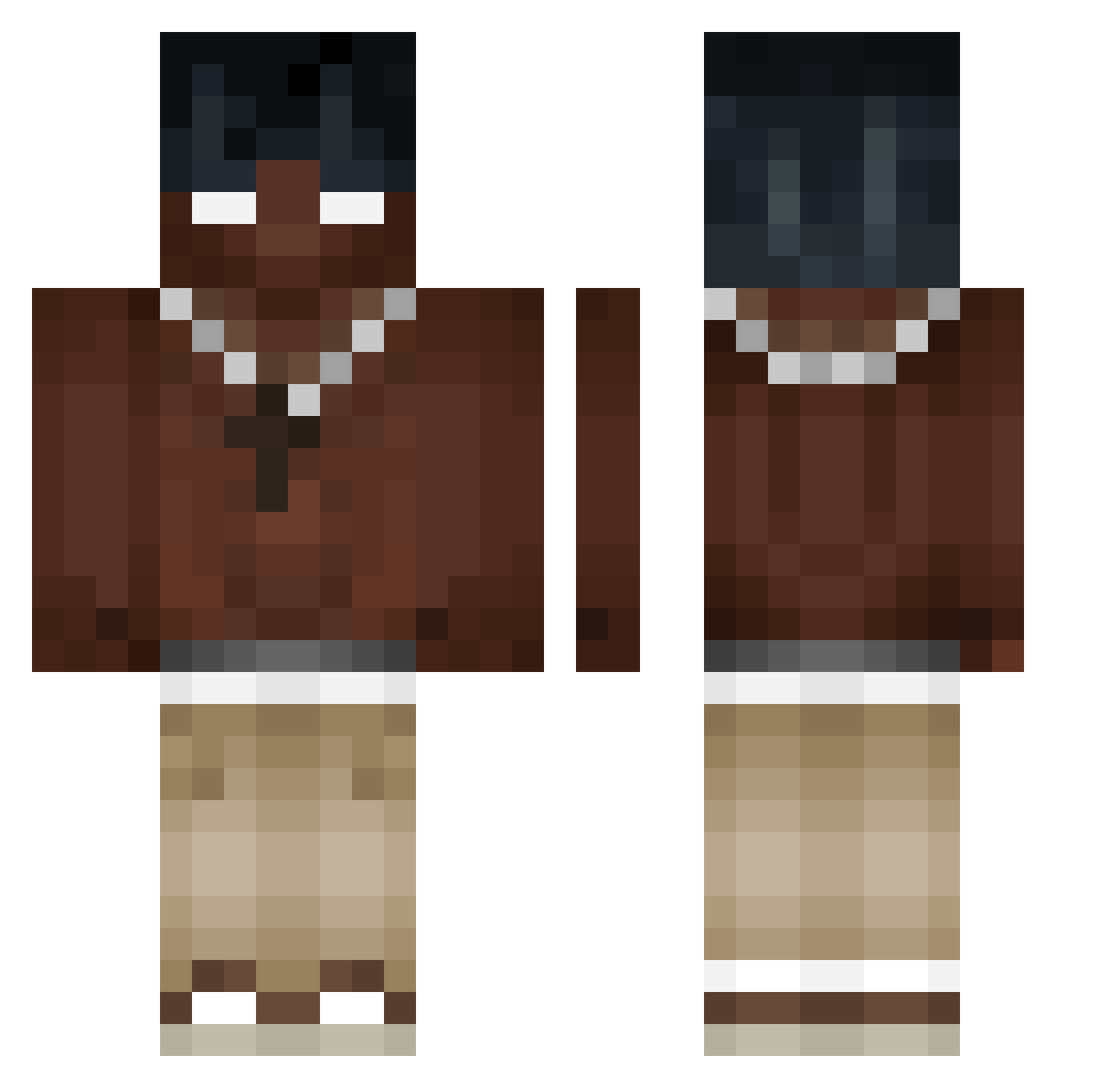
Current Minecraft skin of the player zHadeZz, loaded from the official Mojang API. Rotate the 3D model with your mouse or finger, then download the skin as a PNG file and use it in Minecraft: Bedrock Edition or Java Edition for free. When zHadeZz changes their skin, this page updates automatically and the old skin stays in the history below.
Other players with this skin (487)
zHadeZz was the 93rd player we have seen with this skin, first spotted on 13.08.2026. The same skin was seen on these players. Open a nickname to see their current skin and skin history.
 Nat1237_ CDAIII Reezyfuersleben Pjetruszka xKlubey wRNGCRIT xReyziax AZERAK2 yNowik JFarinLol INDYPUAS niemiecki_kulek NICOLAXXX10 ChimiAmaAIgna FrankHaker soyjuanr gludm MiguelitoPistola Sync1416 Tapion117 DyzmaV12 wilsonr15 34i8 PetitGervais Herobrine6_6_6 szymon1g FRITDZ madalin134 C04kFighterPro Rxddan uprightsiNg Koxmb pfoz Kingtoddy Susamaruuu Cr7Contracts MoMonaz MyNameIsBz55 RegentChalk2136 Ragezw fwweah nyxgajj Boshetune ninjaik_ik_ik Mozzy_09 JkCalibus massamune40 Eteex95 _k4nap3czka77 cavattinn yungRZE Don_Miki Frost4728 saltsick _fover_ kubi50 GaelSuarez waltim09 clarenceoof ELJPILOTO
More Necklace Minecraft skins
How to install the zHadeZz skin
- Press the Download button above to save the skin as a PNG file.
- Minecraft: Bedrock Edition (PE): open the Dressing Room from the main menu (or tap your character → Edit Character), go to Classic Skins → Owned, press the + (new skin) button, choose the downloaded PNG and pick the Classic (Steve) model. Works on PC and mobile; consoles cannot import custom skins.
- Minecraft: Java Edition: open the Minecraft Launcher, go to the Skins tab, click New Skin, load the PNG, pick the Classic (Steve) model and press Save & Use. You can also upload it at minecraft.net → Profile → Change Skin.
The skin does not show up after import - what should I do?
Restart Minecraft and open the Dressing Room again - imported skins sometimes appear only after a restart. Also make sure you selected the imported skin and picked the Classic (Steve) model.
Which model should I choose, Classic or Slim?
This skin is designed for the Classic (Steve) model. If you pick the wrong model, the arms of the skin will look stretched or squeezed.
Is the skin of zHadeZz free to download?
Yes. Press Download, save the PNG file and use it in Minecraft: Bedrock Edition or Java Edition - no payment or registration needed. The skin also works on multiplayer servers and Realms.
More skins
Looking for more? Go back to all Minecraft skins and check the top skins of the week, month and all time, or find any player's skin by nickname.