
yoonhwiyun - Minecraft Skins & Skin History
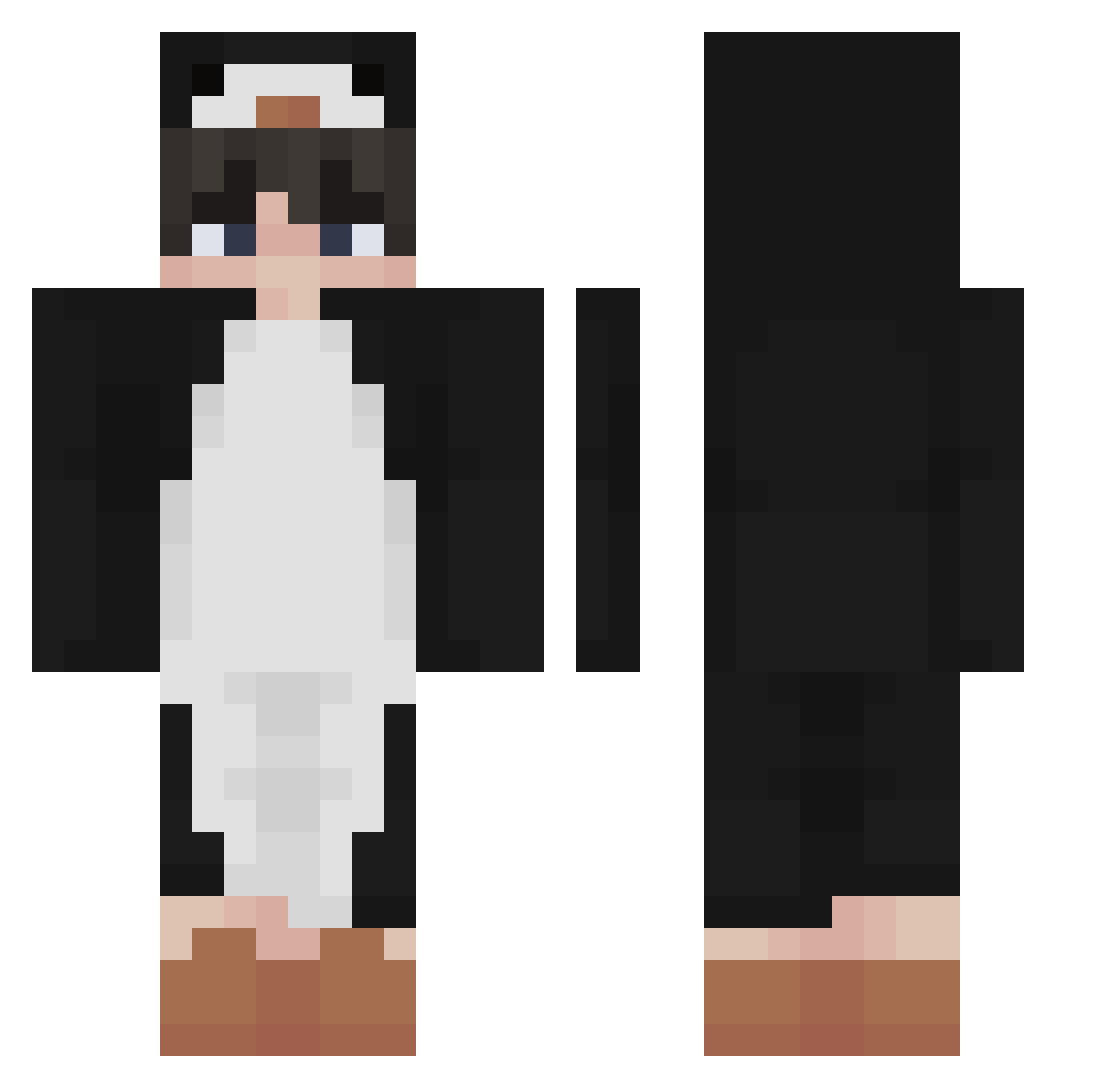
Current Minecraft skin of the player yoonhwiyun, loaded from the official Mojang API. Rotate the 3D model with your mouse or finger, then download the skin as a PNG file and use it in Minecraft: Bedrock Edition or Java Edition for free. When yoonhwiyun changes their skin, this page updates automatically and the old skin stays in the history below.
Other players with this skin (340)
yoonhwiyun was the 77th player we have seen with this skin, first spotted on 15.08.2026. The same skin was seen on these players. Open a nickname to see their current skin and skin history.
 vii666 Soy_sauce360 lFosterxd ZenReb Manhne288 Assein filipp3 PENG3905 Homiek 18year MineSoap1234 Revitating Jzh5532 Relachu fyexX xReekz LUIS_ALPHA Pingu_LePingouin Snnaxxx Angus_Lu0224 jiin5253 Madllye Aandruuh hoangddanh deathXLs_husband 4Dr14N2772 GeoAyaS Thunderizor Hezxx erodah SilverCrown28 maksiu_powpow doroco Phyux2 AhTim0926
 LucidFog Holfan Macedelic yakonay Rapozitu Nasti03 LYJJ iamnotSkipper mypast whatntarnation fufutak Dynamite1510 maczo22k ryogokun129 legend_tier RaikooUwU CornPug 1NFAZ EENJoris respecqful Lumipcgs hank1211 VseHyiSosu TheShabowfox_ thighsq
More Penguin Minecraft skins
How to install the yoonhwiyun skin
- Press the Download button above to save the skin as a PNG file.
- Minecraft: Bedrock Edition (PE): open the Dressing Room from the main menu (or tap your character → Edit Character), go to Classic Skins → Owned, press the + (new skin) button, choose the downloaded PNG and pick the Classic (Steve) model. Works on PC and mobile; consoles cannot import custom skins.
- Minecraft: Java Edition: open the Minecraft Launcher, go to the Skins tab, click New Skin, load the PNG, pick the Classic (Steve) model and press Save & Use. You can also upload it at minecraft.net → Profile → Change Skin.
The skin does not show up after import - what should I do?
Restart Minecraft and open the Dressing Room again - imported skins sometimes appear only after a restart. Also make sure you selected the imported skin and picked the Classic (Steve) model.
Which model should I choose, Classic or Slim?
This skin is designed for the Classic (Steve) model. If you pick the wrong model, the arms of the skin will look stretched or squeezed.
Is the skin of yoonhwiyun free to download?
Yes. Press Download, save the PNG file and use it in Minecraft: Bedrock Edition or Java Edition - no payment or registration needed. The skin also works on multiplayer servers and Realms.
More skins
Looking for more? Go back to all Minecraft skins and check the top skins of the week, month and all time, or find any player's skin by nickname.