
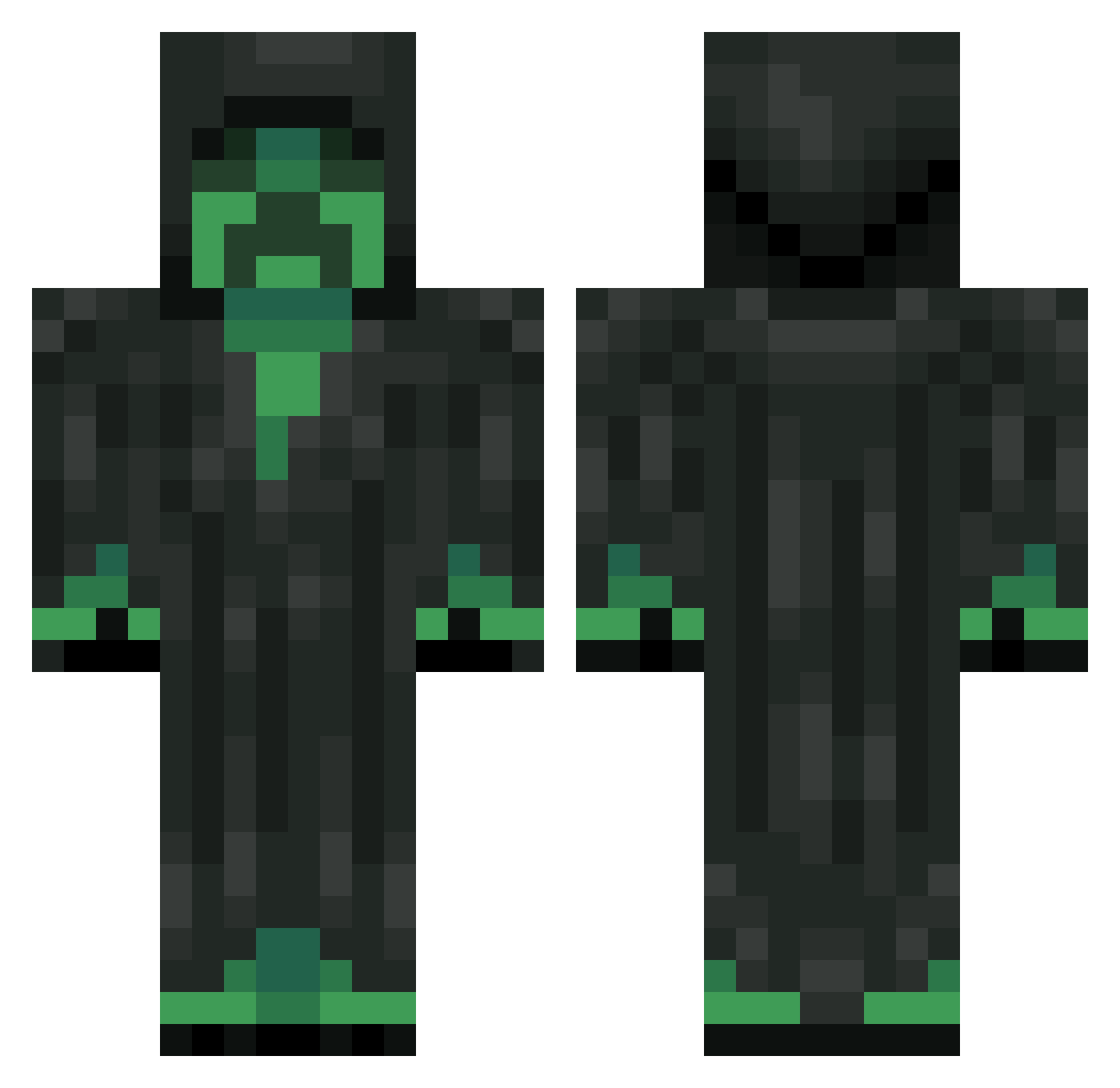
Current Minecraft skin of the player toddy1988, loaded from the official Mojang API. Rotate the 3D model with your mouse or finger, then download the skin as a PNG file and use it in Minecraft: Bedrock Edition or Java Edition for free. When toddy1988 changes their skin, this page updates automatically and the old skin stays in the history below.
Other players with this skin (253)
toddy1988 was the 224th player we have seen with this skin, first spotted on 08.10.2026. The same skin was seen on these players. Open a nickname to see their current skin and skin history.
 NinjaLeaf123 tonguramu XxbomerxX BigTFrag 4KNerd Cookies_x3 Blondekid42 kswnor Karkinus Troll1Man Madness_Man BushIsFake PatricioMC blizaks2 Treviuz Marlocov GraveStalker101 ChessyChen ZiplocBoi Vanesko DerKnaaker Ragamafi420 DrxadLord mosos12 crprBOSS47 Nachost madsen04 badmo0d Blastradius wilkilbil JH_74 Killah_Kookie yellowryse Callum957 bornsinner13 XVoxe1 osskarr94 _S_m_i_t_h_y_ mullvaden00 Einclod Aaroselva Luckyal Frederik0404 NamelessHivemind dynamoexpert Motz_L Sithrein Celestially harryhyhy Sleazex Wallkers 7LJ Finnem4nsie DJ_Llama266 G4bri31 noz9y Baku05 ssshadow1995 nnooooooooobbb Takocky
More Grim Reaper Minecraft skins
How to install the toddy1988 skin
- Press the Download button above to save the skin as a PNG file.
- Minecraft: Bedrock Edition (PE): open the Dressing Room from the main menu (or tap your character → Edit Character), go to Classic Skins → Owned, press the + (new skin) button, choose the downloaded PNG and pick the Classic (Steve) model. Works on PC and mobile; consoles cannot import custom skins.
- Minecraft: Java Edition: open the Minecraft Launcher, go to the Skins tab, click New Skin, load the PNG, pick the Classic (Steve) model and press Save & Use. You can also upload it at minecraft.net → Profile → Change Skin.
The skin does not show up after import - what should I do?
Restart Minecraft and open the Dressing Room again - imported skins sometimes appear only after a restart. Also make sure you selected the imported skin and picked the Classic (Steve) model.
Which model should I choose, Classic or Slim?
This skin is designed for the Classic (Steve) model. If you pick the wrong model, the arms of the skin will look stretched or squeezed.
Is the skin of toddy1988 free to download?
Yes. Press Download, save the PNG file and use it in Minecraft: Bedrock Edition or Java Edition - no payment or registration needed. The skin also works on multiplayer servers and Realms.
More skins
Looking for more? Go back to all Minecraft skins and check the top skins of the week, month and all time, or find any player's skin by nickname.