
supersayan2010 - Minecraft Skins & Skin History
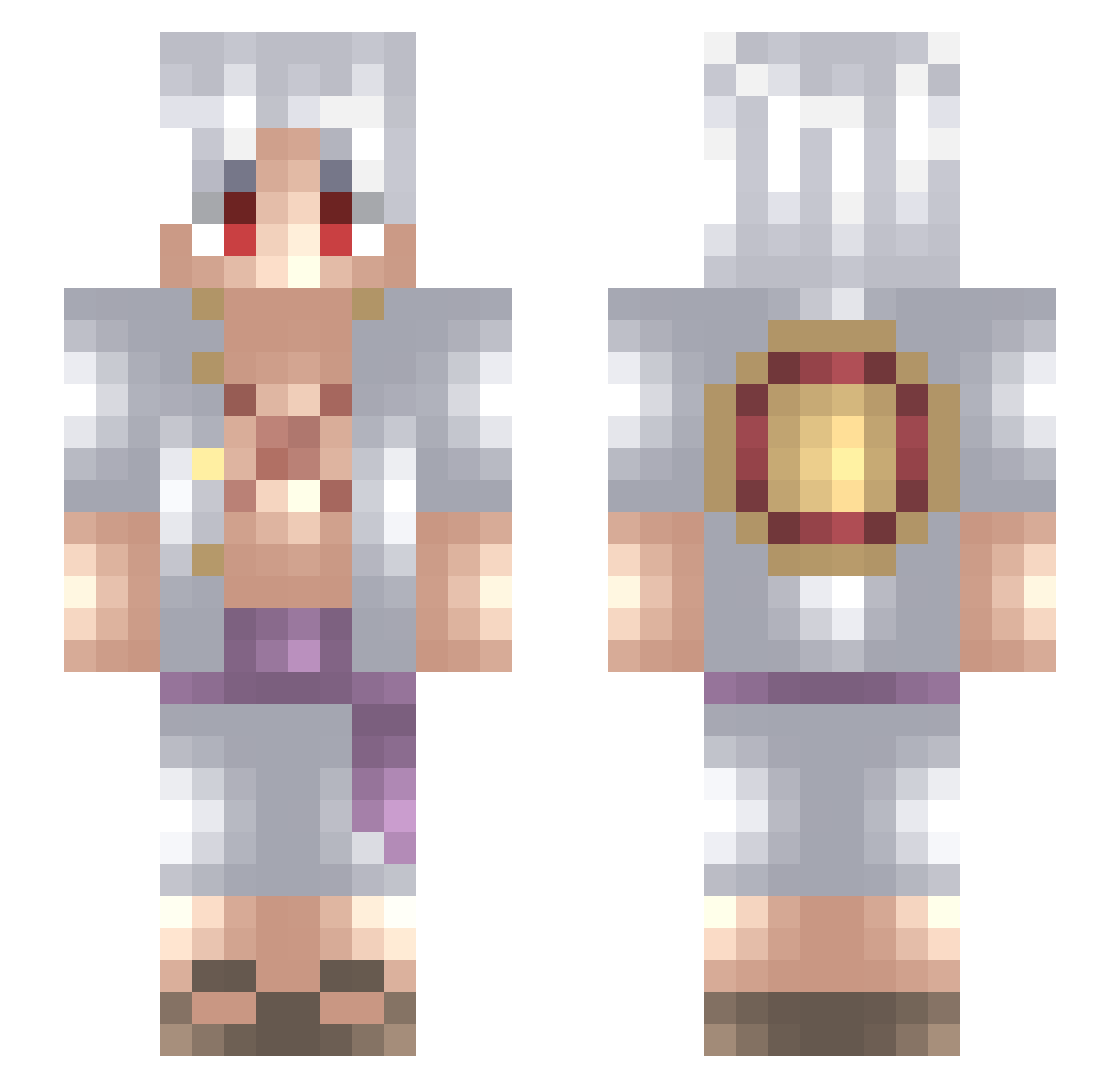
Current Minecraft skin of the player supersayan2010, loaded from the official Mojang API. Rotate the 3D model with your mouse or finger, then download the skin as a PNG file and use it in Minecraft: Bedrock Edition or Java Edition for free. When supersayan2010 changes their skin, this page updates automatically and the old skin stays in the history below.
Other players with this skin (724)
supersayan2010 was the 258th player we have seen with this skin, first spotted on 03.09.2026. The same skin was seen on these players. Open a nickname to see their current skin and skin history.
 Smaiii7
 Haryess secondfox killerzoone78 Senpi1i mangosare_nice ScaryBunny34186 MulaB_met_Ananas Sebernal13 Marko134 BabeerGangsta Saranghaeyyo Xdex89 ShmexyJD lunar_shark0211 Heracles____ sayyek seedk Schaibe art1xee sanlee32 SipMyTea Highforlife Kemal78 Sirrushhh_ TeruHash zuzu0800 Biw69 LEOLEO20 Zanzador Jowitdashifts SOULStarLight s4nt1_r3x ClapYourCheekz mnlmkii erydent imTeiZ _VENOMPOOL__ Eren09 FleurdeFS Dznn7s Theshow2 martinquintela Valdrinos77 GWH8297 Crokw Logboy421 Gisti0 the_horror_god
 muugi__ YouKnowAboutMe xRoronoa_Zorox saymazm Senu999 fraximics DAKSIROLS Alexis_Rey M_zero_N_one Bjay23 FiX9L
More Monkey D Luffy Minecraft skins
See all 964 Monkey D Luffy skins
How to install the supersayan2010 skin
- Press the Download button above to save the skin as a PNG file.
- Minecraft: Bedrock Edition (PE): open the Dressing Room from the main menu (or tap your character → Edit Character), go to Classic Skins → Owned, press the + (new skin) button, choose the downloaded PNG and pick the Slim (Alex) model. Works on PC and mobile; consoles cannot import custom skins.
- Minecraft: Java Edition: open the Minecraft Launcher, go to the Skins tab, click New Skin, load the PNG, pick the Slim (Alex) model and press Save & Use. You can also upload it at minecraft.net → Profile → Change Skin.
The skin does not show up after import - what should I do?
Restart Minecraft and open the Dressing Room again - imported skins sometimes appear only after a restart. Also make sure you selected the imported skin and picked the Slim (Alex) model.
Which model should I choose, Classic or Slim?
This skin is designed for the Slim (Alex) model. If you pick the wrong model, the arms of the skin will look stretched or squeezed.
Is the skin of supersayan2010 free to download?
Yes. Press Download, save the PNG file and use it in Minecraft: Bedrock Edition or Java Edition - no payment or registration needed. The skin also works on multiplayer servers and Realms.
More skins
Looking for more? Go back to all Minecraft skins and check the top skins of the week, month and all time, or find any player's skin by nickname.