
spizzy6969 - Minecraft Skins & Skin History
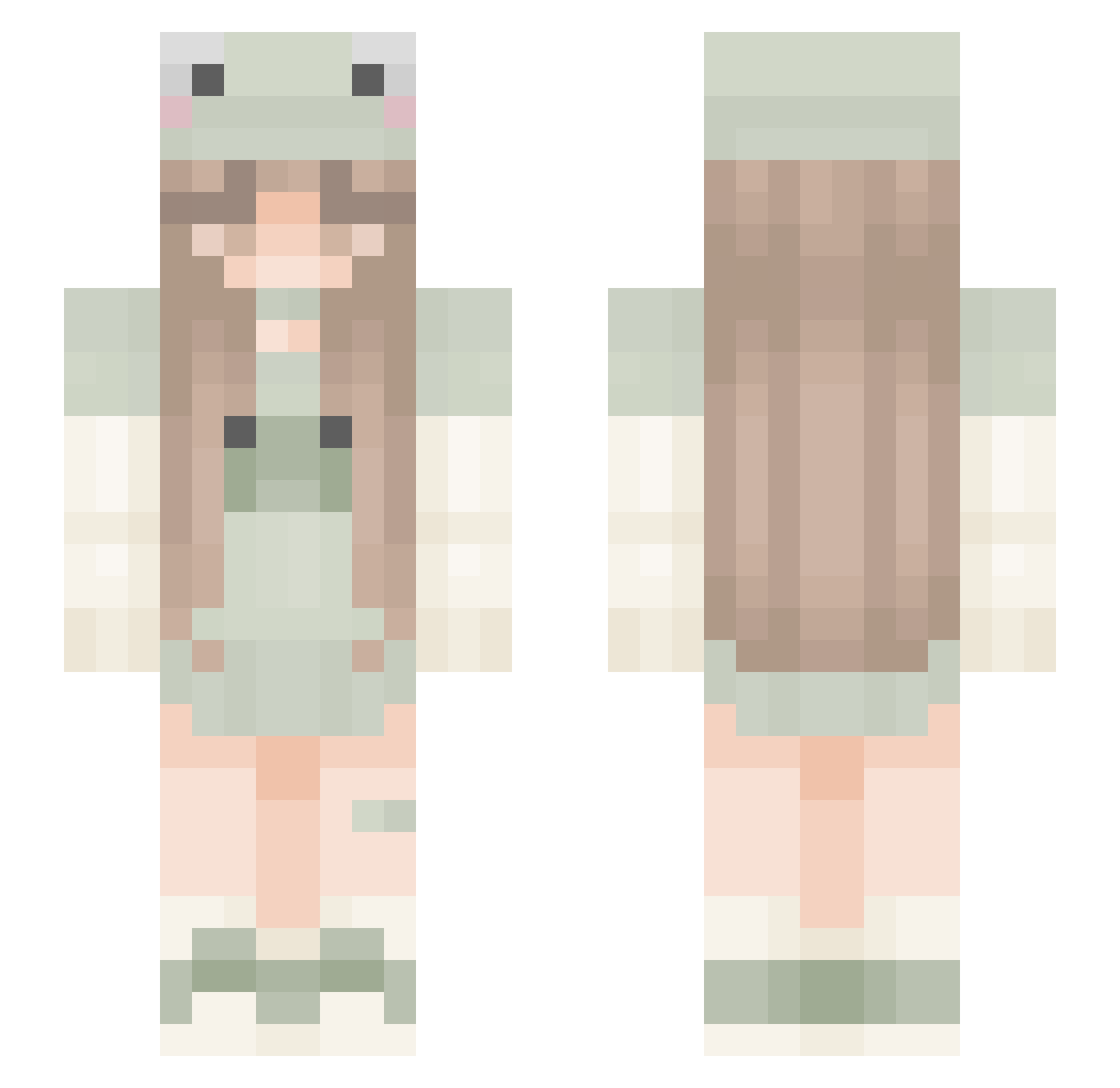
Current Minecraft skin of the player spizzy6969, loaded from the official Mojang API. Rotate the 3D model with your mouse or finger, then download the skin as a PNG file and use it in Minecraft: Bedrock Edition or Java Edition for free. When spizzy6969 changes their skin, this page updates automatically and the old skin stays in the history below.
Other players with this skin (296)
spizzy6969 was the 138th player we have seen with this skin, first spotted on 14.09.2026. The same skin was seen on these players. Open a nickname to see their current skin and skin history.
 matildabezza ___juliet___ boyiicrazyi_ LupinaIstCool Volpinchen_ MiMiBon Abejandra dioremmaa unicornhippo jaijxi Franni_Flower outsidereader ElineLandman Madd_Max185 stary_el_primo stachurskapros Lou1340 Hsuan0619 MaraAiyana sarav118 Einhornlissy09 Fluffy_aesthetic xiaoyu_yuu RomylovesLasagne anaCamila05 Froggiesssss JoBe12 Eve19priincess wywywywywywywy m4rynia RedRose3 BySkyFall Lildaria Loeckchen Alixia_ Workmanship liulong2020 ZZ_ovo Abellaaa ThisAndrea Lunalovesbees tguytonmarin AlensMichelle Ullacapitor Tinaaa1604 froggo_tea ARANTXA2011 Galixxi Al0 Sofy08 Neko_Potato BucketSus Stillblessed iguana890 EvaInMyLand EKKOREE_k9aqHIa ShawnL2 mimaru225 Knighthawk2800 41_
More Frog Hat Minecraft skins
How to install the spizzy6969 skin
- Press the Download button above to save the skin as a PNG file.
- Minecraft: Bedrock Edition (PE): open the Dressing Room from the main menu (or tap your character → Edit Character), go to Classic Skins → Owned, press the + (new skin) button, choose the downloaded PNG and pick the Slim (Alex) model. Works on PC and mobile; consoles cannot import custom skins.
- Minecraft: Java Edition: open the Minecraft Launcher, go to the Skins tab, click New Skin, load the PNG, pick the Slim (Alex) model and press Save & Use. You can also upload it at minecraft.net → Profile → Change Skin.
The skin does not show up after import - what should I do?
Restart Minecraft and open the Dressing Room again - imported skins sometimes appear only after a restart. Also make sure you selected the imported skin and picked the Slim (Alex) model.
Which model should I choose, Classic or Slim?
This skin is designed for the Slim (Alex) model. If you pick the wrong model, the arms of the skin will look stretched or squeezed.
Is the skin of spizzy6969 free to download?
Yes. Press Download, save the PNG file and use it in Minecraft: Bedrock Edition or Java Edition - no payment or registration needed. The skin also works on multiplayer servers and Realms.
More skins
Looking for more? Go back to all Minecraft skins and check the top skins of the week, month and all time, or find any player's skin by nickname.