
scheurbuik - Minecraft Skins & Skin History
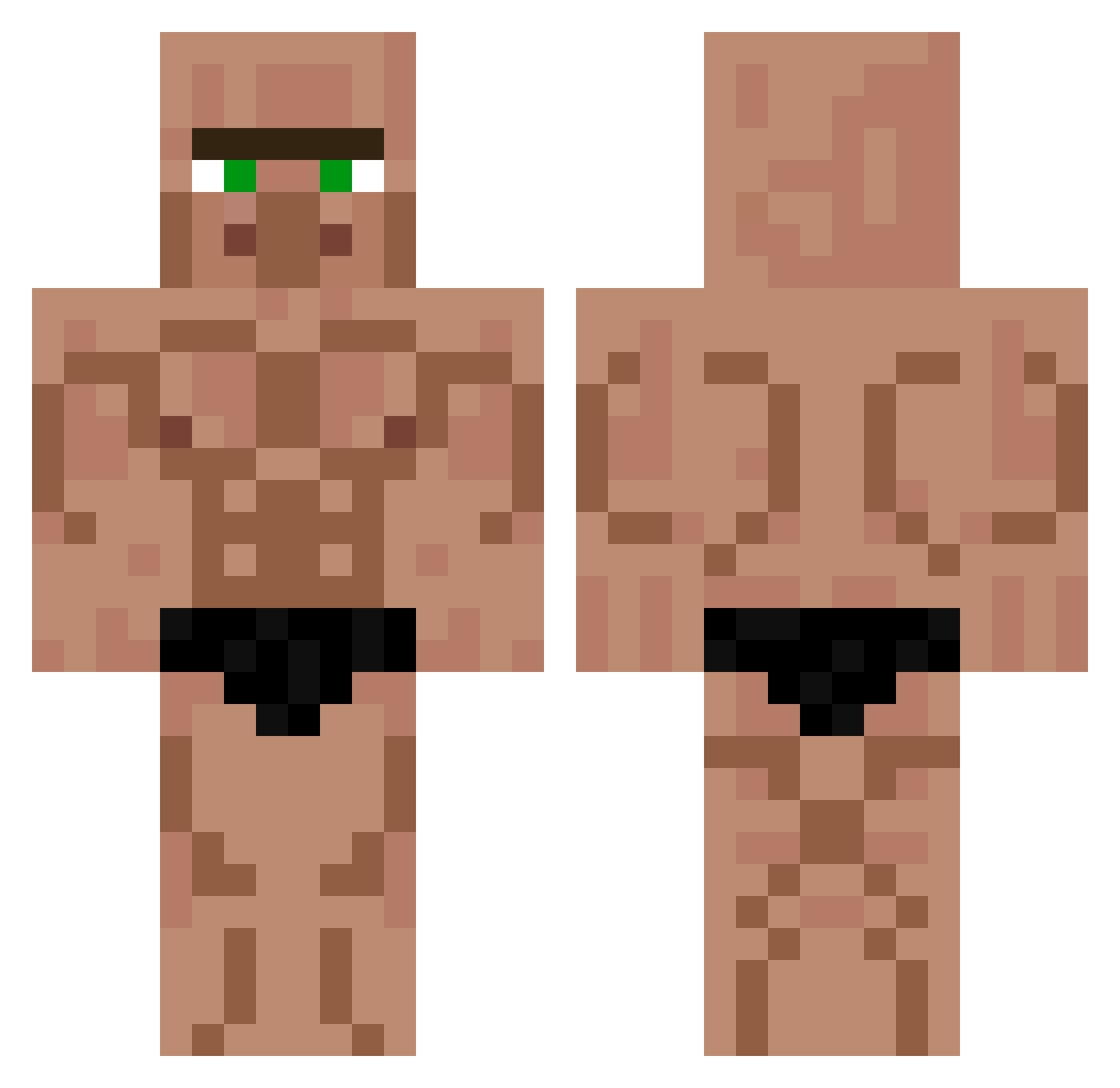
Current Minecraft skin of the player scheurbuik, loaded from the official Mojang API. Rotate the 3D model with your mouse or finger, then download the skin as a PNG file and use it in Minecraft: Bedrock Edition or Java Edition for free. When scheurbuik changes their skin, this page updates automatically and the old skin stays in the history below.
Other players with this skin (567)
scheurbuik was the 23rd player we have seen with this skin, first spotted on 29.07.2026. The same skin was seen on these players. Open a nickname to see their current skin and skin history.
 VR_Monkey_002 DaniTyp01 themikael600 msgrew HappyBiscuit183 Yomel SplashRush BIJDER Gokkeslev AtleMan lincdamink1234 kimkin9su NieNeverR gigioooooooo weedking001 V4s1l1y sucuktasche kekkeken oOoOoOoOoOoOoOf chancewyd GrevenAvGral itwxv Belacwolf4 Acecanor _naughty_nate_ kingjoshi2000 barneyvoador Sowggy JiggyG99 yungIntrolo Nosey114 XxDarkProGamerxX Chaz_2
 MrNobody8 SmuggitySmug TheTimberWolf baranbee triple_apple 989153 Borito246 Barbeiro Swxxtheart SteinNighthunter rinzler93 OxiClean9724 marcosvitor OPtimost BlackJJ03 ArtemiyS helloaustin1 polska0201 drip_shrek Karellys Arinek489 odin_chapeau White_nunu1 BITofBOY Celaerius0 Smegladonnnn xGrimlinALT
More Buff Minecraft skins
How to install the scheurbuik skin
- Press the Download button above to save the skin as a PNG file.
- Minecraft: Bedrock Edition (PE): open the Dressing Room from the main menu (or tap your character → Edit Character), go to Classic Skins → Owned, press the + (new skin) button, choose the downloaded PNG and pick the Classic (Steve) model. Works on PC and mobile; consoles cannot import custom skins.
- Minecraft: Java Edition: open the Minecraft Launcher, go to the Skins tab, click New Skin, load the PNG, pick the Classic (Steve) model and press Save & Use. You can also upload it at minecraft.net → Profile → Change Skin.
The skin does not show up after import - what should I do?
Restart Minecraft and open the Dressing Room again - imported skins sometimes appear only after a restart. Also make sure you selected the imported skin and picked the Classic (Steve) model.
Which model should I choose, Classic or Slim?
This skin is designed for the Classic (Steve) model. If you pick the wrong model, the arms of the skin will look stretched or squeezed.
Is the skin of scheurbuik free to download?
Yes. Press Download, save the PNG file and use it in Minecraft: Bedrock Edition or Java Edition - no payment or registration needed. The skin also works on multiplayer servers and Realms.
More skins
Looking for more? Go back to all Minecraft skins and check the top skins of the week, month and all time, or find any player's skin by nickname.