
sakvi - Minecraft Skins & Skin History
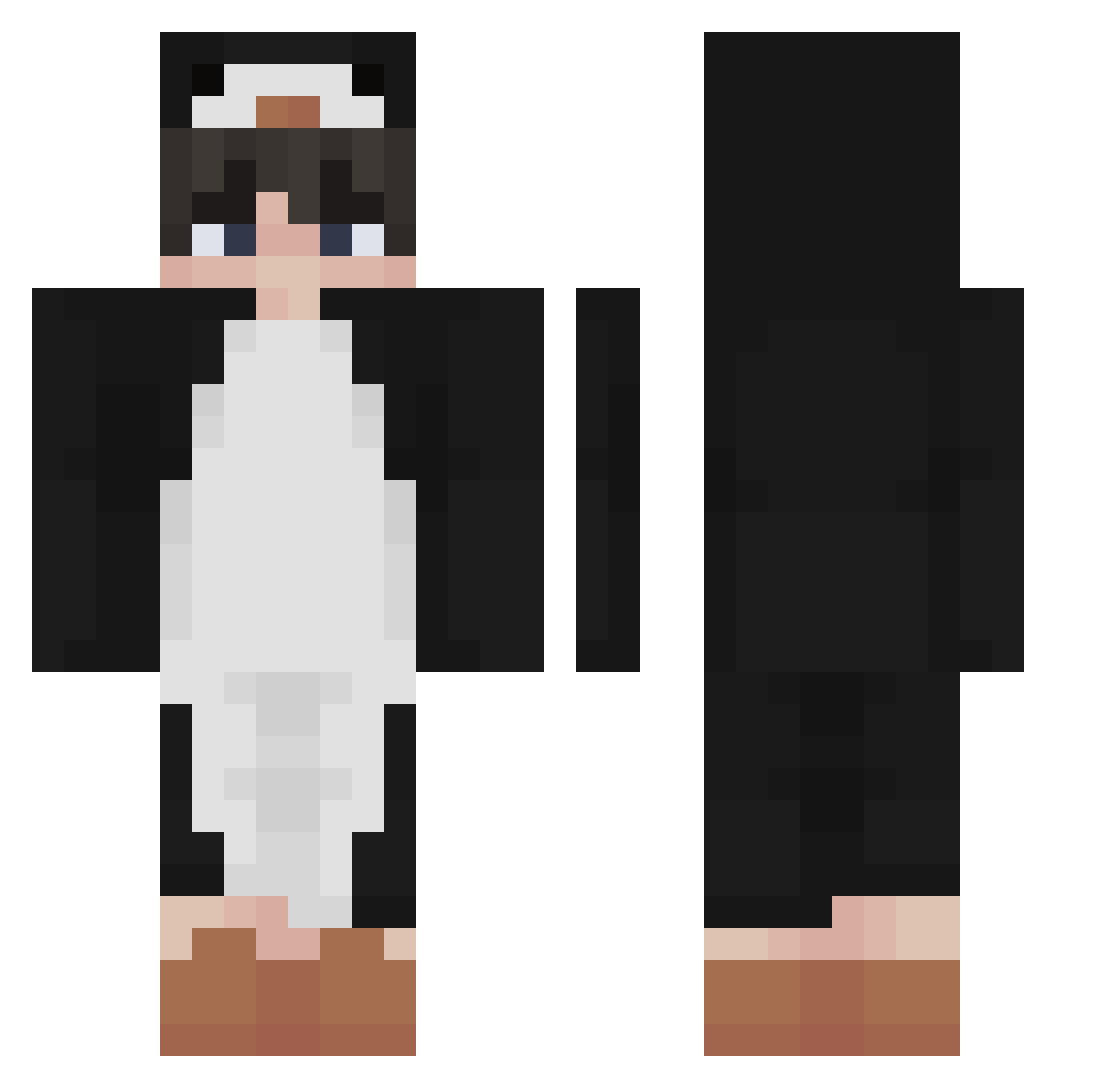
Current Minecraft skin of the player sakvi, loaded from the official Mojang API. Rotate the 3D model with your mouse or finger, then download the skin as a PNG file and use it in Minecraft: Bedrock Edition or Java Edition for free. When sakvi changes their skin, this page updates automatically and the old skin stays in the history below.
Other players with this skin (340)
sakvi was the 29th player we have seen with this skin, first spotted on 01.08.2026. The same skin was seen on these players. Open a nickname to see their current skin and skin history.
 Mr_Miyangi Guru_Hawkins Phantaseal MINESIWOO9815 Jaydennnnnnn iCrabbyy HUEVOJR Sober_King Marcxx_ DJDarkness88 justino324 iSh0Tz Kuro_HD6 FakeFly Pinqin_ Griffif MS3ED lfuq xXbabbystomperXx Luxirain __Polik_ Yakultter PepeBaby Smetry Oe4Yz Izumichii WitherPingvin crock008 keylimeking I_love_you_S2 Tinders OhRojo _LLatte_ irakle SnowierOcean57 pengu305 Tellus022 Tisyyy thighsq Superssv VseHyiSosu EENJoris EdgyMN Uzumaki_utsav CornPug RaikooUwU legend_tier ryogokun129 maczo22k Dynamite1510 dssssss iimLunar Macedelic Holfan
 LucidFog doroco maksiu_powpow hushandgreen SilverCrown28 Hezxx
More Penguin Minecraft skins
How to install the sakvi skin
- Press the Download button above to save the skin as a PNG file.
- Minecraft: Bedrock Edition (PE): open the Dressing Room from the main menu (or tap your character → Edit Character), go to Classic Skins → Owned, press the + (new skin) button, choose the downloaded PNG and pick the Classic (Steve) model. Works on PC and mobile; consoles cannot import custom skins.
- Minecraft: Java Edition: open the Minecraft Launcher, go to the Skins tab, click New Skin, load the PNG, pick the Classic (Steve) model and press Save & Use. You can also upload it at minecraft.net → Profile → Change Skin.
The skin does not show up after import - what should I do?
Restart Minecraft and open the Dressing Room again - imported skins sometimes appear only after a restart. Also make sure you selected the imported skin and picked the Classic (Steve) model.
Which model should I choose, Classic or Slim?
This skin is designed for the Classic (Steve) model. If you pick the wrong model, the arms of the skin will look stretched or squeezed.
Is the skin of sakvi free to download?
Yes. Press Download, save the PNG file and use it in Minecraft: Bedrock Edition or Java Edition - no payment or registration needed. The skin also works on multiplayer servers and Realms.
More skins
Looking for more? Go back to all Minecraft skins and check the top skins of the week, month and all time, or find any player's skin by nickname.