
matthew234512 - Minecraft Skins & Skin History
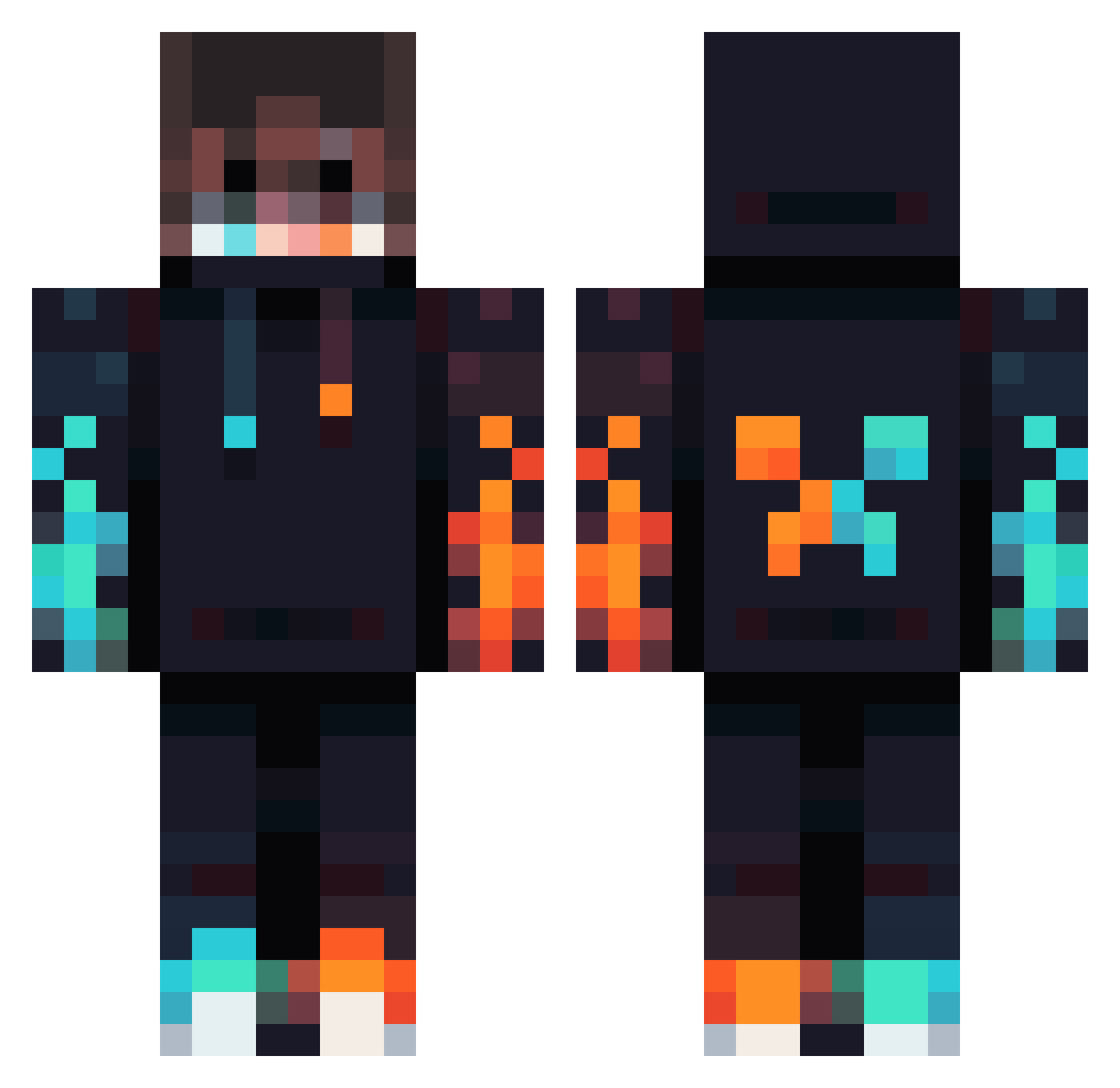
Current Minecraft skin of the player matthew234512, loaded from the official Mojang API. Rotate the 3D model with your mouse or finger, then download the skin as a PNG file and use it in Minecraft: Bedrock Edition or Java Edition for free. When matthew234512 changes their skin, this page updates automatically and the old skin stays in the history below.
Other players with this skin (1012)
matthew234512 was the 901st player we have seen with this skin, first spotted on 08.11.2026. The same skin was seen on these players. Open a nickname to see their current skin and skin history.
 MC20244 Timi311 Matzi007 DraghettoRed15 itscripex 1MrCookieX FireHeart135 dompro147 YxBvG SoliFran Montie165 ninjaz00l MistaAmazing oliviaa333 KuenChun GhostRider12377 200IQ_Gamer Cha0sGamerYT wisptheboss Heiky2014 The_wolf_kid_21 darkknight85289 therealbafg Herobrine12040 AnyaSolos Tolero98 dfwTxRen3Gade Preston7965 Minimi92 Steam_Punk8 Benjiim0n Realking92 Glo0mie parsasaljoughian February04 Skydri Thekingofcoold Yannicksssss Bunte_Knete ghost_rafy ironpixelo ElAmbroo Lara577 GeoB123 Elpiratita Tannicapolo Y4tsukii By_mee Blakiii1 CaptainBarber11 NM_lastkiller haisuperse kingdarsh7 Lolzycat Lizardmaster486 WhiteWolf017 xXDChipXx BBP8 PrimMountain White_dragon_AD
More Fire Minecraft skins
How to install the matthew234512 skin
- Press the Download button above to save the skin as a PNG file.
- Minecraft: Bedrock Edition (PE): open the Dressing Room from the main menu (or tap your character → Edit Character), go to Classic Skins → Owned, press the + (new skin) button, choose the downloaded PNG and pick the Classic (Steve) model. Works on PC and mobile; consoles cannot import custom skins.
- Minecraft: Java Edition: open the Minecraft Launcher, go to the Skins tab, click New Skin, load the PNG, pick the Classic (Steve) model and press Save & Use. You can also upload it at minecraft.net → Profile → Change Skin.
The skin does not show up after import - what should I do?
Restart Minecraft and open the Dressing Room again - imported skins sometimes appear only after a restart. Also make sure you selected the imported skin and picked the Classic (Steve) model.
Which model should I choose, Classic or Slim?
This skin is designed for the Classic (Steve) model. If you pick the wrong model, the arms of the skin will look stretched or squeezed.
Is the skin of matthew234512 free to download?
Yes. Press Download, save the PNG file and use it in Minecraft: Bedrock Edition or Java Edition - no payment or registration needed. The skin also works on multiplayer servers and Realms.
More skins
Looking for more? Go back to all Minecraft skins and check the top skins of the week, month and all time, or find any player's skin by nickname.