
luhhrui - Minecraft Skins & Skin History
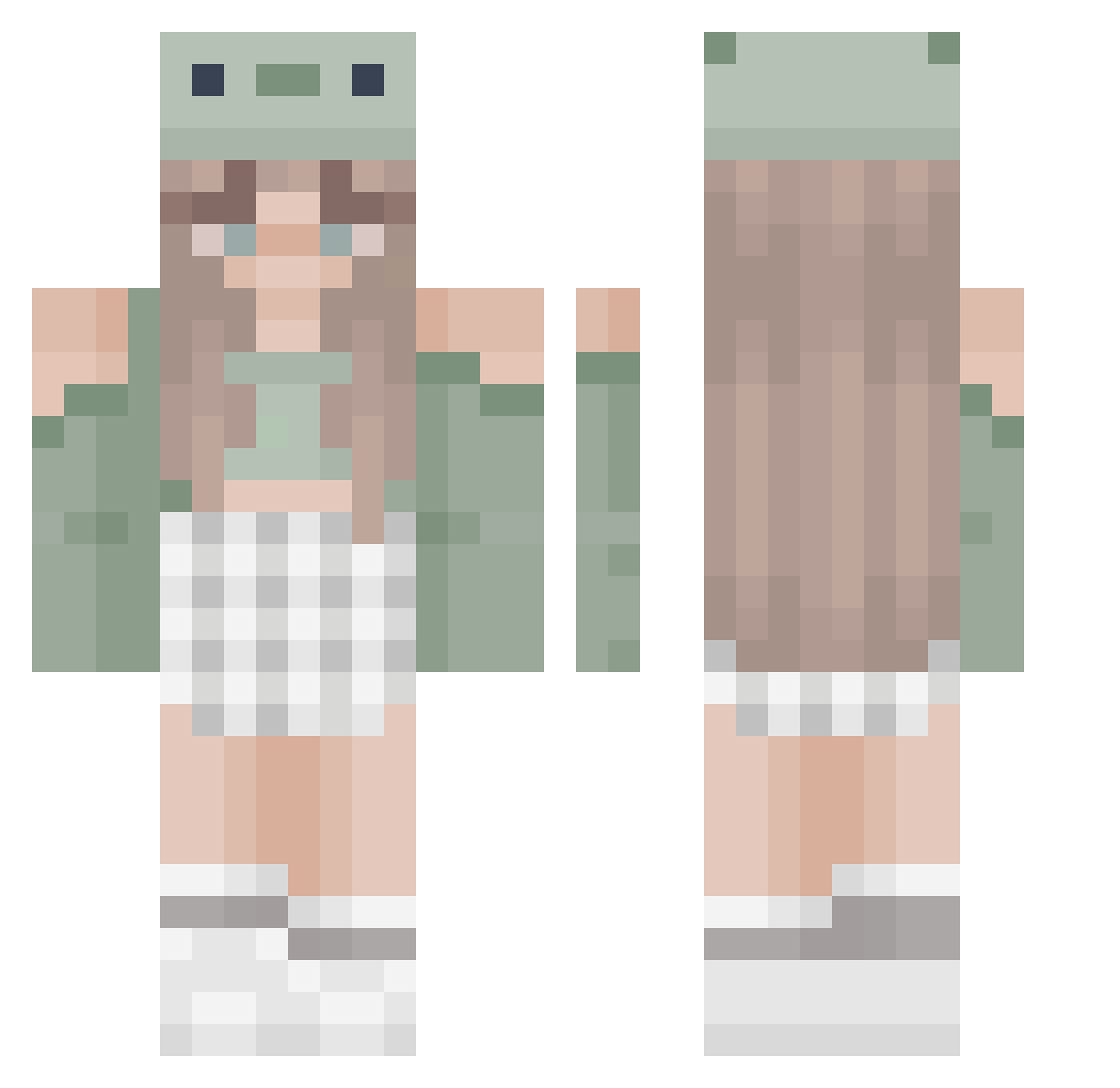
Current Minecraft skin of the player luhhrui, loaded from the official Mojang API. Rotate the 3D model with your mouse or finger, then download the skin as a PNG file and use it in Minecraft: Bedrock Edition or Java Edition for free. When luhhrui changes their skin, this page updates automatically and the old skin stays in the history below.
Other players with this skin (466)
luhhrui was the 205th player we have seen with this skin, first spotted on 13.09.2026. The same skin was seen on these players. Open a nickname to see their current skin and skin history.
 webble_wobble evilois__ Karla0202 televannah rugilexo29 insertsarcasm1 chriine laniexlugge
 Lt_Toast VelocityRose Rv2_0 LavenderXBunneh3 noemi5528 PinkBear08 Jayda0722 Aliizhoo foreverinbloom danielukiss leslie75 ricksancheze elfenlied1306 Ezgi__ momspaghetti3 LolaJ37 Ninja_ChantyTV FatMemeGod11 MartinaUwU Celina088 Alzerk SeaTurtle609 qc3356 unwichtiggirl Gam3rG1rl1337 Woefels Estalitha DocTart Juunie Donutroses cecely67 Laurakng ADATUDE Soriya70 Alice_the_pand BlubberryBlossom Abildk lostgreta ppispl TAEKIKI trevorsx Y0PINEL EclipseEmber lilzy007 potawi 24good Zarah2zafir Boredelvis Anitaa_perez faithh562 frothgoth Tropicano875
More Sage Green Minecraft skins
How to install the luhhrui skin
- Press the Download button above to save the skin as a PNG file.
- Minecraft: Bedrock Edition (PE): open the Dressing Room from the main menu (or tap your character → Edit Character), go to Classic Skins → Owned, press the + (new skin) button, choose the downloaded PNG and pick the Classic (Steve) model. Works on PC and mobile; consoles cannot import custom skins.
- Minecraft: Java Edition: open the Minecraft Launcher, go to the Skins tab, click New Skin, load the PNG, pick the Classic (Steve) model and press Save & Use. You can also upload it at minecraft.net → Profile → Change Skin.
The skin does not show up after import - what should I do?
Restart Minecraft and open the Dressing Room again - imported skins sometimes appear only after a restart. Also make sure you selected the imported skin and picked the Classic (Steve) model.
Which model should I choose, Classic or Slim?
This skin is designed for the Classic (Steve) model. If you pick the wrong model, the arms of the skin will look stretched or squeezed.
Is the skin of luhhrui free to download?
Yes. Press Download, save the PNG file and use it in Minecraft: Bedrock Edition or Java Edition - no payment or registration needed. The skin also works on multiplayer servers and Realms.
More skins
Looking for more? Go back to all Minecraft skins and check the top skins of the week, month and all time, or find any player's skin by nickname.