
ludolphe91 - Minecraft Skins & Skin History
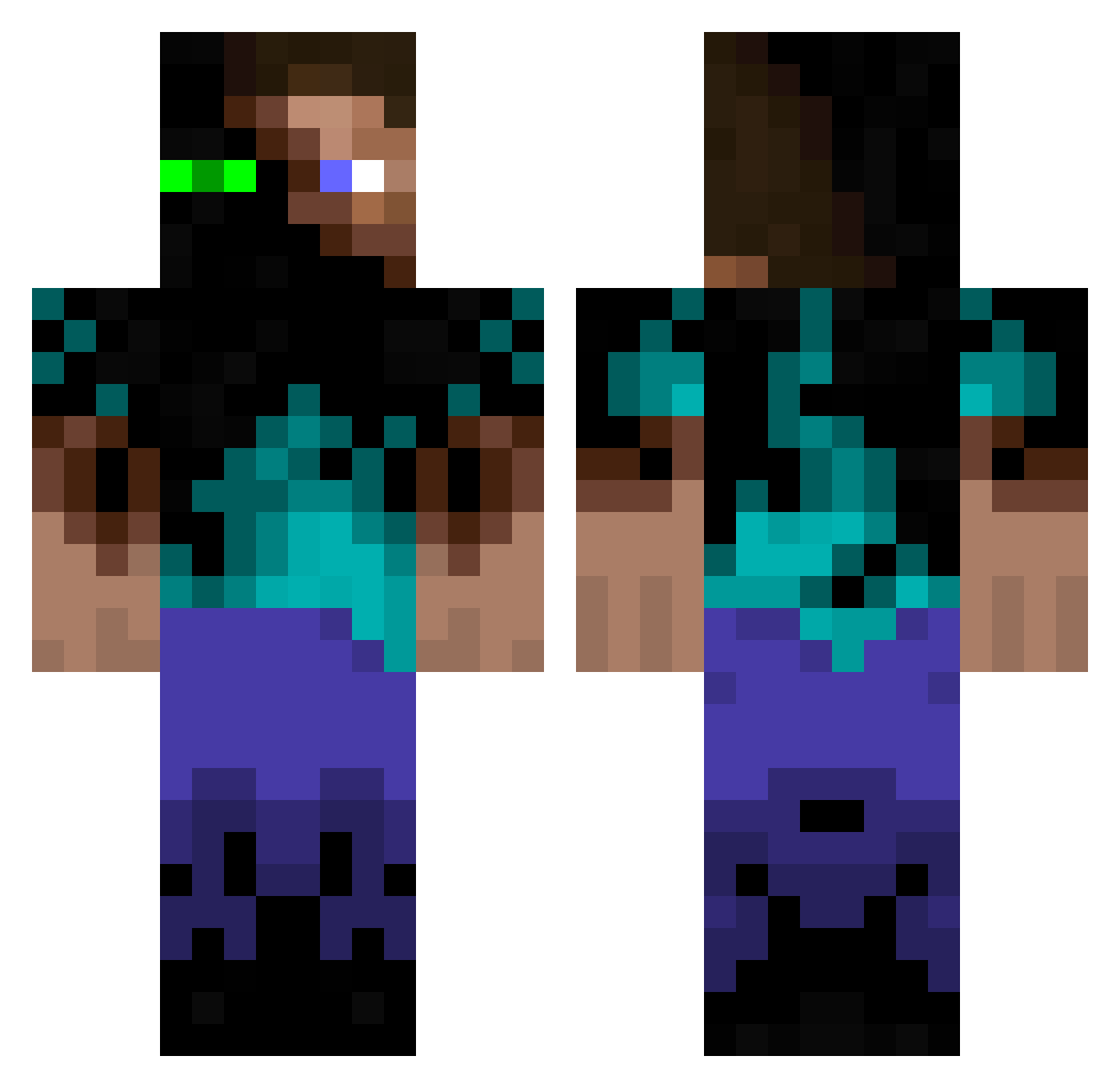
Current Minecraft skin of the player ludolphe91, loaded from the official Mojang API. Rotate the 3D model with your mouse or finger, then download the skin as a PNG file and use it in Minecraft: Bedrock Edition or Java Edition for free. When ludolphe91 changes their skin, this page updates automatically and the old skin stays in the history below.
Other players with this skin (934)
ludolphe91 was the 226th player we have seen with this skin, first spotted on 16.08.2026. The same skin was seen on these players. Open a nickname to see their current skin and skin history.
 nista02 leedskull theironslash nisloscen EKKS4 Foreveryoung38 lilxerox 123456kyle654321 JuggernogDrinker laser1205 Cryo__Sleep SkilzKilz dizzychart happy_kittens Sumbelgott Exxile xX_AsierV_Xx WildReaper1946 jonaske7 cr1012 Jojovisst aichwood Lollipop_king Sammydavies johnpop26 James_RD elgunther ranzorshock Freefa11er Fallout90009 masyumaro3020 leon9345 rossortelli thyraxe zlightninglegend Camrillim 99noodles MinecraftGuy119 Azykk LizardBeach jodsta99 Zrox1 D3T0X NxDs OfficialCupcake 1DreiDrei7 Anixira thatawsomeguy11 fra697 Ninjaz0mb1e333 captin_OMG Nalyd134 Hendorx alex1xx1 TRex_mc masterofebin Sanora123 TheGoldenLemur Ben_7542 Hacnuke
More Glowing Eyes Minecraft skins
See all 2312 Glowing Eyes skins
How to install the ludolphe91 skin
- Press the Download button above to save the skin as a PNG file.
- Minecraft: Bedrock Edition (PE): open the Dressing Room from the main menu (or tap your character → Edit Character), go to Classic Skins → Owned, press the + (new skin) button, choose the downloaded PNG and pick the Classic (Steve) model. Works on PC and mobile; consoles cannot import custom skins.
- Minecraft: Java Edition: open the Minecraft Launcher, go to the Skins tab, click New Skin, load the PNG, pick the Classic (Steve) model and press Save & Use. You can also upload it at minecraft.net → Profile → Change Skin.
The skin does not show up after import - what should I do?
Restart Minecraft and open the Dressing Room again - imported skins sometimes appear only after a restart. Also make sure you selected the imported skin and picked the Classic (Steve) model.
Which model should I choose, Classic or Slim?
This skin is designed for the Classic (Steve) model. If you pick the wrong model, the arms of the skin will look stretched or squeezed.
Is the skin of ludolphe91 free to download?
Yes. Press Download, save the PNG file and use it in Minecraft: Bedrock Edition or Java Edition - no payment or registration needed. The skin also works on multiplayer servers and Realms.
More skins
Looking for more? Go back to all Minecraft skins and check the top skins of the week, month and all time, or find any player's skin by nickname.