
l3lacki - Minecraft Skins & Skin History
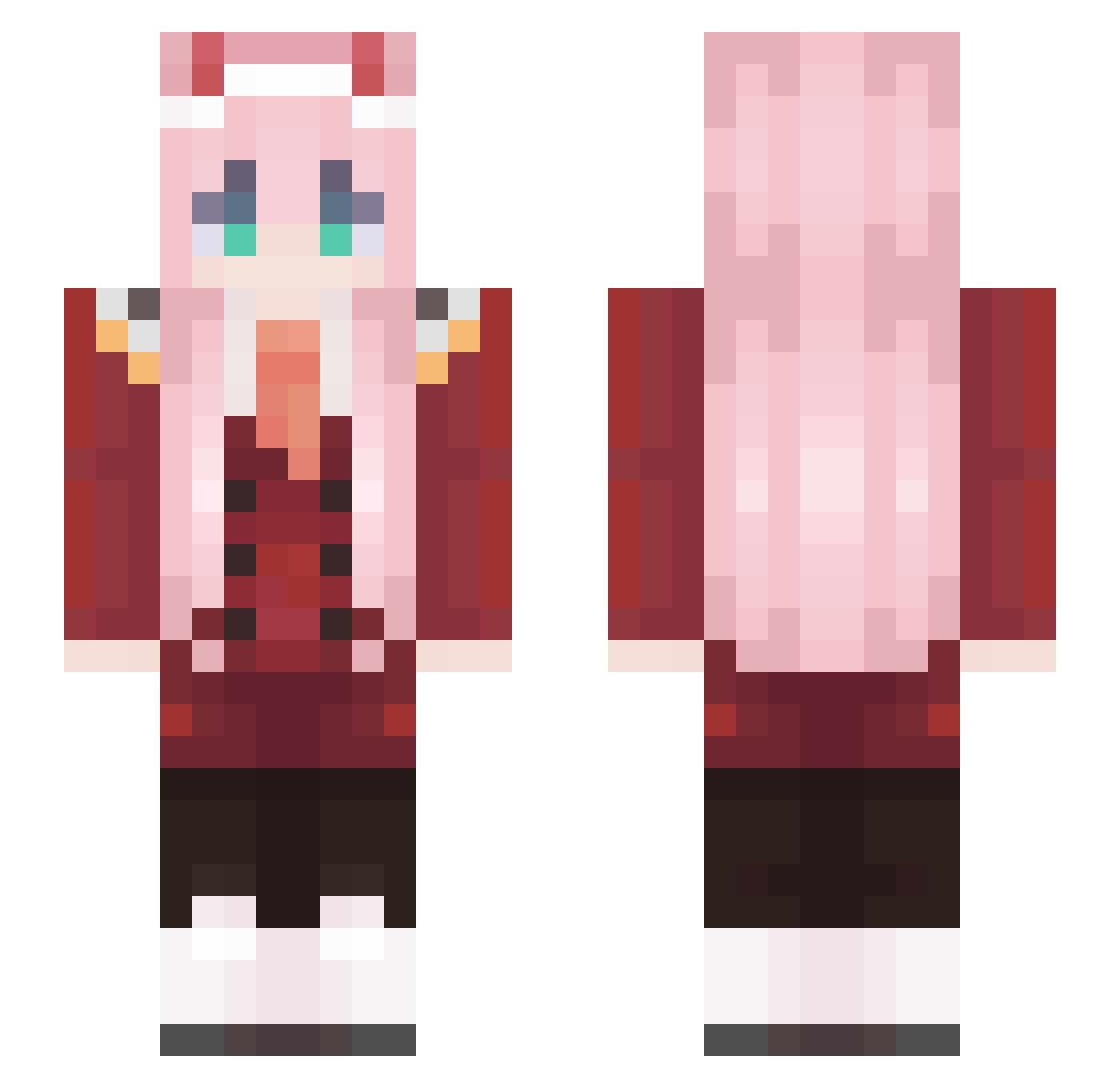
Current Minecraft skin of the player l3lacki, loaded from the official Mojang API. Rotate the 3D model with your mouse or finger, then download the skin as a PNG file and use it in Minecraft: Bedrock Edition or Java Edition for free. When l3lacki changes their skin, this page updates automatically and the old skin stays in the history below.
Other players with this skin (574)
l3lacki was the 177th player we have seen with this skin, first spotted on 26.08.2026. The same skin was seen on these players. Open a nickname to see their current skin and skin history.
 Ximaron Peter_hero Bessa18 ExTacYy TokArmy33 teatea75 Nibroc722 Gamacksy FrozeMatter Goldblur matyusailway ShaChaYRCM eren_yeager2006 Rogierres Chloeyay21 WelshBlitz ve1kana Woderna L3gdfabian Zertejo weigo123 RazorBlade101 ITSMEASHTON SnakyPeter hamachimu itz_starki11erv1 DinosSideChick CXrrz avivzano1 Wikusia003 StreetNati Schmenjuliii bricker64 AngelLight1
 huxiaofan LINK6666 rainypainy LISAMAOSLISAS stegisfreundin HazardRabbit Satrux Isbace Teemo29 cookyluky Ptaku_Krzaku Dream_HB thekew4rd AndyZhang riceshower___ CANHEL96 BuKa_SNIP compadre4839 Harsky_ lmfaoWOT Indigo_Summer 00two_ ScamChan gxerman aijanut BlesseOwO
More Zero Two Minecraft skins
How to install the l3lacki skin
- Press the Download button above to save the skin as a PNG file.
- Minecraft: Bedrock Edition (PE): open the Dressing Room from the main menu (or tap your character → Edit Character), go to Classic Skins → Owned, press the + (new skin) button, choose the downloaded PNG and pick the Slim (Alex) model. Works on PC and mobile; consoles cannot import custom skins.
- Minecraft: Java Edition: open the Minecraft Launcher, go to the Skins tab, click New Skin, load the PNG, pick the Slim (Alex) model and press Save & Use. You can also upload it at minecraft.net → Profile → Change Skin.
The skin does not show up after import - what should I do?
Restart Minecraft and open the Dressing Room again - imported skins sometimes appear only after a restart. Also make sure you selected the imported skin and picked the Slim (Alex) model.
Which model should I choose, Classic or Slim?
This skin is designed for the Slim (Alex) model. If you pick the wrong model, the arms of the skin will look stretched or squeezed.
Is the skin of l3lacki free to download?
Yes. Press Download, save the PNG file and use it in Minecraft: Bedrock Edition or Java Edition - no payment or registration needed. The skin also works on multiplayer servers and Realms.
More skins
Looking for more? Go back to all Minecraft skins and check the top skins of the week, month and all time, or find any player's skin by nickname.