
itSpookiie - Minecraft Skins & Skin History
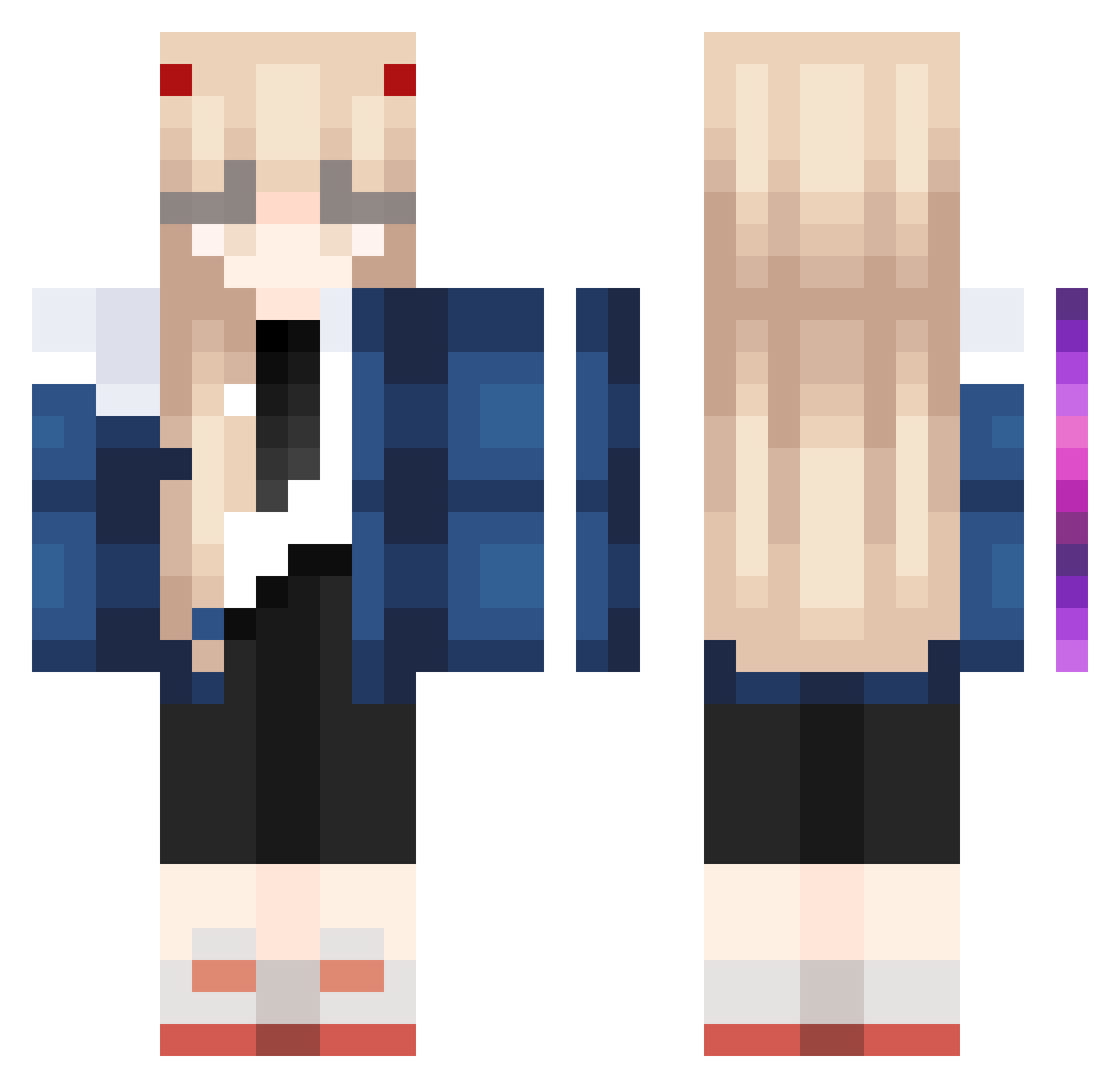
Current Minecraft skin of the player itSpookiie, loaded from the official Mojang API. Rotate the 3D model with your mouse or finger, then download the skin as a PNG file and use it in Minecraft: Bedrock Edition or Java Edition for free. When itSpookiie changes their skin, this page updates automatically and the old skin stays in the history below.
Other players with this skin (1023)
itSpookiie was the 260th player we have seen with this skin, first spotted on 22.08.2026. The same skin was seen on these players. Open a nickname to see their current skin and skin history.
 Mischi18 SparxyWon1
 4vsjbc NVjBFGN Timi1893 celiakk Nutiiz18 Puer_Thaumiel nominalsphere71 Alfredo1223 Chroma_ENT luuli_ YueHan_CN Rain_sama OuoLingluoOuo rootb1r HZMdog OkMrHoliday KiukiuBR thebreadgenie Gaga92 SoftSnowy OldClient_1337 saltJan HWWE123 KurisuNice redhothabaneroo Nekohasaki Chnny Jaba0202 ajzzz2 RonjaT Luaubread karitu
 iShinoBee alonso0808 Caamils RiaRia_ Roarsky Marlie_L Zavithia zero1536 yused02 alex9010xpress bmg7439 Q_qingshi KyxU coffeepick scr1ptarina_ seminpower Notitube Apriiiill YungChih302 Noxelf RedLip Rosemary76 AtDoomsGate Hxmix julaxxxx kikomlxo
More Zero Two Minecraft skins
How to install the itSpookiie skin
- Press the Download button above to save the skin as a PNG file.
- Minecraft: Bedrock Edition (PE): open the Dressing Room from the main menu (or tap your character → Edit Character), go to Classic Skins → Owned, press the + (new skin) button, choose the downloaded PNG and pick the Classic (Steve) model. Works on PC and mobile; consoles cannot import custom skins.
- Minecraft: Java Edition: open the Minecraft Launcher, go to the Skins tab, click New Skin, load the PNG, pick the Classic (Steve) model and press Save & Use. You can also upload it at minecraft.net → Profile → Change Skin.
The skin does not show up after import - what should I do?
Restart Minecraft and open the Dressing Room again - imported skins sometimes appear only after a restart. Also make sure you selected the imported skin and picked the Classic (Steve) model.
Which model should I choose, Classic or Slim?
This skin is designed for the Classic (Steve) model. If you pick the wrong model, the arms of the skin will look stretched or squeezed.
Is the skin of itSpookiie free to download?
Yes. Press Download, save the PNG file and use it in Minecraft: Bedrock Edition or Java Edition - no payment or registration needed. The skin also works on multiplayer servers and Realms.
More skins
Looking for more? Go back to all Minecraft skins and check the top skins of the week, month and all time, or find any player's skin by nickname.